
Vandaag of morgen in huis

Kwaliteit gegarandeerd

Welkomstaanbiedingen ontgrendelen: GRATIS bezorging | Tot 80% korting | Gratis 30 dagen JoyPlus-proefperiode
Download de app
Buying a 3D printer seems straightforward until you start comparing specifications. Manufacturers quote high speeds, automatic features and smart detection, but these terms don't always tell you how well a printer will work in a British home, workshop or classroom.
Three common pitfalls keep cropping up:
If you focus only on speed or the number of features, you could end up choosing a machine that doesn't match how you actually use it.
The print volume determines how large a single object can be. For most household projects, around 220 × 220 × 220 mm is sufficient. If you want to make larger enclosures, architectural models or multiple parts at once, you'll be looking at 256 mm or more per axis.
An FDM 3D printer builds an object layer by layer from filament. The construction affects stability. A CoreXY 3D printer moves the print head across the X and Y axes using a belt system. This design is often paired with high acceleration, but a sturdy frame and good vibration compensation remain important.
Also consider:
A nozzle rated at 280 °C, 300 °C or 320 °C opens up possibilities for different filament types, but always check the full material specification. PLA and PETG are generally easier to work with than ABS, ASA, PC or fibre-reinforced filaments.
A hardened steel nozzle is practical for abrasive materials, such as carbon fibre or glass fibre filament. For flexible TPU, a direct-drive extruder is often a relevant feature.
A 3D printer with a heated enclosure is particularly interesting for technical materials where temperature differences can cause warping. The enclosure doesn't replace ventilation. Follow the manufacturer's safety instructions and only use materials like ABS or ASA in a suitable, well-ventilated space.
A 3D printer with automatic calibration can simplify setting up the first layer. However, check which calibrations are performed automatically: bed levelling, Z-offset, flow, pressure control or vibration compensation are all different functions.
A 3D printer with a camera can be handy for live monitoring, time-lapse recordings or fault detection. Also look at network features, app support and privacy settings. A camera is a tool, not a guarantee that every failed print will be spotted automatically.
Don't forget the costs after purchase:
The recommendations below are based on verifiable product specifications from the available product information. Before buying, check the current version, included accessories and compatibility with filament.
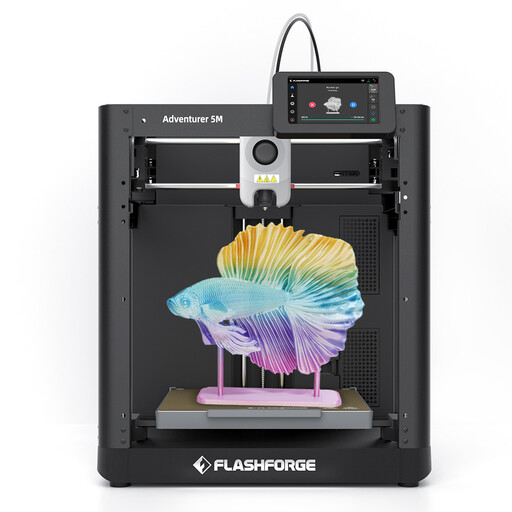
Why this fits the profile: The printer has a print volume of 220 × 220 × 220 mm, automatic bed levelling and a direct-drive extruder rated at 280 °C. That suits home users who mainly want to work on PLA and PETG projects without lots of manual adjustments.
The automatic bed levelling reduces the need for manual adjustments. The maximum speed of 600 mm/s should be seen as a product specification, not the speed for every print.
CoreXY construction, quick nozzle change, double-sided PEI platform and a choice of nozzle sizes from 0.25 to 0.8 mm.
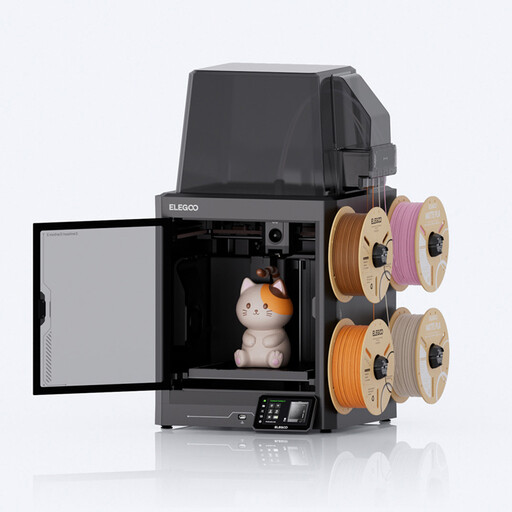
Why this fits the profile: This combination is aimed at users who want to combine multi-colour printing, monitoring and material choice in one system. The product information mentions four-colour printing, automatic calibration and a 350 °C hardened steel nozzle.
RFID filament detection, automatic refill and runout detection are designed to reduce interruptions during longer multi-colour jobs. Check the cost and availability of compatible filament beforehand.
Print volume of 256 × 256 × 256 mm, integrated camera, HEPA and activated carbon filter, and a stated noise level of 45 dB.
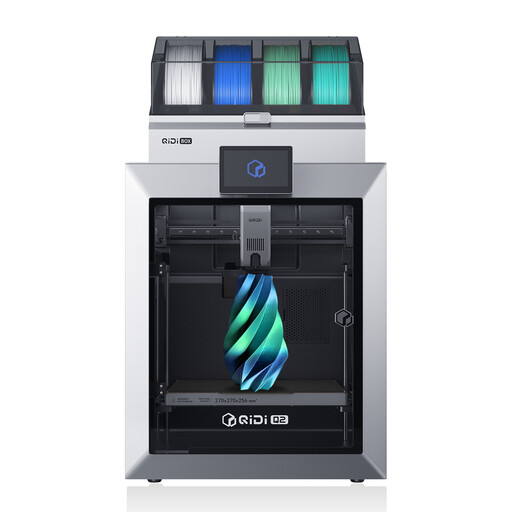
Why this fits the profile: For engineers, designers and small businesses, a fully enclosed FDM printer with a heated chamber is appealing when functional prototypes and technical materials are the focus.
The stated heated chamber temperature of up to 65 °C and the 3-in-1 filter system cater to more demanding material use. Ventilation and material instructions remain essential.
Maximum nozzle temperature of 370 °C, print volume of 270 × 270 × 256 mm, AI camera and automatic calibration according to the product information.
Use this checklist before you order a fast 3D printer:
We've put together a full, up-to-date list of products that fully meet these strict selection criteria and comply with current European safety regulations.
Yes, but choose a model with automatic bed levelling, clear software and a direct-drive extruder if possible. A 3D printer for beginners works best when you start with PLA and add other materials later.
The lifespan depends on usage hours, maintenance and parts. Clean the print bed and nozzle regularly, check belts and moving parts, and replace wear items when the manufacturer recommends it. With heavy use, the nozzle, build plate and filters will need replacing sooner.
On top of the purchase price, you pay for filament, electricity and maintenance. PLA is usually the most accessible material to start with. Multi-colour printing can cause extra filament consumption due to colour changes. With a professional 3D printer, you may also need filters, hardened nozzles and technical filaments.
