
Vandaag of morgen in huis

Kwaliteit gegarandeerd

Welkomstaanbiedingen ontgrendelen: GRATIS bezorging | Tot 80% korting | Gratis 30 dagen JoyPlus-proefperiode
Download de app
Buying a 3D printer seems straightforward until you start comparing specifications. Manufacturers quote high print speeds, AI features and multicolour printing, but those terms don’t always tell you what you need in a UK workshop. A printer for miniatures has different requirements from one for prototypes, functional parts or small production runs.
A fast 3D printer might reach 600 or even 800 mm/s on paper. In practice, results depend on the material, layer height, model and slicer settings you choose. The recommended speed is often lower than the quoted maximum. So check both figures, as well as the maximum acceleration, motion system and frame stability.
A large printer takes up more space and also needs a sturdy surface and sufficient ventilation. Measure the printer, any filament box and the space around the machine before you buy. A large 3D printer is only useful if you really want to print models in one piece. For small parts, a more compact model may use less space and material.
A multicolour 3D printer can make colour changes easier, but check how the system works. A setup with multiple toolheads works differently from a filament module with a single nozzle. Check how many colours are supported as standard, which modules you’ll need and whether TPU or other flexible filaments can be fed through the colour system. Extra colour changes can also use more time and filament.
An FDM 3D printer melts filament such as PLA, PETG, TPU or ABS. This technology is well suited to functional parts, prototypes and larger models. Check the nozzle temperature, extruder type, heated build plate and supported filaments.
A resin 3D printer cures liquid resin layer by layer using UV light. This technology is a good choice for miniatures, jewellery models and parts where fine detail matters. However, it involves extra steps: resin must be handled safely, models need to be washed and cured, and the workspace must be well ventilated.
A 3D printer with automatic bed levelling measures the position of the build plate and compensates for small inconsistencies. This can make preparation easier, but also check whether the printer supports automatic Z-offset, flow calibration or vibration compensation. No feature replaces cleaning the build plate and checking the first layer.
An open printer is often enough for PLA. For ABS, ASA, PC or fibre-reinforced filaments, an enclosure can help reduce temperature variations and warping. A 3D printer with a heated chamber is particularly useful for technical materials. Check the maximum chamber and nozzle temperatures, as well as the nozzle type. A hardened steel nozzle, for example, is a practical choice for abrasive filaments.
A high-resolution 3D printer won’t automatically produce more detail on every model. With FDM, nozzle size, layer height, mechanical stability and slicer settings all play a part. For resin printers, pixel size and LCD resolution are among the relevant factors. For large objects, build volume and stability are often more important than an extremely low layer height.
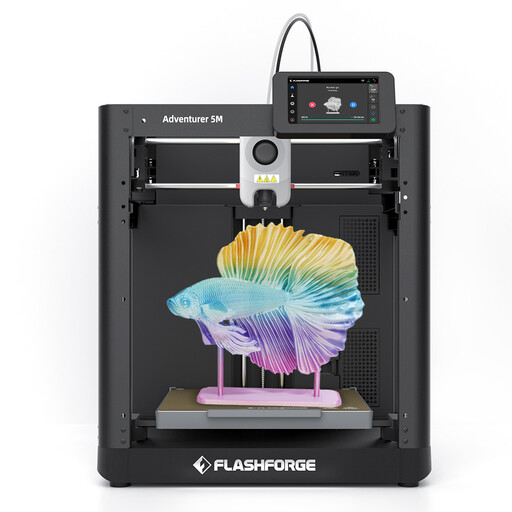
Why it suits this user: This FDM model has a build volume of 220 × 220 × 220 mm, automatic bed levelling and a direct-drive extruder reaching up to 280 °C. It’s a good fit for makers who want to get started with popular filaments and prototypes.
The product information lists automatic bed levelling and a quick-change nozzle. However, check the actual speed for each filament; 600 mm/s is the stated maximum.
CoreXY construction, automatic bed levelling, 280 °C direct drive and a choice of nozzle sizes.
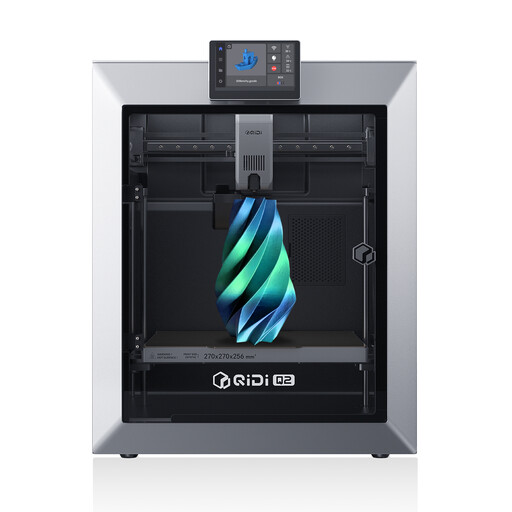
Why it suits this user: According to the product description, this enclosed FDM printer has a heated chamber reaching up to 65 °C, a 370 °C all-metal hotend, automatic bed levelling and an AI camera. It’s suited to engineers and designers looking for a wider choice of materials and print monitoring.
The enclosure and heated chamber are designed to control temperature. An AI camera won’t detect every fault, so supervision and a suitable material profile are still important.
65 °C heated chamber, 270 × 270 × 256 mm build volume and support for a wide range of filaments.
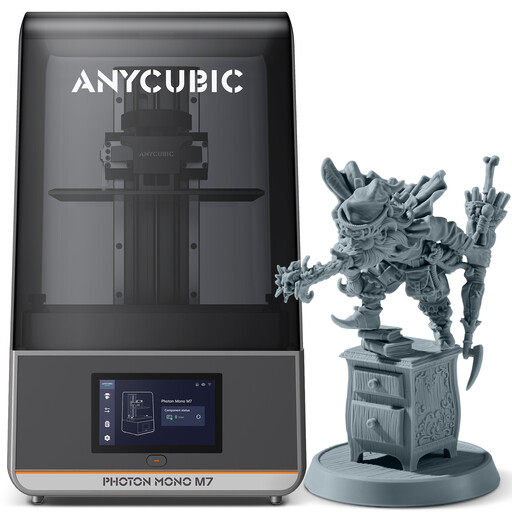
Why it suits this user: This resin 3D printer is designed for detailed models and prototypes. According to the product specifications, it has a 14K screen, a build volume of 223 × 126 × 230 mm and a stated speed of up to 150 mm/u when used with suitable resin.
The specifications clearly state resin compatibility and layer height. Bear in mind that you’ll need to clean models by hand and use UV protection, gloves and ventilation.
14K monochrome LCD screen, dual linear rails and a levelling-free design, according to the product information.
We’ve put together a complete, up-to-date list of products that meet these strict selection criteria and the applicable European safety regulations.
There’s more to consider than the purchase price. For FDM, factor in filament, spare nozzles, build plates and electricity. For resin, you’ll also need to account for resin, gloves, cleaning solution, UV post-curing and replacement films. Check that spare parts and consumables are available too.
Place every printer on a stable, heat-resistant surface. Nozzles, build plates and resin can cause burns. Use resin printers in line with the manufacturer’s safety instructions, with good ventilation and suitable personal protective equipment. Children must be supervised when printers are used in schools or homes.
Models with automatic bed levelling, pre-calibrated profiles and a pre-assembled frame can get you started sooner. You’ll still need to clean the build plate, load the filament or resin correctly and check the first layer.
Lifespan depends on how many hours it’s used, the materials, maintenance and components. Clean the nozzle and build plate regularly, keep filament dry and replace wear parts as recommended by the manufacturer. A metal frame and readily available spare parts can be useful for heavy use.
It depends on the material weight, print time, failed prints and energy use. With FDM, it’s often easy to work out the cost per gram. For resin, you’ll also need to account for support structures, leftover resin, cleaning products and protective equipment. For a realistic estimate, use the material price per kilogram and the amount of material used, as shown in your slicer.
