
Vandaag of morgen in huis

Kwaliteit gegarandeerd

Welkomstaanbiedingen ontgrendelen: GRATIS bezorging | Tot 80% korting | Gratis 30 dagen JoyPlus-proefperiode
Download de app
Buying a 3D printer seems simple until you start comparing the technical specifications. Manufacturers quote high speeds, automatic features and smart detection, but those figures don’t tell the whole story. For example, a printer that can reach 600 mm/s on paper won’t necessarily suit every material, model or home office.
So the most important question isn’t just: “How fast does this machine print?” You should also consider the build volume, the materials you want to use, noise levels, ease of use and maintenance requirements. Choosing carefully now can help you avoid needing extra parts or a different printer a few months down the line.
A 600 mm/s 3D printer sounds appealing for prototypes and larger print runs. In practice, the usable speed depends on factors such as layer height, nozzle, motion system, material settings and the finish you want. The recommended speed is often lower than the maximum speed.
So check the acceleration, cooling and maximum volumetric flow rate too. High speeds without effective heat dissipation can result in inaccurate corners, visible layers or poor adhesion.
A 3D printer with automatic bed levelling can make it easier to set up the first layer. That doesn’t mean you’ll never need to clean or check the build plate. Grease, dust, filament residue and an incorrect Z-offset can still lead to poor adhesion.
Automatic bed levelling is particularly useful if you regularly switch materials or have several users, for example in a school, makerspace or small business.
Not every printer can handle every material. PLA is generally accessible for beginners, while PETG, TPU, ABS and composite filaments have different requirements for temperature, ventilation, build plate and enclosure.
Before buying, check:
An enclosed 3D printer can be useful for materials that are more sensitive to draughts and temperature fluctuations. However, an enclosure takes up more space and can make the machine heavier.
The build volume determines how large a single model can be. A size of 220 × 220 × 220 mm is suitable for many decorative objects, parts and prototypes. If you want to print larger parts or several small models at once, consider a printer with around 250 or 260 mm per axis.
Also check the printer’s overall dimensions. Leave space around it for cables, ventilation, filament spools and maintenance.
A 0.4 mm nozzle is a practical middle ground between detail and print speed. Smaller nozzles, such as 0.25 mm, can produce fine details but generally take longer. Larger nozzles, such as 0.6 or 0.8 mm, can produce larger layers and wider lines.
A direct-drive extruder feeds filament straight to the nozzle. This can be beneficial for flexible materials such as TPU. At higher temperatures, check that the printer is suitable for the material you want to use. A maximum nozzle temperature of 280, 300, 320 or 370 °C doesn’t, by itself, tell you which materials are safe or suitable; always follow the material profile and the manual.
1.75 mm PLA filament is a sensible choice for beginners, decorative models and indoor use. It’s generally easy to print with, but isn’t suitable for every application.
PETG filament is worth considering for parts that need a different balance of strength, flexibility and moisture resistance. It can be more prone to stringing and often requires adjusted slicer settings.
For a professional 3D printer, other features may be relevant, such as a heated chamber, filter, material profiles, filament detection, camera monitoring and repeatable calibration. Manufacturer claims about print quality or success rates are just that: claims. Don’t treat them as a guaranteed result for every user.
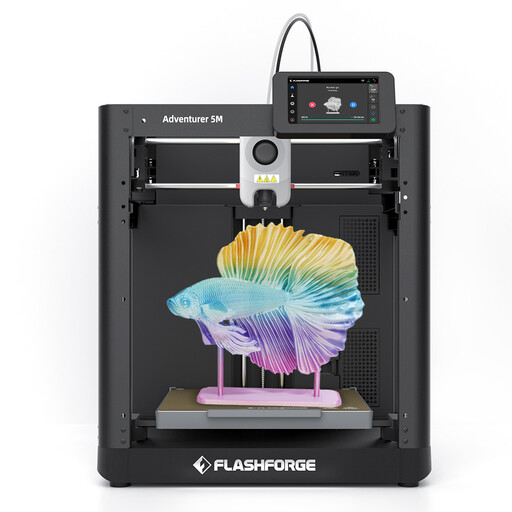
Why it suits this user: Automatic bed levelling and a compact build volume of 220 × 220 × 220 mm make it a good fit for hobbyists who want to get started without extensive setup.
The product description lists automatic bed levelling, a direct-drive extruder and interchangeable nozzles. This means you’ll rely less on manual bed adjustment.
According to the product information: maximum speed of 600 mm/s, 280 °C nozzle, heats up to 200 °C in 35 seconds and PEI build plate.
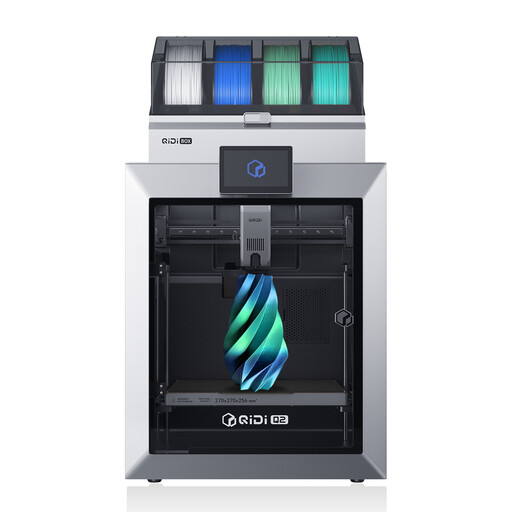
Why it suits this user: Designers and engineers who want to use a range of filaments get an enclosed system with a heated chamber and high-temperature options.
The enclosure and heated chamber are useful specifications if draughts and warping are a concern. Always check the recommended settings for each material.
According to the product description: build volume of 270 × 270 × 256 mm, maximum speed of 600 mm/s, nozzle temperature up to 370 °C and a 65 °C heated chamber.
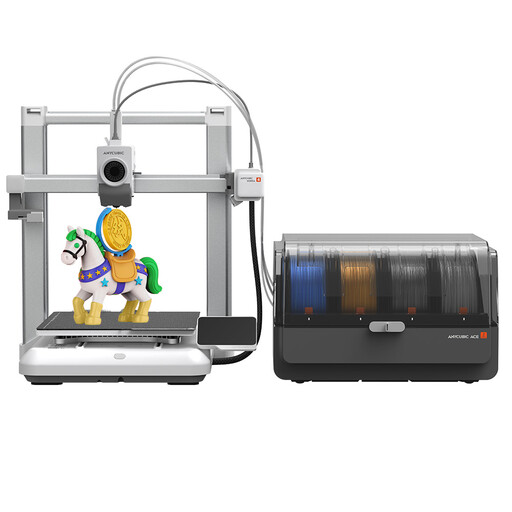
Why it suits this user: Ideal for makers who want to create multi-colour models without having to paint different parts by hand.
The colour function is clearly listed in the product specifications. Do bear in mind that material changes and purging can use extra filament, depending on the model.
According to the product information: four colours as standard, expandable to eight, a 260 × 260 × 260 mm build volume and a maximum nozzle temperature of 300 °C.
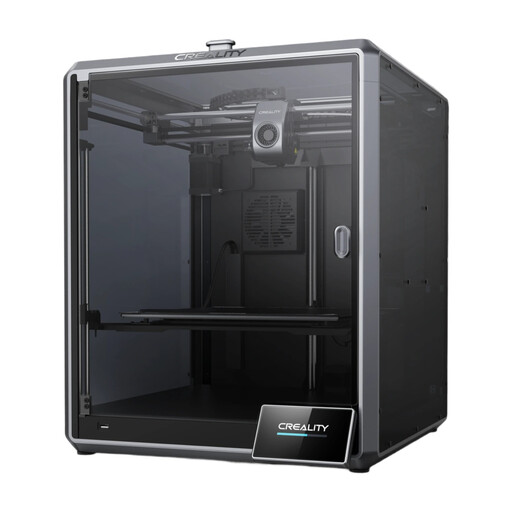
Why it suits this user: A good choice for larger models, rapid iterations and users who want to incorporate camera monitoring and automatic features into their workflow.
According to the product information, the direct-drive extruder is suitable for flexible filaments. The manufacturer’s claims about detection and print results still depend on settings and usage.
According to the product description: 300 °C nozzle, 300 × 300 × 300 mm build volume, automatic bed levelling, LiDAR and AI camera.
We’ve put together a complete, up-to-date list of products that meet these strict selection criteria and current European safety regulations.
Start with a material that suits your purpose. PLA is often a straightforward choice for decorations, models and first projects. A spool of eSUN PLA-Basic 1.75 mm or eSUN PLA+ is a practical option if you’re looking for a black, brown, light brown or white version. For models with a standout finish, eSUN Rainbow Silk PLA is another option. Its colour gradient and silky sheen are product specifications, not a guarantee of identical results with every printer.
For functional parts, you could consider PETG filament, such as JOYBUY x ANYCUBIC PETG. Adjust the temperature and cooling settings according to the information provided. Store filament in a dry place, preferably in a sealed container with desiccant. Damp filament can affect surface quality and extrusion.
A 3D printer for beginners should ideally have automatic bed levelling, clear material profiles, a simple loading process and an easy-to-access build plate. PLA is usually a practical material to start with. Also consider support, spare parts and the space available at home.
As well as the purchase price, your main costs are filament, electricity, maintenance and any replacement parts. A 1 kg spool of PLA or PETG is a simple starting point for estimating costs. Check each model’s material usage in your slicer and add a small allowance for support material and failed prints.
A printer’s lifespan depends on the number of hours it’s used, maintenance, its surroundings and parts such as the nozzle, motion wheels, belts and build plate. Clean the nozzle and plate regularly, check moving parts and let hot components cool before carrying out maintenance. Place the printer on a stable, heat-resistant surface and follow the manufacturer’s safety instructions.
