
Vandaag of morgen in huis

Kwaliteit gegarandeerd

Welkomstaanbiedingen ontgrendelen: GRATIS bezorging | Tot 80% korting | Gratis 30 dagen JoyPlus-proefperiode
Download de app
Buying a 3D printer seems straightforward until you start comparing specifications. Manufacturers highlight high print speeds, automatic functions and broad material compatibility, but this information does not always tell you what you actually need in practice. For example, a budget printer may require a great deal of manual adjustment, while a fast model is not automatically the right choice for detailed objects.
With this buying guide, you can compare the key features of an FDM 3D printer, recognise common pitfalls and choose a model that suits your projects, available space and level of experience.
An advert may quote a speed of 500 or 600 mm/s. This is usually a maximum value measured under specific conditions. The actual speed depends on the model, layer height, filament, nozzle and desired quality.
So also check the recommended print speed, acceleration and construction. A CoreXY frame can be suitable for fast movements, but the printer also needs sufficient cooling and a stable extruder.
A 3D printer with automatic bed levelling can help create a more consistent first layer. However, a clean print bed, the correct nozzle height and suitable filament settings remain important. Automatic levelling does not replace all preparation.
Also consider the type of print surface. A PEI platform can make it easier to remove prints, but the surface must be cleaned and used correctly according to the instructions.
A printer may support PLA, PETG, TPU, ABS or ASA, but that does not mean every material can be printed using the same settings. Check the maximum nozzle temperature, bed temperature, extruder type and whether the printer has an enclosed build chamber.
For a first 3D printer for beginners, PLA is often a practical choice. PETG may be more suitable for functional parts. Always check the recommended temperature and filament diameter.
The print volume determines how large an object can be made in a single print. Many compact models measure around 220 × 220 × 220 mm. This is suitable for figures, holders, components and prototypes. A larger volume is useful for bigger models, but requires more space and may increase heating time.
Do not measure only the printer itself. Leave room around it for cables, ventilation, filament reels and access to the print bed.
A direct-drive extruder feeds filament over a shorter distance than a system where the extruder is positioned further away from the nozzle. This can be useful when printing flexible materials such as TPU. A 0.4 mm nozzle is a common starting point. Smaller nozzles are suitable for fine details, while larger nozzles can produce thicker layers and shorter print times.
For fast models, cooling and high flow capacity are also relevant. A high maximum temperature alone does not mean that every technical filament can be processed safely or without problems.
A 3D printer with Wi-Fi can receive files wirelessly and may allow you to monitor prints remotely. This is useful when the printer is located in a workshop or studio. Check whether the printer also supports USB, a memory card or its own slicer software. A clear touchscreen and features such as filament detection and resuming after a power cut can make operation easier.
PLA filament is popular for decorative models, prototypes and learning projects. It is generally easy to print and available in a wide range of colours. The 1.75 mm eSUN PLA-Basic reels are available in colours including black and white. According to eSUN's product description, these reels are designed for high print speeds of up to 300 mm/s, although the result still depends on the printer, nozzle and settings.
PETG filament is an interesting option for functional parts that need a little more toughness and temperature resistance. The 1 kg JOYBUY x ANYCUBIC PETG reel is suitable for many FDM/FFF printers. According to ANYCUBIC's product description, this material offers slight flexibility and is less likely to crack than a more rigid material. Dry the filament thoroughly and adjust the temperature and cooling according to the material profile.
Multicolour reels, such as PLA Silk or Rainbow PLA, are mainly intended for visual effects. They are not the same as a multicolour 3D printer with several separate filament channels. With this type of printer, you should consider colour-change times, filament waste and compatibility with the multicolour system.
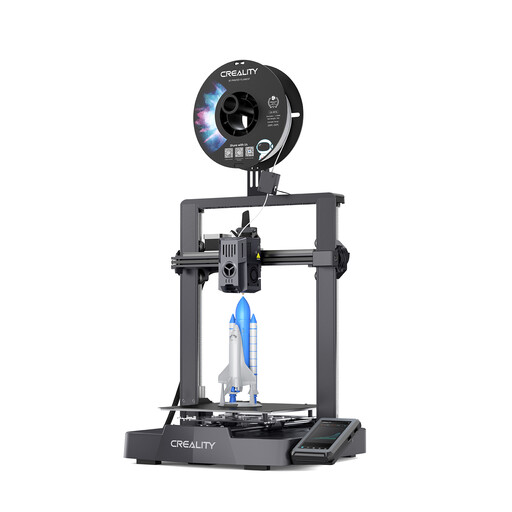
Why it suits this profile: An accessible FDM model for hobbyists, students and users who want to get started with PLA or PETG without manual bed levelling being a necessary part of every print.
The product specifications list automatic levelling, filament detection and recovery after a power cut. However, you should treat the maximum speed of 500 mm/s as an upper limit.
Print volume of 220 × 220 × 240 mm, maximum nozzle temperature of 300°C, Wi-Fi and support for PLA, PETG, ABS, TPU and ASA.
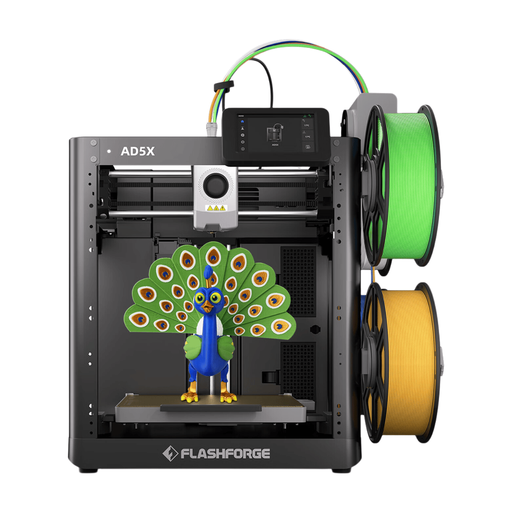
Why it suits this profile: Suitable for makers who want to combine colour changes, speed and a compact build space for creative models and prototypes.
The product specifications mention support for up to four colours, automatic bed levelling and automatic filament feeding. Check in advance which colour module is included.
CoreXY construction, maximum speed of 600 mm/s, 300°C direct-drive extruder and print volume of 220 × 220 × 220 mm.
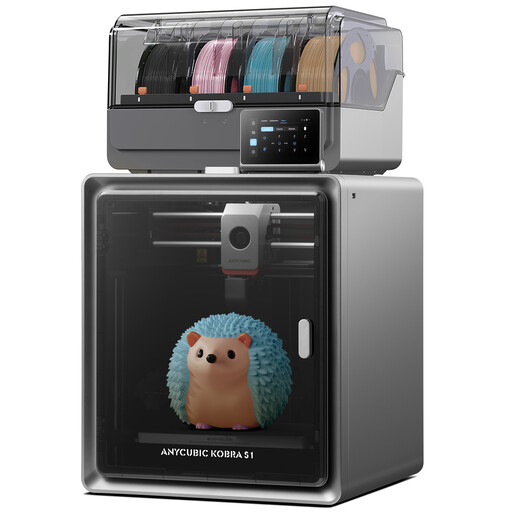
Why it suits this profile: Designed for intensive users, small businesses and makers looking for multicolour printing, material choice and monitoring in a single system.
According to the product specifications, automatic levelling, filament detection, a drying function and camera monitoring are built in. TPU 95A must be fed directly into the printer and does not work through the ACE 2 Pro for multicolour printing.
Four colours as standard, expandable to sixteen colours, 250 × 250 × 250 mm print volume and support for PLA, PETG, TPU, ABS and ASA.
A 3D printer uses hot parts and moving components. Place the device on a stable, heat-resistant surface and keep children away during use. Follow the instructions for ventilation, electrical connections and removing transport protections.
Running costs include more than just the purchase price. Also allow for:
We have put together a complete, up-to-date list of products that fully meet these strict selection criteria and the applicable European safety regulations.
A model with automatic bed levelling, clear controls and filament detection reduces the amount of manual work required. PLA is often a practical starting material. Also check whether slicer software and instructions are available in a language you are comfortable with.
Its lifespan depends on frequency of use, maintenance, the quality of moving parts and storage conditions. Clean the print bed, keep the rails and belts in good condition according to the instructions, and store filament in a dry place. A printer used for production every day will wear out faster than a model used occasionally for hobby projects.
Not necessarily. A shorter print time can be useful, but high speeds may cause more filament waste when the settings are not properly adjusted. So do not compare only the maximum speed. Also consider the recommended speed, material compatibility, nozzle options and the cost of replacement parts.
