
Vandaag of morgen in huis

Kwaliteit gegarandeerd

Welkomstaanbiedingen ontgrendelen: GRATIS bezorging | Tot 80% korting | Gratis 30 dagen JoyPlus-proefperiode
Download de app
A 360mm AIO liquid CPU cooler is a great option for a powerful gaming PC, workstation or system with a modern Intel or AMD processor. A 360mm radiator provides plenty of cooling surface and is a good fit for PC builders who want to combine high performance with ARGB lighting, a sleek look or a display on the pump.
However, a large radiator doesn’t guarantee that every cooler will fit your computer. Case compatibility, socket support and noise levels are sometimes less clearly stated in product titles. Use these checks to avoid buying a cooler that turns out not to fit once you’ve unpacked it.
A 360mm radiator usually takes up three 120mm fan slots. So don’t just check whether your case “supports water cooling”; look specifically for:
A front-mounted radiator can affect internal airflow differently from a top-mounted one. Also check that the graphics card won’t come into contact with the radiator or tubes.
An ARGB CPU cooler usually uses a 3-pin 5V connector. Traditional RGB lighting often uses a 4-pin 12V connector. These systems aren’t directly interchangeable, so don’t connect a 5V ARGB connector to a 12V RGB header.
Check the connectors on your motherboard in advance, and see whether the lighting is controlled via the included controller, the motherboard or dedicated software. Otherwise, you may be able to fit a stylish RGB liquid cooler, but not use all its lighting effects.
A CPU cooler with a display can show temperature information, images or animations. This is handy for an open PC setup or a system where appearance matters. However, the display often needs an internal USB connection and software. Check that you have a spare USB 2.0 header and that the cables can be neatly tucked away.
A display doesn’t automatically improve cooling performance, either. First assess the radiator, fans, pump and socket compatibility. Treat features such as 3D effects and customisable images as extras, not as proof of better cooling.
For a recent PC, support for the correct socket is a practical minimum. The models selected for this guide specify support for Intel LGA 1851/1700 and AMD AM5/AM4. This makes them suitable for a range of modern systems, but always check the latest motherboard and installation information before ordering.
Also check which mounting hardware is included. A CPU cooler for Intel LGA 1851 won’t necessarily use exactly the same mounting hardware as a model for AMD AM5. The product page and manual will tell you which parts you need.
A 360mm CPU cooler usually consists of a radiator with three 120mm fans. However, the size alone doesn’t tell you how noisy it will be. Check the available specifications for:
For example, the LE100 360 models list 2500 RPM PWM fans, 81.8 CFM airflow and 3.2 mmAq pressure in the product name. These are specifications you can check, but the actual noise level also depends on your fan curve, case insulation and room temperature.
An AIO liquid cooler is largely pre-assembled, but the pump is still a moving part. Pay attention to the position of the pump block, the direction of the tubes and any software or power connections. Keep the radiator free of dust and make sure there’s enough ventilation around the case.
An all-in-one liquid cooler requires less hands-on maintenance than a custom loop, but it isn’t completely maintenance-free. After installation, check that the pump is running, the fans respond and there are no unusual noises or visible leaks. Follow the manufacturer’s instructions and warranty terms.
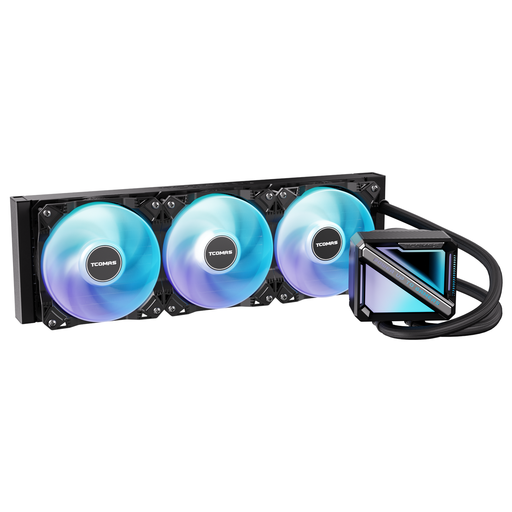
Why it suits this user: This black 360mm AIO liquid cooler combines a straightforward design with a square ARGB pump housing. It’s a good fit for a first PC build where broad socket support is important.
The listed support for Intel LGA 1851/1700 and AMD AM5/AM4 makes it easy to check socket compatibility. Also check that your case has enough room for the radiator.
360mm radiator, ARGB pump design and support for Intel and AMD sockets.
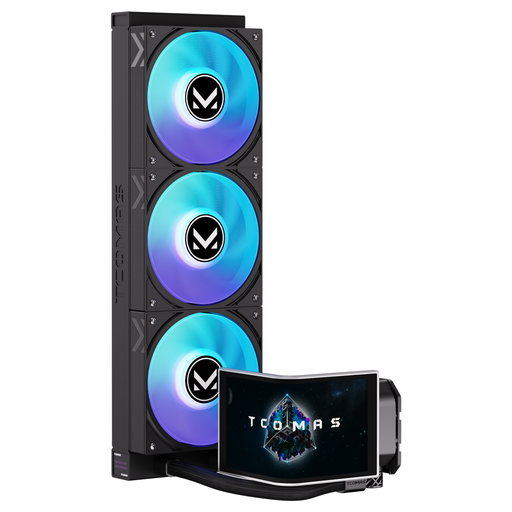
Why it suits this user: The large 6.67-inch curved AMOLED display with customisable content is ideal for users who want to personalise the look of their gaming PC.
The display is clearly listed in the product specifications. However, check for an available internal USB connection and enough space around the pump block.
6.67-inch curved AMOLED display, 3D visual effects and ARGB support.
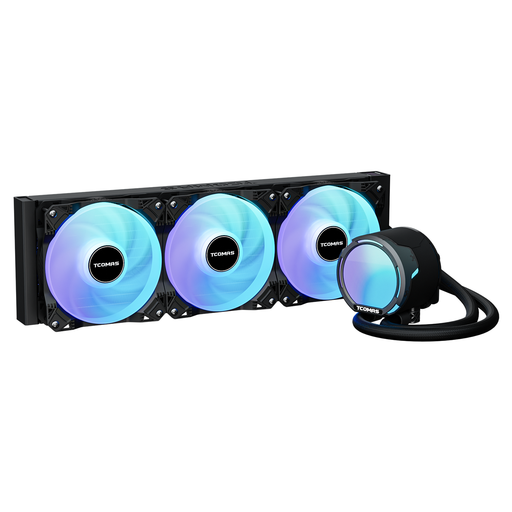
Why it suits this user: Its specified PWM fans and high airflow make it a good match for systems under sustained heavy load, such as when gaming, rendering or compiling.
The product name gives specific figures for fan speed, airflow and pressure, so you can compare these with your preferred noise levels.
2500 RPM PWM fans, 81.8 CFM airflow and support for LGA 1851/1700/1200/115X and AM5/AM4.
We’ve put together a complete, up-to-date list of products that meet these strict selection criteria and the applicable European safety regulations.
No. Radiator size and socket compatibility are two separate things. Check that the cooler supports your socket, such as Intel LGA 1851 or AMD AM5, then make sure your case has room for a 360mm radiator. Also check the mounting bracket and the instructions for your chosen model.
Not necessarily. Noise levels depend on the pump, fans, fan speed, airflow and the PWM curve you set. A 360mm AIO may allow for lower fan speeds thanks to its larger radiator surface, but the specifications and your setup still matter. Good fan and pump control is important for quiet CPU cooling.
Lifespan varies by model and usage conditions. The pump and fans are moving parts and can wear out over time. Keep dust to a minimum, fit the radiator according to the instructions, and check regularly for unusual noises or changes in temperature. Keep your proof of purchase and check the warranty terms if a problem arises.
