
Vandaag of morgen in huis

Kwaliteit gegarandeerd
Download de app
Choosing a new monitor can be a daunting task. You're investing in a device you'll stare at for hours every day, and the wrong choice can lead to frustration. Perhaps this sounds familiar: your desk is a mess of cables, you constantly lack enough screen real estate for your spreadsheets, or you suffer from neck strain after a long workday. A 34-inch ultrawide monitor can solve many of these problems, provided you choose the right model.
This article isn't a collection of marketing claims, but a practical guide. We'll discuss the key specifications to consider and highlight two specific models that meet the needs of the modern professional and remote worker.
Before making a decision, it's helpful to understand the key features. These parameters determine how the monitor will perform in your specific work environment.
Resolution: UWQHD is the Standard A 34-inch monitor needs functional screen real estate. The standard resolution for this size is UWQHD (Ultra-Wide Quad HD), which translates to 3440 x 1440 pixels. This gives you significantly more horizontal workspace than a standard QHD monitor (2560 x 1440). In practice, this means you can comfortably open two or even three windows side-by-side without constantly switching between them. This is ideal for data analysis, programming, or video editing.
Panel Type: IPS vs. VA The two most common panel technologies are IPS and VA.
Ergonomics: A Healthy Posture An ergonomic monitor is not a luxury but a necessity for anyone spending long days at a desk. Look for a height-adjustable stand (ideally with a range of 13-15 cm), the ability to tilt the screen, and possibly swivel it. Proper ergonomic adjustments help prevent neck and back pain.
Connectivity: The Key to a Clutter-Free Desk Modern workspaces demand smart connectivity options.
Flat or Curved? A 21:9 monitor is wide, which makes the choice between a flat or curved screen relevant. A curved monitor (with a curvature like 1500R) can offer a more immersive viewing experience, as the edges of the screen curve towards you. This can reduce eye strain because the viewing distance to all parts of the screen is more consistent. A flat screen has the advantage that straight lines appear perfectly straight, which may be preferable for graphic design or working with large spreadsheets. The choice is largely a matter of personal preference.
Based on the criteria above, we have selected two models from iiyama. Both are 34-inch UWQHD monitors, but they serve different needs in terms of connectivity and panel type.
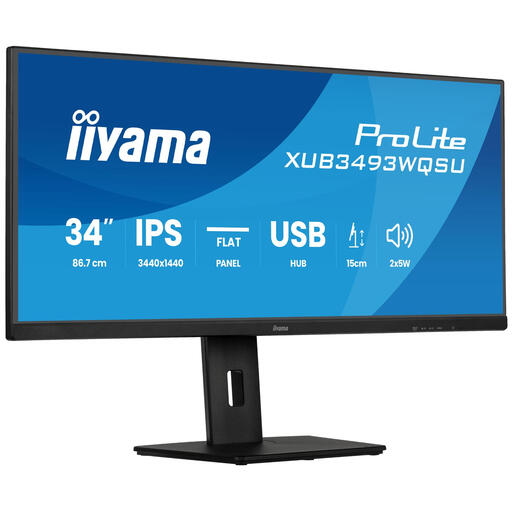
Why this product: This model is a solid choice for professionals seeking maximum screen real estate and colour accuracy in a flat format. The IPS panel ensures bright and accurate colour reproduction, making it an excellent all-rounder for various office tasks.
Advantages:
Who is this for: This is an ideal business monitor for data analysts, programmers, and office workers who frequently work with spreadsheets and documents. The flat form factor is perfect for tasks where straight lines are important.
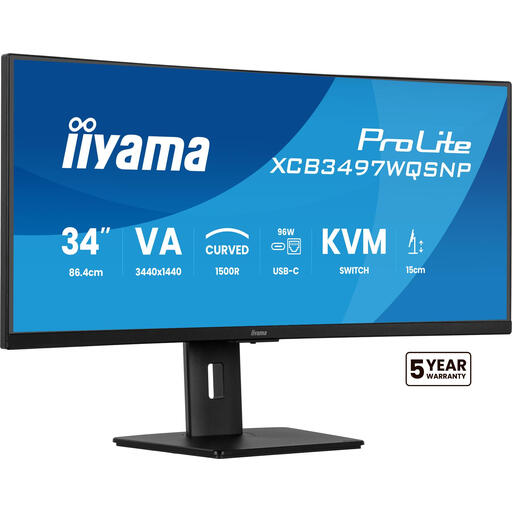
Why this product: This model is the ultimate solution for a clean and efficient workspace. The combination of a curved monitor with a built-in USB-C dock, KVM switch, and LAN port makes it a connectivity powerhouse.
Advantages:
Who is this for: This monitor is perfect for laptop users (both Windows and MacBook) seeking a 'one-cable' solution. It's also ideal for remote workers who use both a work and personal computer at the same desk and appreciate a clean setup.
Choosing a monitor is highly personal and depends on your specific workflow and preferences. The models mentioned above are two examples of an iiyama 34-inch monitor, each with its own strengths. If you're looking for a different size, a higher refresh rate for gaming, or other specific features, it's wise to explore a wider range of options.
For a complete overview of monitors in various sizes and with different specifications, you can browse our main Monitors category.
Is a 34-inch ultrawide monitor too big for office work? No, for many professionals, this size is ideal. It effectively replaces a dual 24-inch monitor setup, but without the distracting bezel in the middle. It provides a seamless, expansive workspace that significantly enhances multitasking.
What is the advantage of a monitor with USB-C docking? The main advantage is convenience and a clutter-free desk. A single USB-C cable connects a compatible laptop for power, video, audio, and data. This eliminates the need for a separate laptop charger and other cables, resulting in a minimalist workspace.
Is a curved monitor better than a flat one? This is a matter of personal preference. A curved screen can enhance immersion and reduce eye strain on a wide display, as the distance from your eyes to every corner of the screen is more consistent. A flat screen is often preferred for graphic design and tasks where it's crucial for straight lines to be displayed perfectly straight.
Written by the Joybuy Product Recommendation Officer
