
Vandaag of morgen in huis

Kwaliteit gegarandeerd

Welkomstaanbiedingen ontgrendelen: GRATIS bezorging | Tot 80% korting | Gratis 30 dagen JoyPlus-proefperiode
Download de app
A 27-inch QHD gaming monitor combines a generous viewing area with a sharp resolution of 2560 × 1440 pixels. For PC gamers, it offers a practical middle ground between Full HD and 4K: you get more detail than with 1080p, without your graphics card always having to handle the same high workload as with Ultra HD.
However, a high refresh rate or short response time does not tell you everything. Some specifications only apply under certain settings, while other terms are used mainly for marketing purposes. That is why you should pay attention to the following points before buying a gaming monitor.
A monitor may support a maximum refresh rate of 200Hz, but operate at 180Hz by default, for example. According to the product specifications, the LG 27GS85Q-B has a refresh rate of 180Hz, with support for up to 200Hz through overclocking.
This means you may need to change a setting yourself in the monitor menu and in Windows. Also check whether your graphics card, cable and chosen connection support this speed. The LG uses DisplayPort 1.4 and HDMI 2.0. The maximum speed may vary depending on the input.
A label such as 1ms monitor sounds straightforward, but manufacturers use different measurement methods. Check whether it refers to GtG, MPRT or another measurement. An aggressive overdrive setting can also cause visible overshoot: pale edges around moving objects.
So do not focus only on the number. A combination of fast pixel response, a high refresh rate and well-tuned overdrive is more relevant for competitive gaming.
A HDR400 monitor meets a brightness class that specifies a peak brightness of around 400 cd/m². That is useful information, but HDR performance also depends on contrast, local dimming, black levels and colour reproduction.
The LG 27GS85Q-B lists HDR400, HDR10, 320 cd/m² brightness and global dimming. So with a Nano IPS monitor, expect vivid HDR colours, but not a level of contrast comparable to an OLED screen. An OLED model such as the AOC AGON PRO AG276QZD2 uses self-lit pixels; its product specifications list HDR True Black 400.
A 2560 × 1440 gaming monitor is also known as a Quad HD monitor. At 27 inches, this works out at approximately 109 pixels per inch. Text, game worlds and user interfaces therefore look sharper than on a 27-inch Full HD screen.
For QHD gaming, your graphics card still needs to deliver enough frames. 200Hz is more achievable in esports games than in graphically demanding titles running at high detail settings. So check your GPU’s performance in the games you actually play.
A 200Hz monitor refreshes the image up to 200 times per second. This can make movement look smoother, particularly when your computer is also producing a high frame rate. A 200Hz screen offers little benefit if your system usually gets stuck at around 70 fps in your favourite game.
Also look for support for variable synchronisation. The LG 27GS85Q-B is listed in the product specifications as a G-Sync Compatible monitor and FreeSync gaming monitor. These technologies synchronise the monitor’s refresh rate with the graphics card’s frame rate. After installation, check that Adaptive Sync, FreeSync or G-Sync is enabled in the monitor and driver menus.
A Nano IPS monitor uses an IPS panel with wide viewing angles and colour reproduction suitable for both gaming and everyday use. The LG has a viewing angle of 178 degrees, a matt screen surface and 10-bit colour reproduction via 8-bit + FRC according to the stated specifications.
A QD-OLED monitor offers a different image character. The AOC AGON PRO AG276QZD2 lists a QD-OLED panel, 240Hz, a 0.03ms response time and 99% DCI-P3 coverage. OLED does require you to pay attention to usage settings, static elements and the terms of the manufacturer’s warranty. According to the product information, AOC provides a three-year burn-in warranty; always check the current warranty terms before buying.
An ergonomic gaming monitor should not only be fast, but also offer plenty of adjustment options. The LG stand supports height adjustment of up to 110 mm, tilting, swivelling and 90-degree pivot rotation. The VESA size is 100 × 100 mm.
Check the depth of your desk and your viewing distance in advance. A monitor arm can free up space, but pay attention to the maximum weight, VESA size and the strength of the desktop. A dual arm only makes sense if you actually use two screens.

Why it suits this profile: This LG offers QHD, Nano IPS and a high refresh rate without requiring you to move straight to an OLED model. That makes it suitable for anyone looking for one screen for gaming, studying and everyday computer use.
The product specifications list 180Hz and up to 200Hz through overclocking separately. This makes it clear that 200Hz is not necessarily the standard mode.
2560 × 1440, Nano IPS, 1ms response time, HDR400, FreeSync and G-Sync Compatible. The stand is height-adjustable and supports pivot rotation.
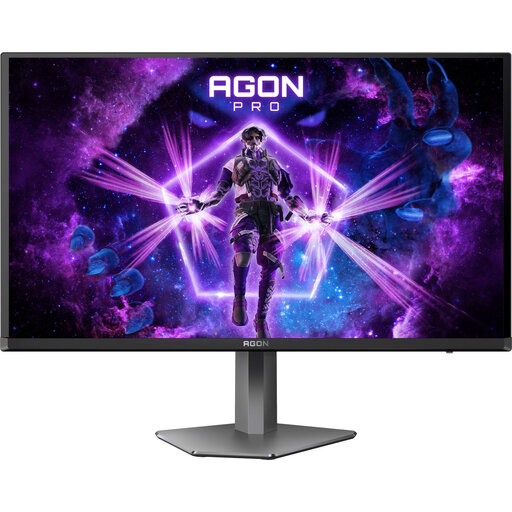
Why it suits this profile: This model is aimed at players looking for a QHD screen with 240Hz and OLED-level contrast for fast-paced competitive games.
The stated response time is 0.03ms, and the refresh rate varies by connection: 240Hz via DisplayPort and 144Hz via HDMI according to the product name.
QD-OLED panel, QHD resolution, 240Hz, AdaptiveSync, FreeSync and G-Sync Compatible. The stand supports height adjustment, pivot rotation, swivelling and tilting.
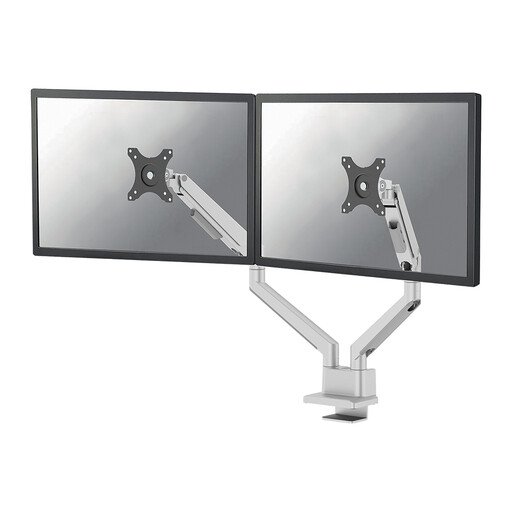
Why it suits this profile: For an intensive PC setup with two screens, this gas-spring arm provides extra space and flexible positioning.
The arm specifies a load capacity of 9 kg per screen and VESA 75 × 75 and 100 × 100 mm. Check these values before mounting your monitor.
Suitable for two screens up to 32 inches, height adjustment from 21.5 to 49.5 cm, cable management and a 180° stop mechanism.
We have put together a complete, up-to-date list of products that fully meet these strict selection criteria and the applicable European safety regulations.
Yes, QHD at 27 inches provides a sharp image, while models with 180Hz, 200Hz or 240Hz can display fast movement smoothly. The actual benefit depends on your graphics card, game settings and frame rate.
Power consumption depends on the panel type, brightness, HDR usage and settings. A higher refresh rate can affect energy consumption, but brightness often has a noticeable impact as well. Check the energy label and product specifications rather than looking only at the Hz value.
Lifespan varies depending on the panel, usage time and environmental conditions. Keep the ventilation clear, use suitable brightness settings and clean the screen with a soft, dry cloth. With OLED models, it is advisable to check the brand’s built-in maintenance features and warranty terms.
