
Vandaag of morgen in huis

Kwaliteit gegarandeerd

Welkomstaanbiedingen ontgrendelen: GRATIS bezorging | Tot 80% korting | Gratis 30 dagen JoyPlus-proefperiode
Download de app
If you're looking for a curved gaming monitor 27 inch, you're likely ready for an upgrade. You want an immersive experience, fluid visuals, and a competitive edge in your favourite games. However, the market is flooded with marketing terms and specifications that often confuse more than they clarify. Before you invest, it's crucial to know what to look for to avoid a bad purchase.
Many gamers fall into two common traps:
Full HD monitor 27 inch often provides a better balance for smooth gameplay.This guide will help you see past the specs and choose a 27-inch gaming monitor that fits your needs and budget.
Focus on these three technical features. They largely determine your gaming experience and the monitor's price.
The refresh rate, measured in Hertz (Hz), indicates how many times the image is updated per second. A standard monitor has a 60Hz refresh rate, but for gaming, you'll want more. A 180Hz gaming monitor delivers extremely smooth visuals, which is crucial in fast-paced shooters or racing games. Your reaction time improves because you see the action sooner.
Response time, measured in milliseconds (ms), is the time it takes for a pixel to change colour. A 1ms gaming monitor minimises 'ghosting' (image trails) behind fast-moving objects. However, pay attention to the measurement method; GtG (Gray-to-Gray) is generally a more reliable indicator of gaming performance than MPRT.
The type of LCD panel affects image quality. The two most popular choices for gaming are:
Adaptive-Sync is a technology that synchronises your monitor's refresh rate with your graphics card's frame rate. This prevents 'screen tearing'—an ugly horizontal break in the image. It's a must-have feature for a smooth gaming experience on both PC and modern consoles. Most monitors with Adaptive-Sync work with both AMD (FreeSync) and NVIDIA (G-Sync Compatible) graphics cards.
Below are some popular choices, matched with specific user profiles. This will help you find a monitor that aligns with your needs.

Why This Fits Their Persona: For gamers where every millisecond counts. This monitor is built for speed and responsiveness, essential for competitive titles like Valorant, CS2, or Apex Legends. The combination of specs is focused on performance in a `monitor for PC gaming`.
This `MSI curved monitor` opts for a Full HD resolution, allowing you to leverage the high 180Hz refresh rate even with a mid-range graphics card. You're not paying for pixels that will hinder your performance.
The combination of a 180Hz refresh rate and a fast response time (0.5ms GtG, Min.) ensures extremely fluid and sharp visuals. The Adaptive-Sync technology prevents tearing.
Why This Fits Their Persona: This user is looking for a monitor that pulls them into the world of single-player games on the PS5/Xbox or during a movie night. The focus is on image quality and an enveloping feel, not purely on competitive speed.
Instead of focusing on the 1ms myth, this screen offers an excellent all-around experience. The VA panel delivers superior contrast, which is more important for a cinematic atmosphere than the absolute fastest response time.
The 1500R curvature fills your field of view and enhances immersion. The high contrast ratio (3000:1) of the VA panel provides deep blacks, making dark scenes in games and movies look impressive.
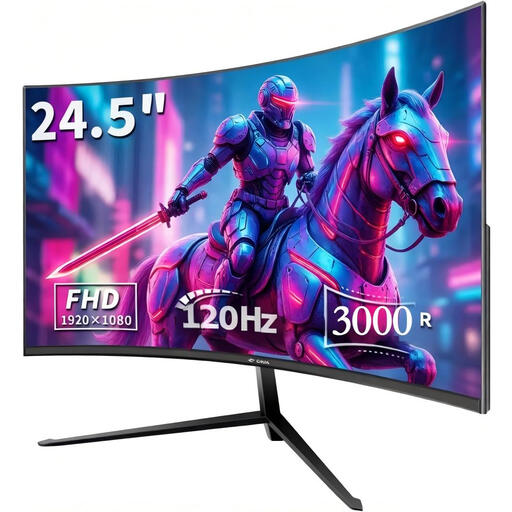
Why This Fits Their Persona: Ideal for those building their first gaming setup or seeking an upgrade without breaking the bank. This screen offers key gaming features in a more compact size, perfect for a smaller desk or a dorm room.
By opting for a 24-inch size, you get a sharp Full HD image and a high refresh rate for a lower price. This prevents you from overspending on a larger screen when your budget is limited.
It offers a smooth 120Hz refresh rate and a curved screen for an immersive experience. The Adaptive Sync technology also ensures smooth, tear-free gameplay.
We have compiled a complete, up-to-date list of products that meet these selection criteria and local regulations.
A curved monitor can significantly enhance immersion, especially at sizes of 27 inches or larger. The curve fills your peripheral vision, making you feel more 'in the game'. While it's partly a matter of personal preference, many gamers find the experience more engaging and comfortable on the eyes during long sessions.
To fully utilise 180Hz, your graphics card needs to be able to generate 180 frames per second (fps) in the games you play. For a Full HD monitor 27 inch, a modern mid-range graphics card is often sufficient for many popular esports titles. For the very latest games on high graphics settings, you might need a more powerful card to hit those frame rates.
Yes, Adaptive-Sync is an open standard that forms the basis for AMD's FreeSync. Many of these monitors are also "G-Sync Compatible," which means NVIDIA has validated them to work correctly with their GeForce graphics cards. It's always a good idea to check the specific monitor's product page for official compatibility information.
