
Vandaag of morgen in huis

Kwaliteit gegarandeerd

Welkomstaanbiedingen ontgrendelen: GRATIS bezorging | Tot 80% korting | Gratis 30 dagen JoyPlus-proefperiode
Download de app
A 240Hz gaming monitor can display fast-paced games much more smoothly than a standard 60Hz or 144Hz monitor. However, a high refresh rate alone doesn’t guarantee the right purchase. You’ll also need a graphics card that can produce enough frames per second, a suitable connection and a panel that meets your needs.
Many gamers run into the same pitfalls:
An FHD gaming monitor with 1920 × 1080 pixels puts relatively little demand on your graphics card. This makes FHD appealing for competitive shooters, especially at 24 or 24.5 inches. Models such as the Titan Army C24A1H and Samsung Odyssey G4 G40H are examples of compact screens with a high refresh rate.
A QHD gaming monitor gives you 2560 × 1440 pixels. At 27 inches, this means a higher pixel density and more screen space. The trade-off is that your PC needs more graphics power to run games at 240Hz. The MSI MAG 275CQDF X24 and iiyama GB2790QSU-B5 combine a 27-inch screen, QHD and 240Hz.
Pay attention to screen size, too. A 27-inch FHD monitor can work well for gaming, but text and fine details may look less sharp than on a 27-inch QHD model.
The panel has a significant effect on how images look:
An OLED gaming monitor or QD-OLED monitor does need a little extra consideration when it comes to how you use it and its maintenance features. For example, the MSI MAG 272QP QD-OLED X24 lists OLED Care, a heatsink and graphene film. These are features noted in the product description; the monitor’s lifespan also depends on brightness, usage patterns and environmental factors.
Before buying, check which input supports the refresh rate you want. For example, a monitor may offer 240Hz via DisplayPort, while HDMI has a lower limit. The Samsung Odyssey G4 G40H lists up to 300Hz via DisplayPort and up to 240Hz via HDMI.
Adaptive-Sync, AMD FreeSync and G-SYNC Compatible help match the monitor’s refresh rate to your graphics card’s frame rate. Results can vary depending on the combination of monitor, driver, cable and game settings. Enable the feature in Windows and your graphics card’s control panel, and check that your chosen connection is suitable.
Also check how the response time is measured. GtG and MPRT are not the same. For example, a “gaming monitor with a 1ms response time” may list 1ms MPRT, while the GtG figure is measured differently. Use response time as one factor in your comparison, rather than as the sole criterion.
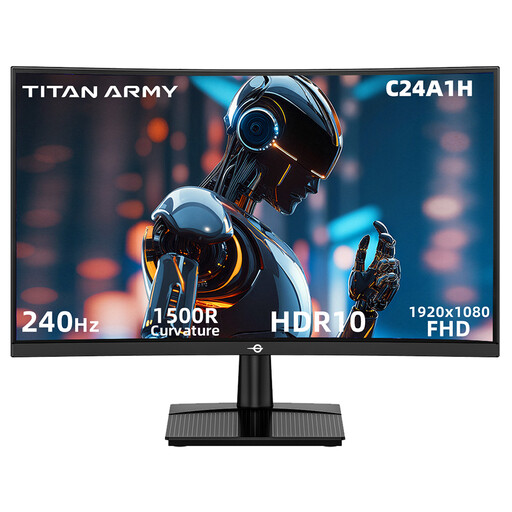
Why it suits this user: This 23.6-inch FHD monitor is aimed at gamers who want 240Hz without immediately moving up to QHD or OLED. Its 1500R curvature and VA technology make it a good fit for a compact gaming setup.
The specifications list 240Hz via HDMI 2.0 and DisplayPort 1.2. Check that your cable and graphics card support this setting.
FHD, 240Hz, VA panel, FreeSync Compatible, HDR10 and VESA 100 × 100 mm.
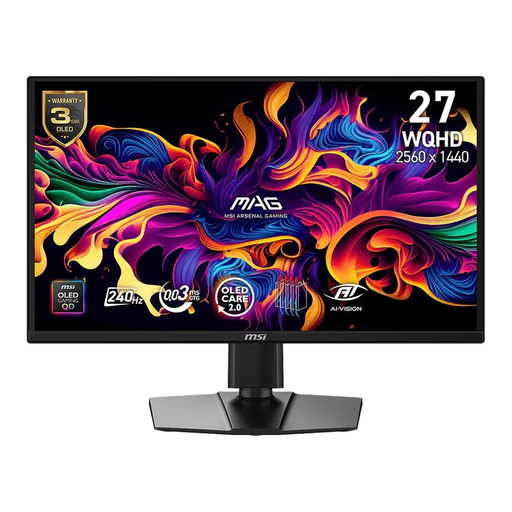
Why it suits this user: This model combines QHD, QD-OLED and 240Hz for gamers who value contrast and colour as much as speed.
The product information lists DisplayHDR True Black 400 and Adaptive Sync. Check the current connections, settings and usage conditions when you buy.
2560 × 1440, 240Hz, 0.03ms GtG, G-SYNC Compatible, FreeSync Premium and an adjustable stand.
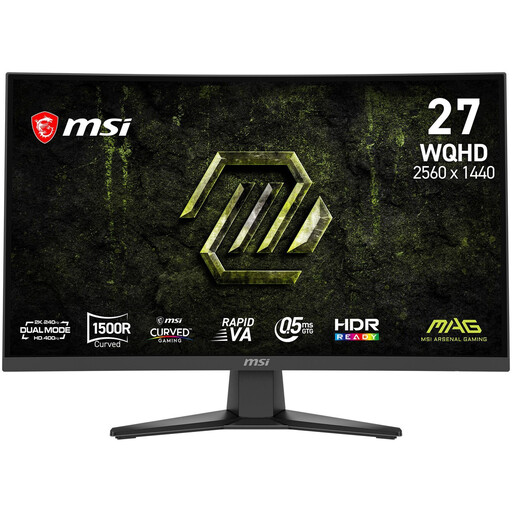
Why it suits this user: This 27-inch model is designed for gamers who want to combine QHD detail, a curved screen and high speed for PC gaming and entertainment.
The connections are clearly specified: DisplayPort 1.4a and two HDMI 2.0b ports. The maximum refresh rate still depends on the source and cable.
QHD, 27 inches, Rapid VA, 240Hz, 0.5ms GtG, FreeSync Premium and VESA mounting.
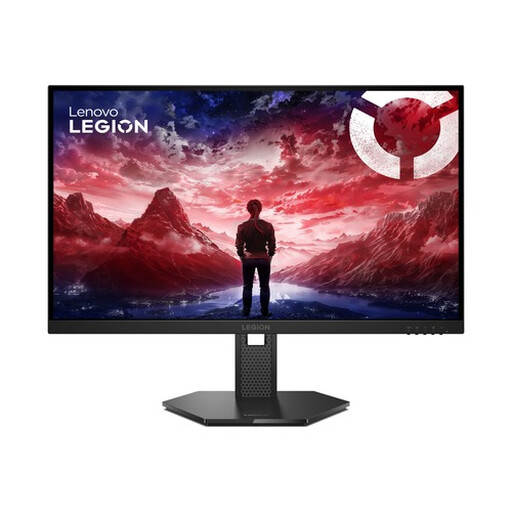
Why it suits this user: The combination of FHD, IPS and an adjustable stand suits gamers who also use their screen for everyday computing and different gaming positions.
The product details explicitly list HDMI 2.1, DisplayPort 1.4, G-SYNC Compatible and FreeSync Premium. Still, check your own hardware and cables.
27-inch IPS, 240Hz, HDR10, 99% sRGB, height, swivel, tilt and pivot adjustment.
We’ve put together a complete, up-to-date list of products that meet these strict selection criteria and current European safety regulations.
To make full use of 240Hz, your PC needs to deliver around 240 frames per second in the game you’re playing. This depends on the resolution, graphics settings and graphics card. QHD generally requires more graphics power than FHD. You can also use a 240Hz monitor at a lower frame rate; you just won’t be making full use of its refresh rate.
According to the product specifications, an OLED or QD-OLED monitor can offer deep blacks and a fast pixel response. For extended use, it’s a good idea to use features such as screen protection and panel maintenance if the manufacturer provides them. Vary static images and check the warranty terms, especially those relating to possible image retention or burn-in.
Power consumption varies depending on the panel type, brightness, HDR mode and energy-saving settings. Check the energy label and the stated figures for SDR and HDR. A higher refresh rate can affect power consumption, but your connected PC and the number of hours you play also account for a large share of your overall costs.
