
Vandaag of morgen in huis

Kwaliteit gegarandeerd

Welkomstaanbiedingen ontgrendelen: GRATIS bezorging | Tot 80% korting | Gratis 30 dagen JoyPlus-proefperiode
Download de app
A 1TB magnetic portable SSD is a great option for content creators, vloggers, photographers and iPhone users who want to store large files quickly. With USB-C, a compact design and magnetic attachment, this kind of drive is ideal for use on the go and for recording video directly from a compatible iPhone.
However, not every high-speed external SSD will automatically work well with your devices. Watch out for these common pitfalls:
An external USB-C SSD is handy for modern laptops, tablets, cameras and smartphones. However, to reach transfer speeds of up to 2000 MB/s, your device must also support USB 3.2 Gen 2x2. Connect the SSD to a slower USB port and speeds will drop.
According to its product specifications, the DigiEra LPS2000M-2 offers read speeds of up to 2000 MB/s and write speeds of up to 1800 MB/s. These are stated maximums. Actual performance depends on factors such as the source device, cable, file size, temperature and available bandwidth.
If you’re using a MacBook or laptop, it’s worth checking the USB specification of the port first. A short, suitable USB-C cable can also help reduce connection issues when transferring large files.
If you’re looking for an SSD for ProRes video, there’s more to check than storage capacity alone. According to the product description, the DigiEra SSD supports direct recording to external storage on compatible iPhone 15 Pro and Pro Max models at 4K 60fps ProRes. For iPhone 16 Pro and Pro Max models, it lists 4K 120fps ProRes.
This doesn’t mean every iPhone 15 or iPhone 16 has the same features. Check:
The product specifications state that DigiEra models aren’t compatible with iPhone 14 or older models. The USB-C connector means you can also use the drive with laptops, tablets and other devices, but features such as direct video recording may vary by device.
A portable SSD should be easy to carry as well as fast. According to the product information, the DigiEra models weigh 1.62 oz, approximately 46 grams, and have an aluminium casing. They’ll fit in a camera bag, coat pocket or tech organiser.
The manufacturer states that the drive is shock-resistant up to 1500G for 0.5 ms and vibration-resistant from 10 to 2000 Hz. Treat these as product specifications, not a guarantee that your data will be safe in every situation. Avoid moisture, prolonged heat and hard knocks. Safely disconnect the SSD before removing the cable, especially while video files are being written.
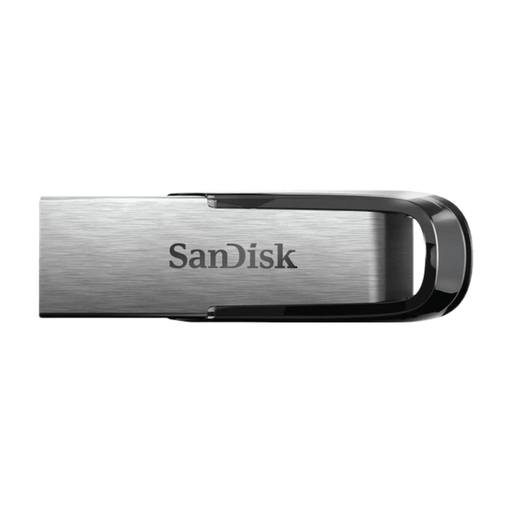
Why it suits this profile: A USB stick may be enough for documents, photos and occasional file transfers. This isn’t a 1TB SSD, but it offers a more affordable starting point for everyday use with USB-A.
The USB 3.0 specification makes it clear that this product isn’t intended to be a 2000MB/s SSD, so you’ll know what to expect from the outset.
512GB capacity, metal casing, USB-A connector and support for password protection, according to the product information.
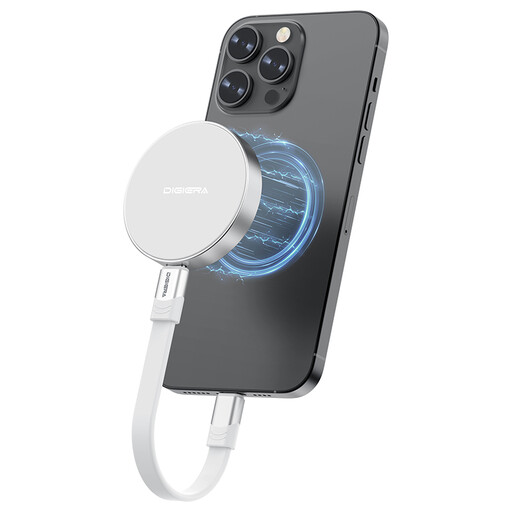
Why it suits this profile: Ideal if you want to combine 1TB of external storage, USB-C and magnetic attachment in one compact drive.
The interface and read and write speeds are listed separately: USB 3.2 Gen 2x2, read speeds of up to 2000 MB/s and write speeds of up to 1800 MB/s.
1TB capacity, approximately 46 grams, aluminium casing and USB-C connectivity for compatible laptops, tablets and phones.

Why it suits this profile: A practical choice for mobile filmmakers and anyone who moves large video files between an iPhone, laptop and other USB-C devices.
The product description specifically mentions compatibility with iPhone 15 and newer models, and notes the limitation for older iPhones.
Magnetic attachment, read speeds of up to 2000 MB/s, write speeds of up to 1800 MB/s and a stated shock resistance of up to 1500G.
We’ve put together a complete, up-to-date list of products that meet these strict selection criteria and current European safety regulations.
No. According to the product information, the DigiEra models discussed here are designed for iPhone 15 and newer models with USB-C. For magnetic attachment and direct ProRes recording, you should also check that your specific model and case are compatible.
No. This is a stated maximum speed under suitable conditions. Your laptop or phone’s USB port, the cable, file type and temperature can all reduce the actual speed. A USB 3.2 Gen 2x2 SSD needs a compatible host device.
Its lifespan depends on write workload, storage conditions, heat and everyday use. Always keep important files available in at least one other location. A shock-resistant SSD can offer extra protection against mechanical impact, but it isn’t a substitute for a backup.
