
Vandaag of morgen in huis

Kwaliteit gegarandeerd

Welkomstaanbiedingen ontgrendelen: GRATIS bezorging | Tot 80% korting | Gratis 30 dagen JoyPlus-proefperiode
Download de app
A 1TB magnetic portable SSD may seem straightforward to choose on paper. However, differences in connectivity, speed and how it attaches can determine whether the drive is easy to use or ends up forgotten in a bag. This is especially important for content creators, photographers, videographers and iPhone users who want to store large files while on the move.
A compact SSD can be suitable for backups, transferring RAW photos and recording 4K video. But a high MB/s claim doesn’t automatically mean you’ll get that speed in practice. So, check the following potential pitfalls first.
A 2000 MB/s portable SSD will usually use a fast interface such as USB 3.2 Gen 2x2. Both the SSD and the connected device need to support this standard. If your laptop or smartphone has a slower USB port, actual transfer speeds will be lower.
Also check the difference between read and write speeds. For example, a manufacturer might state a read speed of 2000 MB/s, while the write speed is lower. Write speed is particularly important when copying video projects and recording ProRes video.
USB-C describes the shape of the connector, not its full performance or compatibility. So, check:
An external SSD for iPhone 15 and iPhone 16 also needs to attach securely and practically to your phone. A standard cable may work technically, but could get in the way when filming on the move.
A magnetic SSD for iPhone can be handy when you’re filming handheld or on location. Its stability depends on having a suitable magnetic ring or phone case. The drive may shift if you’re moving around, on uneven ground or using a heavy cable.
For important recordings, always use an extra attachment point or a suitable MagSafe-compatible case. Also check whether the magnetic connection is intended only to position the drive, rather than to protect it from water or drops.
A 1TB external SSD has space for large photo libraries, video clips and project files. The available capacity will be slightly less than the stated amount because of formatting and system functions. A 1TB drive can fill up quickly with 4K video, particularly when using high frame rates and ProRes files.
If you regularly work on longer productions, you could consider a 2TB or 4TB model as your main storage. A 1TB drive is still a practical choice for mobile work storage or temporary backups.
Look at the following combination:
A USB 3.2 Gen 2x2 SSD can be fast, but a device with an older USB standard will be the limiting factor. For a camera, tablet or games console, check the device’s compatibility list.
A compact enclosure fits in a pocket or camera bag, but heat dissipation is still important during long transfers. Aluminium can help conduct heat, while rubber protection is mainly designed for everyday use and knocks.
Read IP ratings carefully. IP65, for example, means protection against dust and temporary exposure to water in certain conditions; it doesn’t make an SSD suitable for immersion. Clean and dry the connector before plugging it in.

Why it suits this user: This 1TB external SSD is designed for everyday use with laptops, Android devices and games consoles. Its USB-C connection makes it a practical choice for modern devices.
The stated speed is clearly linked to USB 3.2 Gen 2. Bear in mind that the connected port determines the actual speed.
Read speeds of up to 1050 MB/s, write speeds of up to 1000 MB/s and compatibility with multiple systems.
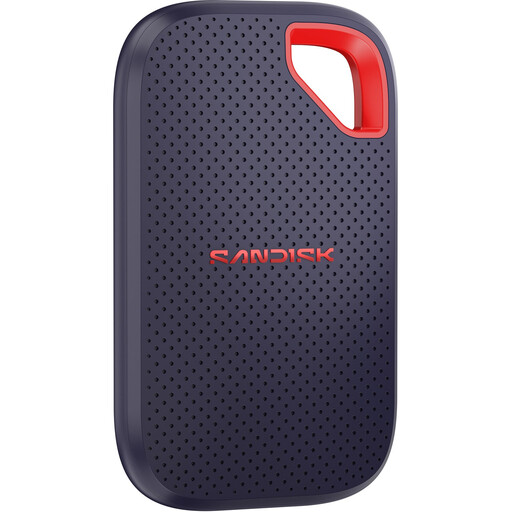
Why it suits this user: A good choice for photographers and mobile creators who want to carry a fast, compact SSD for large files.
The specifications state that 2000 MB/s is achievable only with a compatible USB 3.2 Gen 2x2 host. This makes the speed claim easier to assess.
Read speeds of up to 2000 MB/s, IP65 rating, drop protection from heights of up to 3 metres and 256-bit AES hardware encryption.

Why it suits this user: This magnetic SSD for iPhone is designed for mobile filmmakers and users of compatible iPhone 15 and iPhone 16 models who want to attach a compact drive directly to their device.
The product information explicitly states compatibility with iPhone 15 and later. Check your model before buying, and use a suitable case or magnetic ring.
USB 3.2 Gen 2x2, read speeds of up to 2000 MB/s, write speeds of up to 1800 MB/s and a weight of around 46 grams.
According to DigiEra’s product description, this model supports direct recording to external storage on certain iPhone Pro models, including 4K at 60 fps and 4K at 120 fps on the models specified. This is a claim made in the brand’s product information, not a universal guarantee for every combination of phone, cable, camera app and storage setting.
Before an important recording, test the whole setup: iPhone, case, magnetic attachment, cable, available storage space and recording format. Keep the connector free of dust and make sure the SSD isn’t pulling on the cable.
Its lifespan depends on write workload, temperature, storage conditions and everyday use. SSDs have no spinning platters, so they’re often easier to carry around than an external HDD, but they aren’t immune to wear or data loss.
Don’t use an SSD as the only copy of important files. Make at least one extra backup and safely disconnect the drive after a transfer. For very large video projects, a second SSD or desktop storage can help spread the workload.
Most portable SSDs are USB bus-powered and don’t need a separate charger. The connected laptop, tablet or iPhone supplies the power. Long transfers or video recordings can drain the battery more quickly. A short cable, a direct connection and a sufficiently charged device can help reduce connection problems.
We’ve put together a complete, up-to-date list of products that meet these strict selection criteria and the applicable European safety regulations.
