
Vandaag of morgen in huis

Kwaliteit gegarandeerd

Welkomstaanbiedingen ontgrendelen: GRATIS bezorging | Tot 80% korting | Gratis 30 dagen JoyPlus-proefperiode
Download de app
A 15.6-inch laptop backpack may seem easy to choose at first glance. However, there are clear differences in fit, compartment layout, materials and carrying comfort. For example, a backpack may be described as water-repellent even though it is not designed for prolonged exposure to rain. A USB port also does not automatically mean that the backpack itself supplies power.
For students, school pupils, employees, commuters and travellers, the choice mainly comes down to everyday use. Does the laptop fit properly in the protected compartment? Is there room for a charger, mouse, documents and a bottle? And does the bag remain practical when travelling by bike, train or bus?
A 15.6-inch laptop has a screen diagonal of 15.6 inches, but its external dimensions vary by brand and model. As a result, a business laptop with a thick body may fit less well than a slim laptop with the same screen size.
So do not just check whether “15.6 inch” appears in the product name. Compare the laptop’s dimensions with those of the internal laptop compartment. A little extra room is useful, but an excessively large compartment offers less stability while you are on the move.
The term water-repellent laptop backpack usually means that the outer fabric can repel light rain or splashes. This is different from a completely waterproof construction with sealed seams and zips. The product listing should therefore be your guide: check which features are actually mentioned and, in heavy rain, consider using a separate rain cover.
A laptop backpack with multiple compartments can be useful for cables, documents, accessories and everyday essentials. However, too many small compartments can make it harder to find things and may make the bag heavier or less flexible. Focus on a layout that suits your routine, rather than simply counting the number of zips.
A USB port is another additional feature that should be assessed realistically. With a laptop backpack with USB port, this generally means a pass-through connection to a power bank that you need to provide yourself. Check whether a dedicated power-bank compartment and a suitable cable are required.
Pay attention to the following points:
Product titles may include terms such as “water resistant” or “water repellent”. Treat this wording as a product specification for limited exposure to moisture, not as a promise that the contents will stay dry in all conditions.
For commuting in the Netherlands, a sturdy outer fabric, securely closing zips and a rain cover are practical features to consider. Also check whether the bottom is likely to get dirty easily and whether the material can be wiped clean without difficulty.
A lightweight laptop backpack can be comfortable when you cycle or use public transport every day. However, the total weight also depends on what you carry. So look for:
For a business laptop backpack, a discreet appearance and organised layout are often important. For school or short trips, extra capacity and a flexible opening may be more suitable. These features are not gender-specific: when choosing a laptop backpack for women and men, focus mainly on fit, capacity and style.
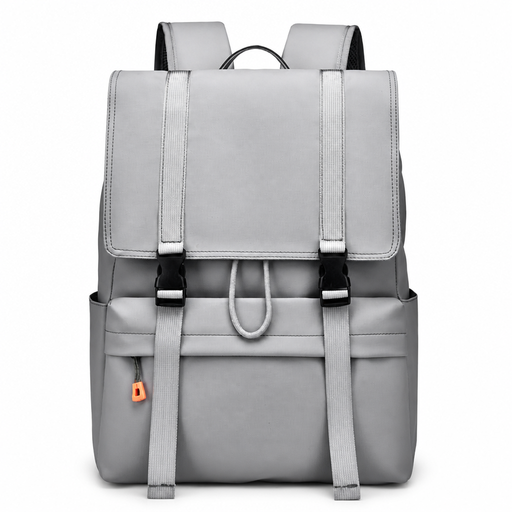
Why it suits this profile: The product listing mentions a 15.6-inch laptop compartment, water-repellent properties, a drawstring closure and a spacious layout. This makes it suitable for school, everyday use and short trips around town.
The stated capacity and closure provide more clarity in advance than a general description such as “daypack” alone. Still, check your laptop’s exact dimensions before ordering.
15.6-inch size; drawstring closure; spacious everyday layout; described as water-repellent.
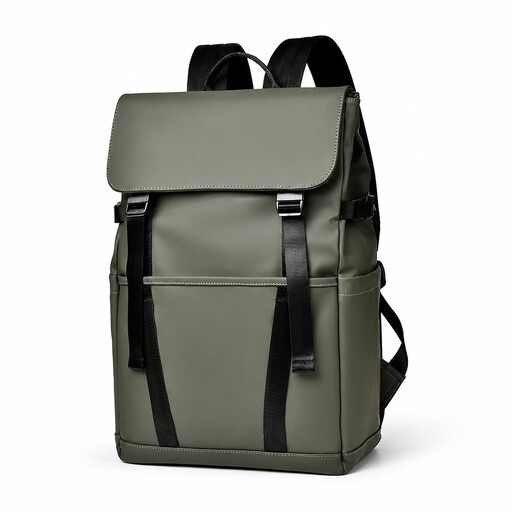
Why it suits this profile: The product name mentions multiple compartments, a luggage strap, water-repellent material and use for commuting, school and travel. This makes it a logical option for anyone who wants to keep accessories organised.
The stated luggage strap and compartment layout answer two practical questions that are often missing from general marketing claims. “Water-repellent” is still intended for limited exposure to moisture.
Multiple compartments; luggage strap; 15.6-inch designation; according to the product name, suitable for the office, school and travel.

Why it suits this profile: The product name combines a slim design with a USB charging port, a water-repellent description and suitability for the office, commuting and travel. This makes it a good fit for commuters who do not want extra bulk.
The USB feature is stated clearly in the product name, but it will probably require your own power bank and cable. Check the connections and available space on the product page.
Slim design; USB charging port mentioned in the product description; described as lightweight and water-repellent; designed for a 15.6-inch laptop.
We have put together a complete, up-to-date list of products that fully meet these strict selection criteria and the applicable European safety regulations.
Use this quick checklist before ordering a laptop backpack:
No. The screen diagonal is only one measurement. The laptop body can vary from one model to another. Measure the width, height and thickness, then compare these figures with the backpack’s laptop compartment.
Its lifespan depends on the material, zips, seams, load and conditions of use. A backpack that is filled heavily every day or frequently placed on the ground will generally wear out more quickly. Check the shoulder straps, seams and zips regularly and avoid overloading the bag.
Usually not. The USB port is generally a connection or pass-through for a separate power bank. The backpack itself therefore does not need to contain a power source. Check the product information and use a suitable power bank and cable.
