
Vandaag of morgen in huis

Kwaliteit gegarandeerd

Welkomstaanbiedingen ontgrendelen: GRATIS bezorging | Tot 80% korting | Gratis 30 dagen JoyPlus-proefperiode
Download de app
A 15.6-inch laptop backpack needs to do more than simply hold a laptop. Students often carry books and a charger, commuters travel by train or bicycle, and professionals want to take documents, accessories and sometimes clothing with them. Yet many models look much the same at first glance.
The key differences are often in the details. For example, a backpack may be described as “waterproof”, while the product information only mentions water-repellent material. A USB port also does not mean that the backpack itself contains a battery. And having a large number of compartments is not automatically practical if the laptop compartment is too tight or insufficiently padded.
A water-repellent laptop backpack helps protect against light rain and splashes, but does not automatically provide protection during prolonged or heavy rain. So check whether the description uses terms such as water-repellent, water resistant or waterproof. These are not synonyms.
For cycling through Dutch rain, a rain cover or a separate laptop sleeve can sometimes be a sensible addition. For example, a NINETYGO product description explicitly states that the fabric is water-repellent, but not fully waterproof and should not be exposed to heavy rain for extended periods.
A 15.6-inch laptop does not always have the same casing dimensions. As well as checking the screen size, check the dimensions of the laptop compartment. A thick work laptop with extra cooling may need more space than a slim laptop.
Also pay attention to where the zip is positioned. A laptop compartment that can only be accessed through the main compartment may be less convenient on a train or at an airport. A separate side compartment gives you quicker access, but does not automatically offer better protection.
A laptop backpack with a USB port usually works as a pass-through connection: you need to connect a power bank inside. The USB connection does not charge independently. Check whether a power bank is included and whether the cable is suitable for your equipment.
RFID protection, a trolley strap and lockable zips are also features designed for specific uses. According to the HP Travel backpack’s product information, it has a hidden RFID-blocking compartment and lockable main-compartment zips. This can be useful when travelling, but does not guarantee protection against theft.
Choose a model whose laptop compartment is clearly suitable for up to 15.6 inches. According to the product description, a padded compartment helps protect against knocks and scratches, but do not place heavy objects directly against the laptop. A sturdy laptop sleeve can provide extra protection.
Do you have a 14-inch laptop? A 14-inch laptop sleeve is often more compact than a backpack and suitable for use inside an existing bag. According to the product specifications, the Case Logic Reflect REFMB114 weighs 213 grams, has a zip fastening and is designed for 14-inch laptops. The description mentions light protection against knocks and a splash-resistant design.
For everyday work, a business laptop backpack is usually practical when it has separate compartments for:
A roomy laptop backpack is not always necessary. For a short commute, a slim model may be more comfortable to carry. For business trips or an overnight stay, an expandable laptop backpack is a better choice. According to the HP Travel product details, it has a capacity of 25 litres, expandable to 30 litres.
A lightweight laptop backpack does not automatically prevent a heavy load: the contents account for most of the weight. Look for adjustable shoulder straps, a chest strap and a handle. Keep heavy items close to your back and avoid regularly overloading the bag.
A model for men or women does not need to have a specific shape. Adjustability, the length of the shoulder straps and how the backpack sits against your body are more important. If you mainly cycle, look for a chest strap and a stable fit.
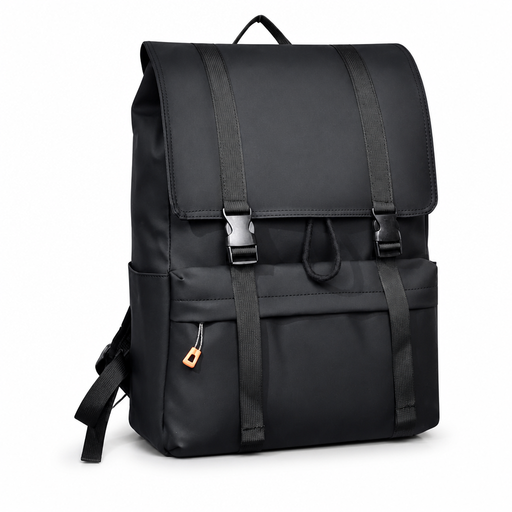
Why it suits this profile: A practical choice for school, work and everyday city use when you are looking for a model with a more spacious layout without opting for a business-style design.
The product name mentions a water-resistant design, but check the current details on compartments, dimensions and rain protection before buying.
Flip-top design, suitable for laptops up to 15.6 inches and ideal for school, work and city travel.

Why it suits this profile: Ideal for professionals and travellers who want to combine a laptop backpack for work and travel with clothing, accessories and travel essentials.
The capacity is clearly stated as 25 litres and expandable to 30 litres. This lets you adjust the capacity for a normal working day or a trip.
25–30-litre capacity, RFID-blocking compartment, chest strap, lockable zips and a stated weight of approximately 860 grams.
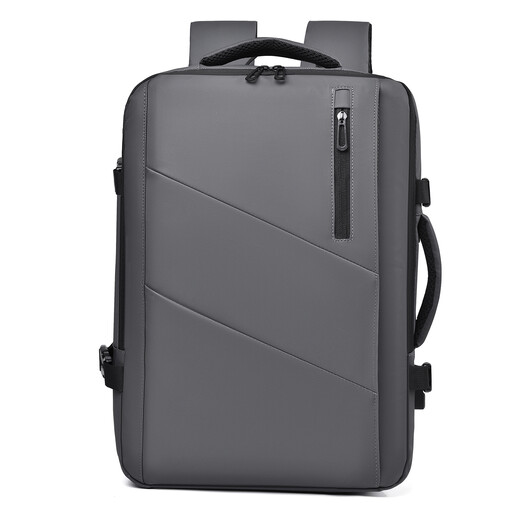
Why it suits this profile: Designed for travellers, commuters and users who sometimes carry just a few items and at other times need extra space for a weekend or business trip.
An expandable design means you do not have to travel every day with an unnecessarily large bag. However, check the dimensions if you want to use the backpack as hand luggage.
Expandable capacity from 25 to 35 litres, water-resistant designation and multiple compartments for travel and commuting.
We have put together a complete, up-to-date list of products that fully meet these strict selection criteria and the applicable European safety regulations.
No. Screen size is only one measurement. Check the maximum laptop dimensions of the compartment and compare them with the width, depth and thickness of your laptop. Also look for a secure fastening and enough room around the corners.
Its lifespan depends on the material, zips, stitching, load and everyday use. According to product information, polyester with a higher denier density may be designed to offer greater durability, but this does not guarantee a specific service life. Clean the backpack according to the instructions and avoid overloading it.
That depends on the protection provided by the laptop compartment and how you use it. A separate sleeve can be useful if you regularly remove the laptop from the backpack, share the bag with heavy items or use a model without clear padding. In rainy weather, do not assume that a sleeve or backpack means the laptop is fully protected against water; always check the product instructions.
