
Vandaag of morgen in huis

Kwaliteit gegarandeerd

Welkomstaanbiedingen ontgrendelen: GRATIS bezorging | Tot 80% korting | Gratis 30 dagen JoyPlus-proefperiode
Download de app
A laptop backpack may seem easy to choose at first glance. However, the wrong size, limited protection or awkward layout can cause daily frustration. Anyone looking for a 15.6-inch laptop backpack usually wants to carry more than just a computer: think charger, mouse, documents, lunch and personal belongings.
As a Joybuy Product Recommendation Officer, I therefore focus mainly on verifiable specifications and suitability for different uses. Below, you can read which pitfalls to avoid, which features matter and which models suit different situations.
A laptop with a 15.6-inch screen does not always have the same external dimensions. For example, a thick gaming laptop may need more space than a slim business model. As well as checking the screen size, therefore, check the dimensions of the laptop compartment and the maximum laptop compatibility.
A 15-inch laptop backpack may fit some 15.6-inch models, but only if the internal dimensions match. A compartment that is too tight can put strain on the zip and seams, while one that is too spacious offers less stability when cycling or travelling.
A waterproof laptop backpack and a water-resistant model are not the same thing. A water-repellent coating may help keep out light rain, but it does not guarantee protection during prolonged rainfall or submersion. Always check the official specification. For example, the HP Prelude Pro is described as “water-resistant”. This is a clearer description than simply calling a product “waterproof” without supporting evidence.
In heavy rain, consider using a separate rain cover and keep liquids securely sealed inside the bag.
A laptop backpack with plenty of storage space is useful when the compartments are arranged logically. Too many small pockets can actually take up valuable room. Look for a separate laptop compartment, space for the charger and an easily accessible pocket for keys or your phone.
A USB port on the outside is usually only a cable pass-through. You still need a power bank; the backpack does not charge your device by itself.
For daily transport, preferably choose a padded laptop compartment with sufficient edge protection. Also check whether the compartment closes with a zip or elastic strap. A loose compartment without any means of securing the laptop offers less protection against movement when you put the backpack down.
A sleeve or laptop shoulder bag may be suitable if you already use a spacious work bag or suitcase. According to the product description, the Inateck LB03008-15BG has a soft inner lining, a protective strip around the zip and a splash-resistant exterior.
A lightweight laptop backpack reduces the overall carrying weight, but you should also consider the shoulder straps. Padded, adjustable straps make it easier to fit the backpack properly. A chest strap can provide extra stability on longer walks or journeys.
Pay attention to the empty weight. According to the specifications, the HP Prelude Pro weighs 480 grams, while the Kensington SP25 weighs 710 grams. The heavier model may offer more structure and compartments, but this weight is added to that of your laptop and accessories.
For everyday work, 10 to 18 litres may be sufficient. If you carry clothing, lunch or travel accessories, you will need more capacity. The HP Travel has a capacity of 25 litres and can be expanded to 30 litres, according to the product specifications.
A trolley strap, lockable zips and a chest strap are useful features for train journeys, air travel and commuting. When looking at an RFID compartment, check exactly what is stated: this type of compartment is intended as an additional storage feature, but does not guarantee protection against every form of data theft.
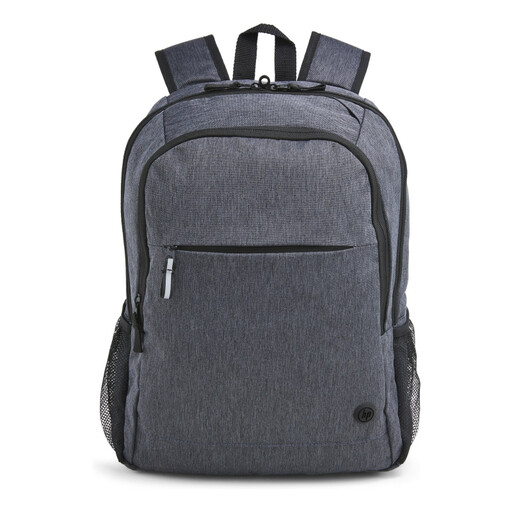
Why it suits this profile: A practical business laptop backpack for students, graduates and commuters looking for an organised bag for a laptop up to 15.6 inches.
The product specifications list a padded 15.6-inch compartment, zipped pockets and adjustable, padded shoulder straps. The water-resistant finish is described more clearly than an unsupported claim of complete waterproofing.
480 grams, trolley strap, lockable zips, reflective details and an outer fabric made from 95% recycled material, according to the product information.
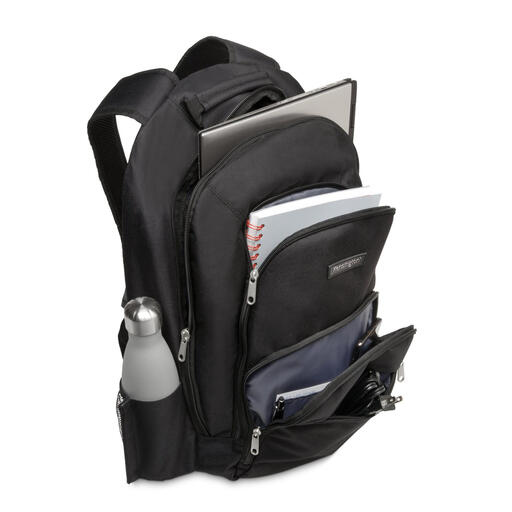
Why it suits this profile: Ideal for professionals who value a businesslike look, robust outer fabric and clear organisation for their accessories.
The bag uses 1680D nylon and, according to the description, has a reinforced internal laptop compartment. This gives more specific information about the material and protection than a general durability claim alone.
Suitable for laptops up to 15.6 inches, with several accessory compartments, zipped pockets and padded shoulder straps. Dimensions: 330 × 180 × 480 mm.

Why it suits this profile: For travellers and commuters who carry clothing, accessories or other everyday items alongside their laptop.
The capacity is clearly stated as 25 litres, expandable to 30 litres. This makes it easier to judge whether the bag suits your packing list instead of relying solely on the phrase “large capacity”.
Chest strap, several compartments, hidden RFID pocket, lockable zips and a weight of 860 grams according to the specifications.
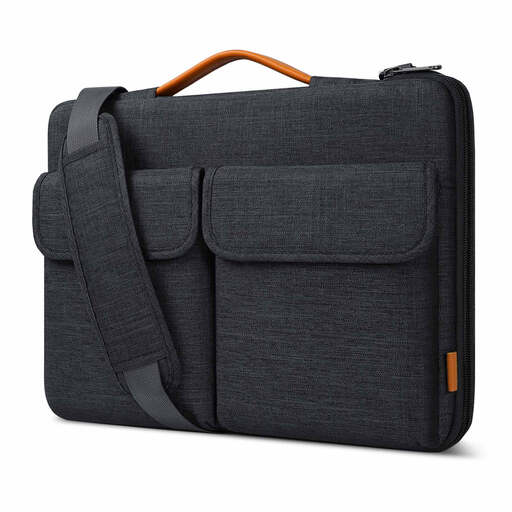
Why it suits this profile: A suitable choice if you prefer a laptop shoulder bag or sleeve to use with an existing work bag, backpack or trolley.
The internal dimensions are listed as 38.5 × 26.5 × 3 cm. Check these measurements against your laptop before ordering; this is not a full backpack with room for clothing or large documents.
Splash-resistant material, soft lining, two carrying options and a strap for attaching it to a suitcase.
We have compiled a complete, up-to-date list of products that fully meet these strict selection criteria and the applicable European safety regulations.
No. Screen size is only one factor. Compare the external dimensions of your laptop with the internal measurements of the laptop compartment. Also consider the thickness of your device, particularly with gaming laptops or models with additional ventilation.
Its lifespan depends on the material, load, use of the zips and maintenance. A bag that is filled heavily every day will wear out faster than a model used for light commuting. Use the bag within its stated capacity, avoid sharp objects next to the laptop and clean the material according to the care instructions. Many products are covered by a legal minimum guarantee of two years under EU consumer rules; check the terms and conditions for each item.
A laptop backpack with a USB port usually contains a cable pass-through to a power bank that you place inside the bag yourself. Check whether the port supports USB-A only or another connection as well, and use a suitable power bank. Treat the USB feature as a convenient extra for travelling, not as a replacement for a charger or safety feature.
