
Vandaag of morgen in huis

Kwaliteit gegarandeerd

Welkomstaanbiedingen ontgrendelen: GRATIS bezorging | Tot 80% korting | Gratis 30 dagen JoyPlus-proefperiode
Download de app
A 15.6-inch laptop backpack may seem straightforward to choose at first glance. However, small differences in compartment layout, fastening and materials can determine whether the bag works well for school, the office or commuting. A laptop may have a 15.6-inch screen, yet still not fit properly because of its bezel, thickness or protective case.
So don’t focus solely on appearance or a low price. First check the dimensions, type of protection and how you plan to use the backpack every day.
The term 15.6 inches refers to the diagonal screen size of the laptop. External dimensions vary by brand and model. For example, a wide gaming laptop will not always fit in the same compartment as a slim business laptop.
Check the following before buying:
A water-repellent laptop backpack can help keep out light rain and splashes. That does not automatically mean the bag can withstand heavy rain for a long time or being submerged. So check the product description and treat the term water-repellent or water-resistant as a material feature, not a guarantee of complete waterproofing.
For cyclists and train commuters, practical points to look for include a covered zip, a flap over the opening and a material that is easy to wipe clean.
A bag can have several zipped compartments and still be awkward to use if they are very narrow. For a laptop backpack for work or school, a separate laptop compartment, space for documents and a more spacious main compartment are usually more important than a long list of small pockets.
Also think about what you actually carry: a charger, mouse, water bottle, lunch, notebook and perhaps clothes for a short trip.
A padded laptop compartment helps prevent direct contact between the laptop and other items. Pay attention to the strength of the base and how the laptop compartment is suspended. A compartment that reaches all the way to the bottom may provide less space between the laptop and the floor when you put the bag down.
Use your laptop’s dimensions as a reference point. The term “15.6 inches” alone is not enough to determine whether it will fit.
Polyester, canvas and similar synthetic materials are common choices for everyday use. A canvas laptop backpack often has a casual look, while a business laptop backpack generally features a more streamlined design.
A drawstring fastening, flap or roll-top opening can provide extra flexibility. On the other hand, some fastenings take a little longer to open and close than a standard zip. With a roll-top laptop backpack, you can often adjust the capacity to suit a full or half-empty bag, but check whether the laptop compartment can be accessed separately.
Adjustable shoulder straps, a padded back and a carry handle are useful for everyday use. For a laptop backpack for commuting, it is also helpful if the bag stays stable while cycling or walking.
A spacious laptop backpack is practical for school, the office and travel, but carrying more also means carrying more weight. So don’t automatically choose the largest bag. An expandable backpack is worth considering if you only need the extra space occasionally.
A laptop backpack with a USB port can be useful when you want to connect a smartphone to a power bank while travelling. The USB port itself does not usually provide power; you will need a separate power bank and a suitable cable. Also check that the product information specifically mentions an external USB charging port.
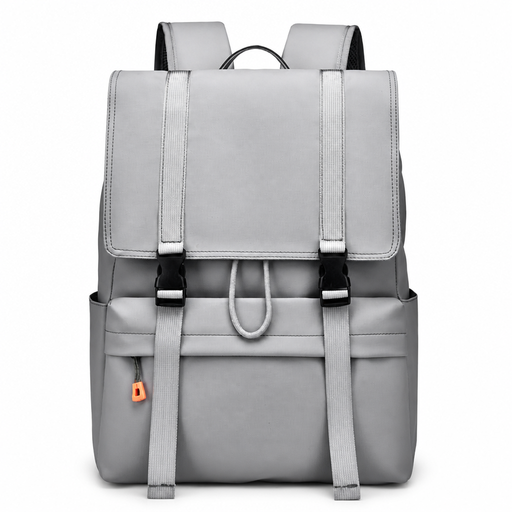
Why it suits this profile: This casual rucksack is designed for school, work and trips around town, making it suitable for men and women looking for a simple layout.
The flip-top opening and drawstring fastening make the main storage area easy to identify. The product name also specifies water-resistant material, but this should not be interpreted as fully waterproof.
Stated features include a 15.6-inch laptop size, large capacity, casual design and water-resistant material.

Why it suits this profile: This business model is ideal for office work, meetings and commuting when you value a streamlined look and USB connectivity.
The product name specifically mentions a USB charging port and water-repellent material. You will still need a power bank; the USB port is not a built-in power source.
Stated specifications include a 15.6-inch size, lightweight design, slim profile, water-repellent material and an external USB charging port.
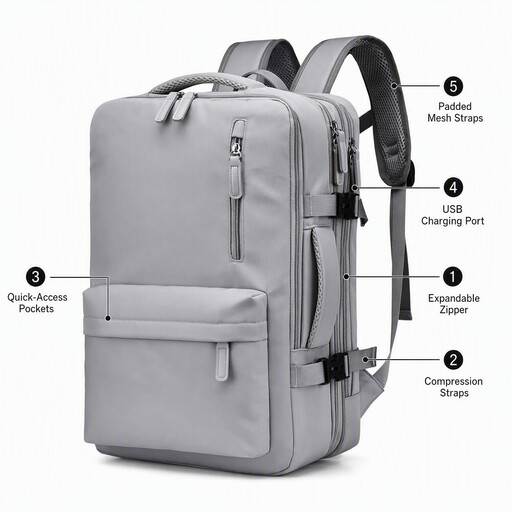
Why it suits this profile: The expandable design is practical for travel, business trips and days when you carry more than just a laptop and charger.
The expandable construction means you do not always have to travel with a bulky bag. Its water-resistant properties provide a practical buffer against light rain, but do not replace a rain cover.
Stated features include expandable storage, multiple compartments, support for 15.6-inch laptops, water-resistant material and an external USB port.
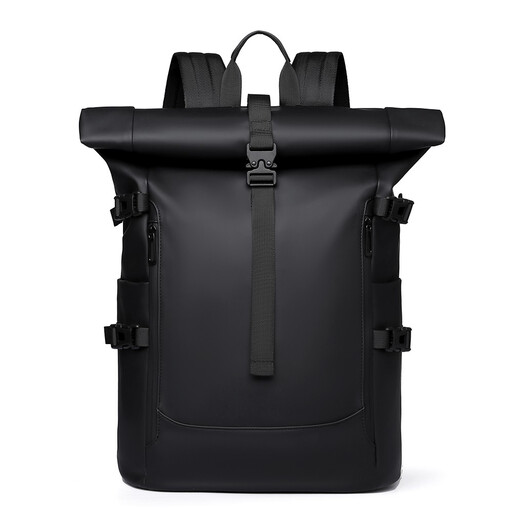
Why it suits this profile: A roll-top model is well suited to cycling, getting around town and everyday commuting when you want to adjust the way you pack your belongings.
The roll-top opening lets you adjust the capacity and helps prevent the main compartment from becoming overfilled. However, check that the laptop compartment closes separately and use additional protection during prolonged rain.
Stated features include a 15.6-inch laptop size, roll-top design, large capacity, multiple straps and water-repellent material.
We have put together a complete, up-to-date list of products that fully meet these strict selection criteria and the applicable European safety regulations.
No. The screen size only tells you the diagonal measurement. Measure the laptop including its bezel and check the internal dimensions of the compartment. A thicker model, such as a laptop designed for graphic work or gaming, will need extra room.
Place the laptop in the designated padded compartment and keep the charger, keys and other hard objects in separate compartments. In prolonged or heavy rain, a rain cover or an additional waterproof sleeve is a sensible extra. Water-repellent material is not a general guarantee against moisture.
It can be, particularly when travelling by train, during school days and when commuting. You will need a power bank and should check in advance which cable is compatible with your phone. The USB port makes it easier to connect your device, but it does not independently determine the charging speed or battery life of your device.
