
Vandaag of morgen in huis

Kwaliteit gegarandeerd

Welkomstaanbiedingen ontgrendelen: GRATIS bezorging | Tot 80% korting | Gratis 30 dagen JoyPlus-proefperiode
Download de app
A 15.6-inch laptop sleeve may seem like a simple product, but the wrong choice can quickly become inconvenient. A sleeve that is too loose offers less stability. A model selected based on screen size alone may be too small for a laptop with a wide bezel or thick casing. A thin sleeve may also promise more protection than it delivers in everyday use.
For students, commuters and professionals, these are the main pitfalls to watch out for:
Measure your laptop’s width, depth and thickness. Compare these measurements with the sleeve’s stated internal dimensions. A 15.6-inch laptop can vary in size depending on the model. Gaming laptops, for example, are often thicker than business ultrabooks.
The Case Logic Reflect REFPC114 lists a maximum screen size of 39.6 cm (15.6 inches). The product information also mentions a 14-inch laptop compartment. This difference is a good reason to check your laptop’s dimensions before buying, rather than relying solely on the screen size.
A soft laptop protective sleeve is practical for carrying your laptop in a rucksack or work bag. According to the product description, polyester, neoprene and similar fabrics help protect against scratches and minor knocks. They are not a substitute for a hard case and cannot guarantee protection against damage from a fall.
Look out for these features:
A scratch-resistant laptop sleeve is particularly suitable when your laptop is carried inside another bag. For travelling with lots of luggage, a laptop bag with thicker panels and a separate laptop compartment is a more sensible choice.
A polyester laptop sleeve is often lightweight and easy to clean with a slightly damp cloth. A laptop sleeve with a zip stays closed during transport, but check that the zip runs smoothly and can be closed fully.
A lightweight laptop sleeve is convenient for lessons, train journeys and short trips. If you also want to carry documents, a tablet or a charger, look for a bag with several compartments. A sleeve is compact, but usually offers little room for accessories.
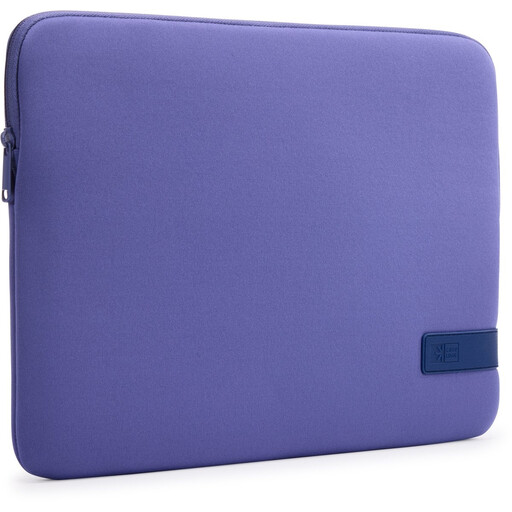
Why it suits this user profile: This purple sleeve has a compact design, polyester exterior and zip fastening. According to the product information, it is designed for laptops up to 15.6 inches and protects against scratches and minor knocks. Be sure to check the internal dimensions of your particular laptop.
The product details clearly state the material, fastening and level of protection. This means you can compare the sleeve without relying solely on colour or marketing language.
Polyester, purple monochrome finish, zip fastening and low weight. Suitable for carrying on its own or placing inside a larger bag.
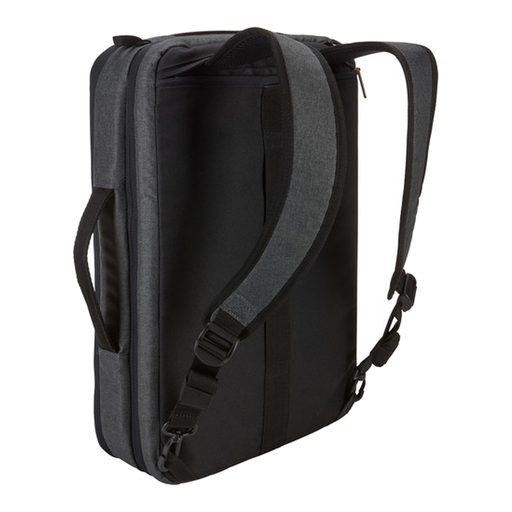
Why it suits this user profile: This bag is designed for anyone who needs more than just a sleeve. The product information lists a padded laptop compartment, separate tablet compartment and several carrying options for work and commuting.
The laptop is stored in a separate padded compartment. Accessories and documents can go in other compartments, so they do not press directly against the laptop.
Suitable for laptops up to 15.6 inches, with room for a tablet up to 10.5 inches, and can be carried as a briefcase or rucksack.
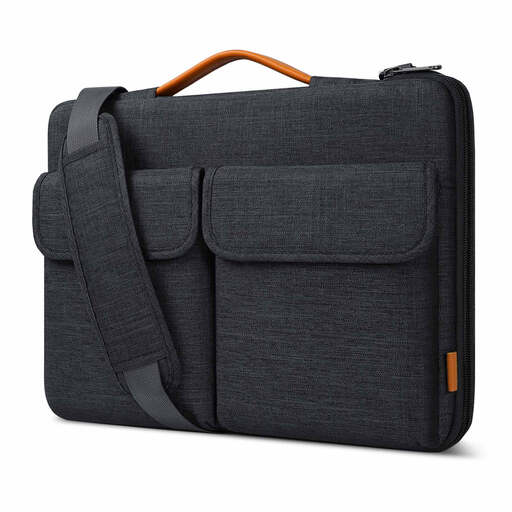
Why it suits this user profile: This model is ideal for users who regularly carry their laptop and value extra storage space. According to the product information, the bag can be carried by hand or over the shoulder.
The stated internal dimensions are 38.5 x 26.5 x 3 cm. The soft inner lining, protective zip strip and separate accessory compartments reduce contact and friction.
Splash-resistant exterior according to the product information, soft lining, handle, detachable shoulder strap and luggage strap.
We have put together a complete, up-to-date list of products that fully meet these strict selection criteria and the applicable European safety regulations.
Check this short list before placing your order:
A separate sleeve is particularly suitable for carrying in a rucksack or bag. If you travel every day with several items, it may be better to consider a laptop bag with a shoulder strap, padded compartments and accessory pockets.
No. Screen size is only one indication. Overall width, depth and thickness vary by manufacturer and model. Always check the sleeve’s internal dimensions as well as your laptop’s measurements.
Its lifespan depends on use, load and material. A polyester or nylon sleeve can last a long time if you do not overfill it, use the zip carefully and remove dirt promptly. Wear to the seams, zip or lining is a sign that the sleeve should be replaced.
A sleeve with a splash-resistant exterior can provide extra protection in light rain, but it is not automatically waterproof. A soft laptop sleeve is also not designed to absorb heavy falls. In poor weather and when travelling extensively, it is best to carry the laptop inside an additional bag.
