
Vandaag of morgen in huis

Kwaliteit gegarandeerd

Welkomstaanbiedingen ontgrendelen: GRATIS bezorging | Tot 80% korting | Gratis 30 dagen JoyPlus-proefperiode
Download de app
A 15.6-inch laptop rucksack may seem like a straightforward purchase at first glance. In reality, models vary widely in fit, layout and protection. A rucksack can be listed as suitable for a 15.6-inch laptop on paper, yet turn out too tight for a thicker model with a wide bezel. Terms such as 'waterproof', 'anti-theft' and 'USB charging' are not always explained clearly either.
Joybuy’s Product Recommendation Officer is here to filter the most important buying criteria, helping you choose a rucksack that suits your laptop, daily essentials and travel style.
The 15.6-inch label refers to the diagonal screen size, not the outside of your laptop. So check the length, width and thickness of your device before you buy. A laptop with a larger casing, extra protective edge or gaming components may need more room than a slim business model.
Also look at the dimensions of the laptop compartment. A rucksack with a spacious main compartment does not automatically have a suitably padded laptop sleeve.
A water-repellent laptop rucksack can help fend off light rain or splashes. That does not mean the bag will withstand a heavy downpour or submersion for any length of time. Check whether the product information mentions a waterproof rating, sealed seams or a supplied rain cover. If such details are missing, treat the bag as suitable for limited exposure to moisture.
For cyclists and commuters, the combination of material, zip construction and the cover over the opening is especially important. Keep electronic devices extra protected during prolonged rain.
A laptop rucksack with a USB port typically includes an internal cable run. You need to connect your own power bank; it is not included with the KONO model in this selection. The USB port is not a replacement for a certified charger either. Use a suitable power bank and cable, and check the port for damage before use.
A USB port is mainly handy for charging a phone on the go without fully opening your rucksack. It is not a guarantee of any particular charging speed.
Look at three measurements:
A roomy laptop rucksack is useful if you also carry A4 documents, books, a lunchbox or clothing. If you only need a laptop and charger, a slimmer model can be more comfortable.
A laptop rucksack with multiple compartments prevents cables, pens and documents from getting mixed up. Look for a separate laptop sleeve, an organiser for small accessories, and a main compartment large enough for your daily items.
For commuting, padded shoulder straps, a breathable back panel and adjustable straps are practical features. Carry a heavy bag with both shoulder straps and distribute the weight as evenly as possible. A luggage strap is handy when you want to attach the rucksack to a wheeled suitcase.
An anti-theft rucksack may have extra zips, hidden pockets or a combination lock. See these features as a deterrent to unwanted access, not complete security. On the KONO model, the three-digit lock is removable and designed to secure the main compartment. Never leave valuables unattended.
For polyester, canvas or other materials, check whether the manufacturer mentions water-repellency, abrasion resistance and care. A care instruction such as cleaning with a soft, damp cloth is more practical than a vague claim about durability.

Why this suits the profile: This model is geared towards daily use for the office, commuting and travel. The combination of a slim design, USB port and support for laptops up to 15.6 inches keeps the essentials practical.
The product listing explicitly mentions 15.6 inches and a USB charging port. Always check your own laptop’s exact measurements, as screen size alone doesn’t say everything.
USB port, water-repellent design as per the product title, and suitable for men and women. The bag is intended for the office, commuting and travel.
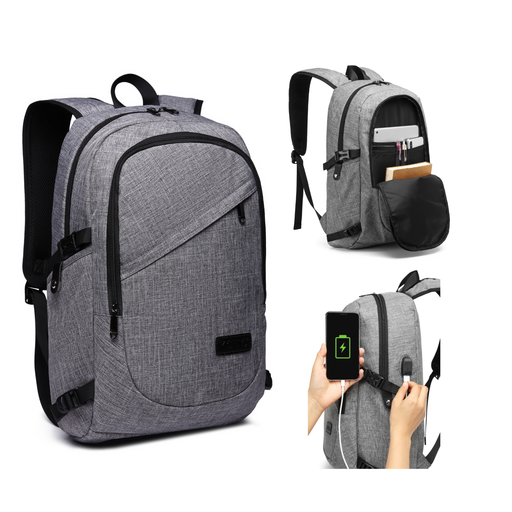
Why this suits the profile: This business rucksack combines a laptop sleeve, a roomy main compartment, organiser pockets and a removable three-digit lock. Ideal for professionals who want to carry documents and accessories in an organised way.
The specifications list 50 × 14 × 30 cm, a laptop compartment up to 15.6 inches and multiple pockets. The lock is a deterrent and does not provide absolute security.
Weight of about 0.73 kg, USB port, breathable padded shoulder straps and a removable lock. A power bank is not included.
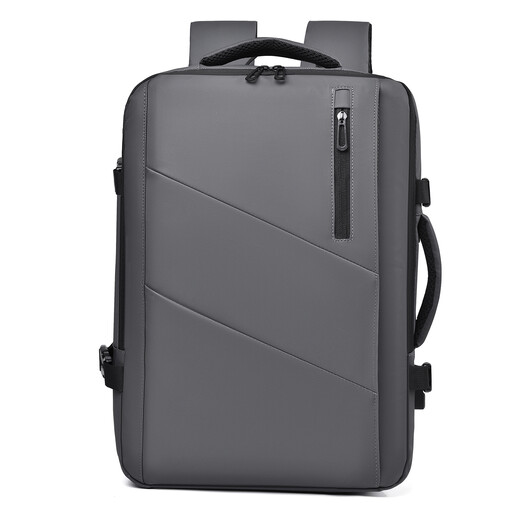
Why this suits the profile: The expandable capacity from 25 to 35 liter is practical for travellers, weekend trips and commuters who sometimes carry extra clothing or work gear.
The expandable capacity makes it easier to adapt the bag to the amount of luggage. Check the dimensions before you set off, and don’t carry the rucksack heavier than is sensible.
Capacity of 25 to 35 liter, water-repellent according to the product title, laptop support up to 15.6 inches and multiple compartments.
We’ve compiled a comprehensive, up-to-date list of products that fully meet these strict selection criteria and current European safety regulations.
No. The screen size is only a guideline. Measure the laptop including its casing and compare those measurements with the laptop compartment. For thicker laptops, pay extra attention to the available depth and how the compartment closes.
Follow the manufacturer’s instructions. For the KONO model, cleaning with a soft, damp cloth is recommended. Do not immerse the bag, avoid abrasive cleaners and let it air dry completely. Water-repellent properties can change with wear and use.
The USB port only uses power supplied by your own power bank. You therefore need to buy and charge a suitable power bank and cable yourself. The port is a pass-through for convenient charging on the move; capacity and charging speed depend on the power bank and device connected.
