
Vandaag of morgen in huis

Kwaliteit gegarandeerd

Welkomstaanbiedingen ontgrendelen: GRATIS bezorging | Tot 80% korting | Gratis 30 dagen JoyPlus-proefperiode
Download de app
A 15.6-inch laptop bag needs to do more than simply hold your computer. Whether you’re cycling in the rain, travelling on a crowded train or going on a business trip, your bag has to cope with moisture, knocks, full compartments and everyday wear. Yet many models look much the same at first glance.
So watch out for these three common pitfalls:
Measure your laptop at three points: length, width and thickness, including any protective case. Compare these measurements with the product information. “Suitable for up to 15.6 inches” usually refers to the screen size; the fit of the laptop casing can vary from one model to another.
For example, a laptop such as the Lenovo V15 G5 measures approximately 35,92 × 23,58 × 1,83 cm. If in doubt, allow a little extra room, but don’t choose an overly spacious sleeve: too much room for movement makes your laptop less stable in transit.
Nylon and polyester may have water-repellent properties, according to the product description. This usually means light drops bead off the surface for a while. It doesn’t guarantee that the seams, zips and internal compartments will stay dry in heavy rain.
If you cycle every day or regularly travel long distances on public transport, look for:
So be cautious about the term waterproof laptop bag. Check whether the product information actually states that the bag is fully waterproof or only “water-resistant” and “water-repellent”.
A business laptop bag with handles is ideal for the office and meetings, while a laptop shoulder bag can be handy for short journeys. For commuting, a 15.6-inch laptop backpack is often more practical, as it distributes the weight across both shoulders.
Also look for:
A hidden anti-theft pocket can provide extra storage for cards or keys. It’s not a guarantee against theft, though, so keep an eye on your valuables in busy stations and shopping streets.

Why it suits this profile: A practical choice for students and commuters looking for a backpack for the office, school or everyday journeys to work. The product name mentions a water-repellent outer surface, a USB charging port and a slim design.
The product information specifically describes the bag as water-repellent rather than fully waterproof, setting clearer expectations in light rain. Before buying, check the exact layout and how the USB port connects.
Suitable for laptops up to 15.6 inches according to the product name; the backpack design and USB charging port are practical for everyday use.
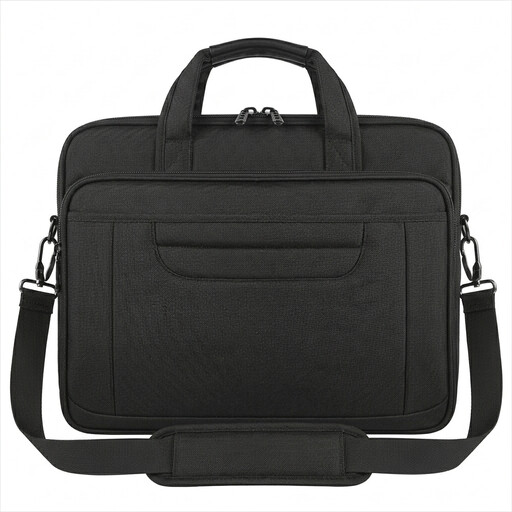
Why it suits this profile: This business laptop bag is ideal for men and women looking for a smart briefcase style for the office, meetings and business trips. Its stated dimensions are 40,6 × 30 × 7,5 cm and it weighs around 800 grams.
The product description mentions a padded laptop compartment, several accessory pockets and a removable shoulder strap. The fabric is described as water-repellent, not fully waterproof.
Handles, a removable shoulder strap, a hidden back pocket and a laptop compartment for laptops up to 15.6 inches; it also has a luggage strap.
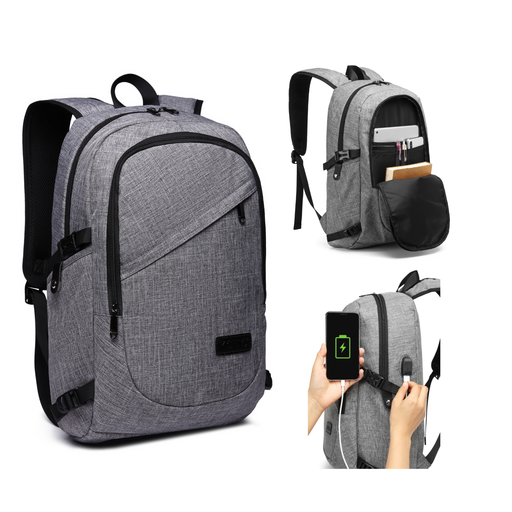
Why it suits this profile: This laptop backpack with a USB port is designed for people who carry a laptop, documents and everyday essentials for commuting, school or business trips. It measures approximately 30 × 14 × 50 cm.
The USB port doesn’t replace a power bank: according to the product description, one isn’t included. The combination lock acts as a deterrent, but doesn’t provide complete protection against theft.
Laptop compartment for laptops up to 15.6 inches, multiple compartments, breathable padded shoulder straps and a removable combination lock.
We’ve put together a complete, up-to-date list of products that meet these strict selection criteria and the applicable European safety regulations.
No. Screen size is just one indication. Check your laptop’s length, width and thickness too. A sturdy protective case may also need extra room.
A USB port in a backpack usually acts as a pass-through for a cable. You connect a suitable power bank yourself; one isn’t included as standard. Use a certified power bank and cable, and avoid putting too much strain on the bag.
Its lifespan depends on the weight you carry every day, how often you use the zips, exposure to moisture and how well you maintain it. Overfilled compartments put strain on the seams and fastenings. Clean the bag according to the product instructions, avoid putting it in the washing machine unless the instructions allow it, and check the laptop sleeve and shoulder straps regularly.
