
Vandaag of morgen in huis

Kwaliteit gegarandeerd

Welkomstaanbiedingen ontgrendelen: GRATIS bezorging | Tot 80% korting | Gratis 30 dagen JoyPlus-proefperiode
Download de app
A 15.6-inch laptop bag needs to do more than simply hold your laptop. Students often carry a charger, notebook and lunch as well. Commuters need comfortable carrying and protection from an unexpected shower. Business travellers also look for a trolley strap, quick access and a well-organised interior.
There are, however, several common pitfalls. A bag that appears large enough on paper may be too tight in practice because of a bulky laptop sleeve. A label such as “waterproof” does not always mean that the bag can withstand heavy rain for an extended period. And having a large number of compartments is not automatically useful if the zips are difficult to reach.
In this guide, I compare the most important specifications and several popular options for 2026. This will help you determine more precisely which 15.6-inch laptop backpack, 15.6-inch laptop sleeve or business bag best suits your needs.
“15.6 inches” generally refers to the diagonal screen size, not the laptop’s overall dimensions. The chassis can vary between brands and models. Measure your laptop’s length, width and thickness, then compare these measurements with the laptop compartment.
Also watch out for conflicting product information. The Lenovo ThinkPad Professional 2nd Generation, for example, is described as suitable for laptops up to 15 inches, while the specifications state a maximum screen size of 16 inches. If in doubt, check the current size chart or ask the seller for confirmation.
Calling a laptop bag waterproof is only meaningful if it is clear under which conditions the bag provides protection. “Water-resistant” or “splash-proof” usually indicates protection against light rain and splashes, not prolonged exposure to a heavy downpour.
Zips and seams are often the weak points. If you cycle daily in the Netherlands, consider using a separate rain cover and place your laptop in the padded compartment rather than loose among your other belongings.
A laptop bag with multiple compartments helps you organise cables, a mouse, documents and keys. However, overloading can put strain on zips, seams and shoulder straps. A bag weighing 800 grams can also feel heavy very quickly once you add a laptop, power adapter and books.
So do not look only at the number of compartments. Consider their capacity, the bag’s load-bearing capacity and how it feels and holds its shape when full.
A laptop compartment should provide enough room without allowing the device to move around excessively. An overly spacious compartment offers less protection against impacts. A compartment that is too tight can put pressure on corners, zips or ports.
For a 15.6-inch laptop, a bag with a separate, padded compartment is generally more practical than a large open main compartment. If you have a 14-inch laptop, a 15.6-inch bag can provide additional space, but check that the laptop does not shift around.
Look for a padded laptop sleeve, a reinforced base and sufficient protection around the corners. A soft polyester sleeve is primarily designed to protect against scratches and minor impacts. A backpack or business laptop bag with a thicker laptop compartment generally creates more distance between your laptop and other belongings.
Do not place sharp objects such as an umbrella, metal water bottle or loose adapters directly next to the device. Even the best padding cannot compensate for poor organisation inside the bag.
A laptop backpack for work distributes the weight across both shoulders. A laptop bag with a shoulder strap is convenient for short distances and formal work environments, but can feel unbalanced when carrying a heavy load.
For train journeys and business travel, a trolley strap, sturdy handle and easily accessible front pocket are useful features. A USB port on the outside is merely a pass-through: you will still need your own power bank. According to the product descriptions of certain models, the bag is water-resistant; this does not guarantee protection against prolonged rain.
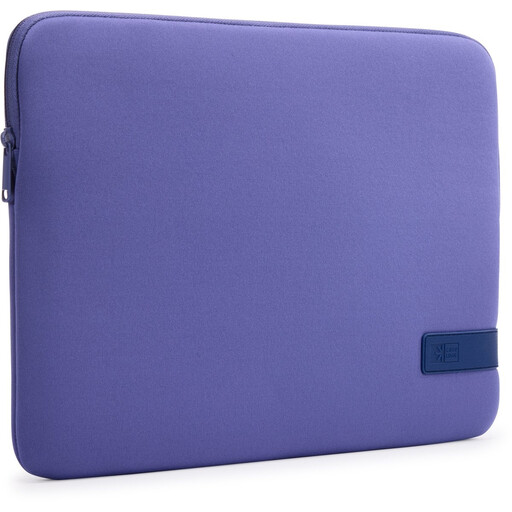
Why it fits: A slim laptop sleeve for students and commuters who carry their laptop inside an existing backpack or shoulder bag.
The product information specifies a maximum size of 15.6 inches and recommends a close fit. The sleeve is not designed to carry a large number of accessories.
Polyester construction, zip closure, lightweight design and protection against scratches and minor impacts according to the product description.
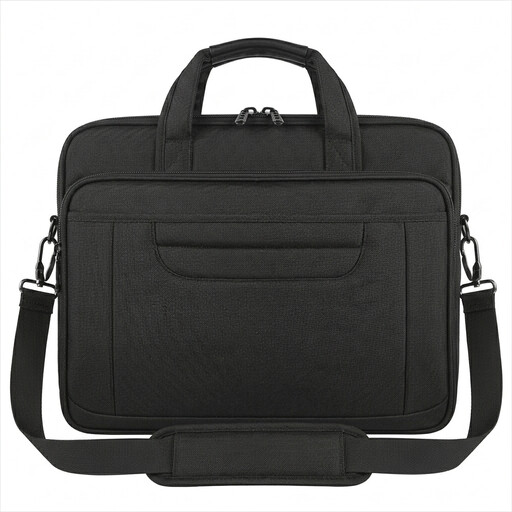
Why it fits: A business laptop bag for the office, client meetings and travel, designed to be carried by hand or over the shoulder.
The water-resistant nylon exterior should not be interpreted as fully waterproof. The product information also advises against overloading the bag.
Suitable for laptops up to 15.6 inches, multiple accessory compartments, detachable shoulder strap, anti-theft pocket and trolley strap.
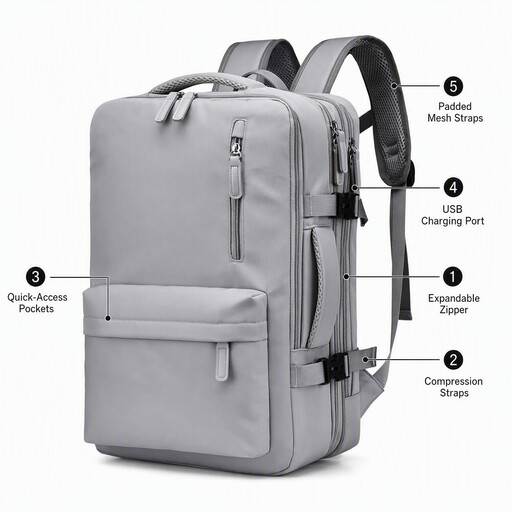
Why it fits: A laptop bag for travel, commuting and days when you need to carry extra clothing or documents alongside your laptop.
The description mentions water resistance but does not specify a waterproof rating or test standard. Use additional protection in heavy rain.
Expandable layout, multiple compartments and a design focused on work and travel according to the product title.
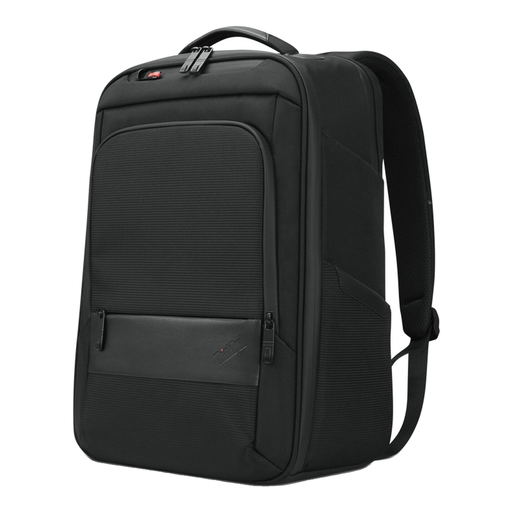
Why it fits: A practical 15.6-inch laptop backpack for daily commuting, with room for documents and accessories.
The listed dimensions are 30 × 43.5 × 18.5 cm and the weight is approximately 1 kg. Check whether this size works comfortably with the belongings you carry every day.
Laptop compartment, zipped pockets, handle and, according to the product details, 70% recycled material.
Browse a current selection of laptop bags for work and compare size, layout, carrying options and travel features based on the available product specifications.
A durable laptop bag is about more than recycled materials. Also consider its expected lifespan, the quality of the zips and seams, and how easy it is to maintain on a daily basis. A bag that wears out quickly does not automatically have a lower environmental impact simply because it contains a certain percentage of recycled material.
Look for verifiable information. The Lenovo backpack states that 70% of its materials are recycled. For the HP Everyday bag, the manufacturer specifies at least 60% recycled post-consumer plastic. These are product specifications provided by the brands; on their own, they say nothing about the product’s total lifespan or environmental impact.
No. Screen size is only one measurement. Always compare your laptop’s external dimensions with those of the laptop compartment. Allow for additional thickness if you use a hard protective case.
That depends on the weight and distance. A backpack distributes the load across both shoulders and is often better suited to cycling or daily travel. A shoulder bag offers quick access and can look more formal, but becomes uncomfortable on one side sooner when carrying a lot of luggage.
Remove dust with a soft brush and wipe stains with a slightly damp cloth. Do not use harsh cleaning products and follow the manufacturer’s care instructions. Allow a wet bag to dry completely before putting your laptop back inside.
