
Vandaag of morgen in huis

Kwaliteit gegarandeerd

Welkomstaanbiedingen ontgrendelen: GRATIS bezorging | Tot 80% korting | Gratis 30 dagen JoyPlus-proefperiode
Download de app
A 15.6-inch laptop bag may seem straightforward to choose at first glance. However, not every bag is suitable for a laptop with a 15.6-inch screen diagonal. The casing, thickness, charger and carrying method all determine whether a bag is comfortable and practical to use.
For students, commuters and business travellers, there are three common pitfalls:
The right choice therefore starts not with the colour or brand, but with the dimensions, protection and way you intend to use the bag.
A screen size of 15.6 inches does not tell you everything about the outside of the device. Measure the width, depth and thickness of your laptop and compare these with the internal dimensions of the bag or sleeve.
Pay attention to the following:
For a bag used for work and travel, a little extra space is useful for a charger and documents. If you only need protection inside a rucksack, a slim, close-fitting case is often the more logical choice.
Marketing terms such as “shockproof” or “360° protection” only have meaning when you look at how the product is made. Check whether the bag has:
A soft sleeve is primarily designed to protect against scratches and minor knocks. If you travel with several items in the same bag, a laptop bag with extra padding may be a better choice. Do not place heavy items directly against the laptop compartment; no soft bag can make a laptop immune to pressure or falls.
When it comes to moisture, note the difference between water-repellent, splash-resistant and waterproof. HP’s product descriptions, for example, mention water resistance and 600D polyester for the Everyday 14-inch Laptop Bag. This does not mean that the bag is suitable for prolonged heavy rain. According to the product information, the Kensington Simply Portable SP40 is explicitly not described as waterproof.
A laptop bag with a shoulder strap is suitable if you regularly travel between the office, school and public transport. A 15.6-inch laptop rucksack usually distributes the weight across both shoulders and often provides more room for clothing, lunch or books.
When choosing a shoulder bag, check the following:
A bag with lots of compartments is not automatically more practical. Too many small compartments can take up valuable space. Choose compartments based on what you actually carry.
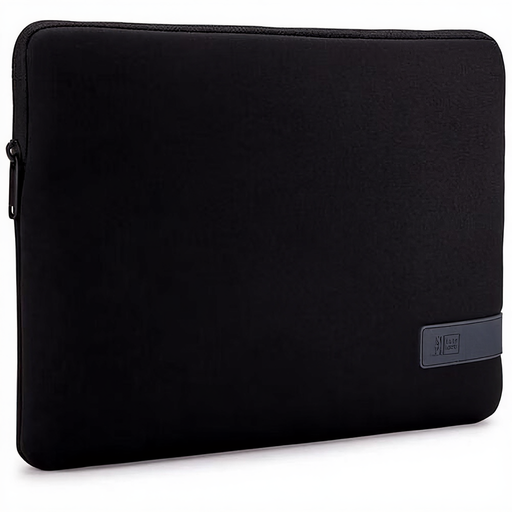
Why it suits this profile: This slim sleeve is designed for a 14-inch laptop and can be used on its own or inside a larger bag. Its construction keeps the weight low for everyday journeys.
The maximum size is clearly stated. However, check your laptop’s dimensions before ordering; this sleeve is not suitable for a 15.6-inch device.
Polyester, zip, weight of 213 grams and protection against minor knocks according to the product information.
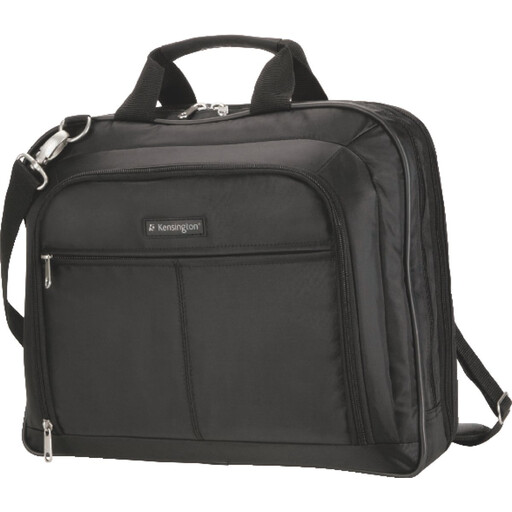
Why it suits this profile: This shoulder bag is suitable for laptops up to 15.6 inches and is aimed at professionals who want to carry documents and accessories in an organised way.
The bag has several accessory compartments and a padded laptop compartment. The product information warns that the bag is not waterproof and should not be overloaded.
1680D nylon, removable padded shoulder strap, several compartments and trolley attachment.

Why it suits this profile: This 15.6-inch laptop rucksack is designed for travelling and long days on the move, with room for work essentials and personal belongings.
The capacity is 25 litres and can be expanded to 30 litres. Distribute the weight evenly and do not overload the bag; the rucksack does not eliminate this limitation.
Shoulder and chest straps, laptop compartment for up to 15.6-inch laptops, several compartments, trolley compatibility and lockable zips.
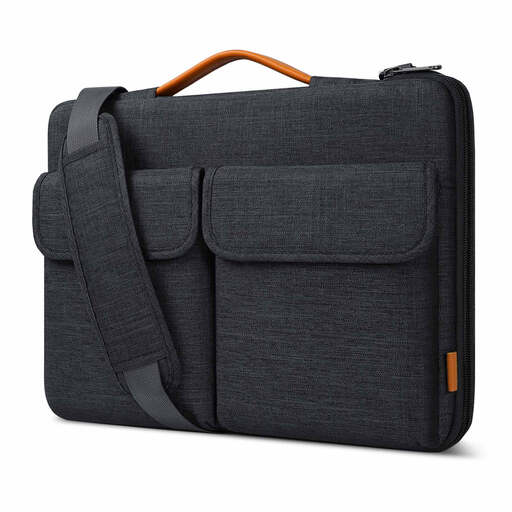
Why it suits this profile: The bag can be carried by hand or over the shoulder and has separate compartments for small accessories, the charger and cables.
The stated internal dimensions are 38.5 × 26.5 × 3 cm. This allows you to compare the fit more accurately than by looking at the screen size alone.
Splash-resistant material, soft flannel lining, protective zip strip and trolley strap.
We have put together a complete, up-to-date list of products that fully meet these strict selection criteria and the applicable European safety regulations.
No. Screen size is only one factor. You should also compare the width, depth and thickness of your laptop with the internal dimensions of the laptop compartment. Take extra care with gaming laptops and models with a large battery.
A protective laptop sleeve is suitable for protecting against scratches and minor knocks, particularly when you place the sleeve inside a rucksack or another bag. If you are carrying the sleeve on its own, a sturdy handle, reliable zip and sufficient padding are important. If you also carry documents, a charger and a mouse, a laptop bag with accessory compartments is often a better option.
Its lifespan depends on the material, load and how it is used. Overloading can put additional strain on zips, seams and shoulder straps. Clean polyester or nylon with a soft, damp cloth, do not use harsh cleaning products and store the bag somewhere dry. Also check the zips, seams and shoulder-strap attachment points regularly.
