
Vandaag of morgen in huis

Kwaliteit gegarandeerd

Welkomstaanbiedingen ontgrendelen: GRATIS bezorging | Tot 80% korting | Gratis 30 dagen JoyPlus-proefperiode
Download de app
A 15.6-inch laptop backpack may seem easy to choose at first glance. However, small differences in compartment layout, materials and carrying comfort can make a big difference in everyday use. A bag that looks spacious in a product photo may offer little room in practice for a lunch box, documents or a charger.
For students, school pupils, business users, commuters and travellers, three pitfalls are particularly important: a laptop compartment that does not fit properly, overestimating water resistance and extra features that are less practical than they sound.
The screen size is not the same as the external dimensions of a laptop. The bezel around the screen, casing and hinges can vary from one model to another. So do not just check the screen size; also check:
A laptop compartment that is too tight makes packing and unpacking difficult. If it is too spacious, the computer may not be held securely in place.
A water-resistant laptop backpack can help repel light rain, but that does not automatically mean the contents will stay dry for a long time. Pay attention to the wording used:
Zips, seams and open pockets are often the weak points. In bad weather, consider using a separate rain cover and place electronic devices in a protective sleeve.
A laptop backpack with a USB port can be useful when you are out and about, but the USB connection does not charge devices by itself. You will need a power bank, which must be connected inside the bag. Also check where the cable exits and whether the compartment is large enough for your power bank.
A lunch compartment, trolley strap or expansion zip can be useful, but may take up space and add extra weight. So check the backpack’s overall weight and decide in advance which features you will genuinely use.
Choose a laptop backpack with a separate compartment that fits your device. A padded base and side walls can create extra distance between the laptop and the outside of the bag. This is not a guarantee against damage, so do not place heavy items directly next to the device.
Also check the dimensions of the bag as a whole. A spacious laptop backpack for work can hold documents and accessories, but may be less comfortable on a busy train or while cycling if it becomes too deep or heavy.
Coated polyester, PU-coated materials and similar synthetic fabrics are common in a business backpack or travel backpack with laptop compartment. The product description should clearly state the applicable material and moisture-protection features.
Look out for the following details:
If no technical classification is provided, it is safer to regard the bag as suitable for everyday use and light rain, rather than as protection during prolonged heavy downpours.
A spacious laptop backpack is practical if you also carry books, clothing or lunch. For commuting, an expandable model can be useful: compact on quieter days and larger when you need to carry extra items.
Pay attention to:
Keep heavy items close to your back. A well-organised interior is often more important than a long list of separate compartments.
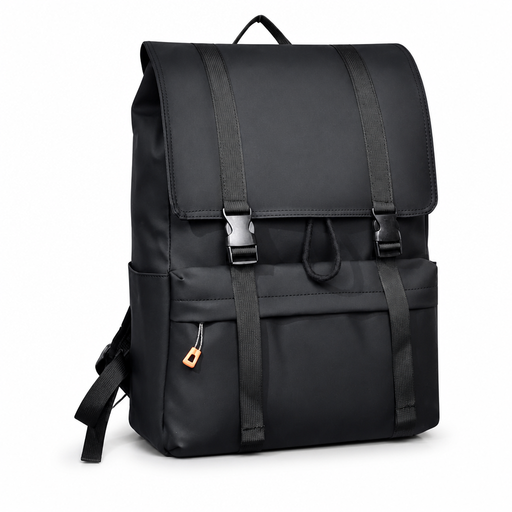
Why it suits this profile: The combination of a laptop compartment, a large main compartment and a drawstring closure makes this bag suitable for school, study and everyday use in the city.
The product description mentions a water-resistant exterior and generous capacity. Before buying, do check the exact compartment dimensions for your laptop.
Laptop compartment, large main compartment and drawstring closure. According to the product description, it is suitable for school, work and city travel.

Why it suits this profile: This model is designed for travel, work and commuting, with a 25-litre capacity that can be expanded to 30 litres.
The capacity and dimensions are clearly stated. The expansion zip means you do not have to travel with an unnecessarily large bag as standard.
25 litres, expandable to 30 litres, chest strap, lockable zips and an RFID-blocking compartment according to the product description. The stated weight is approximately 860 grams.
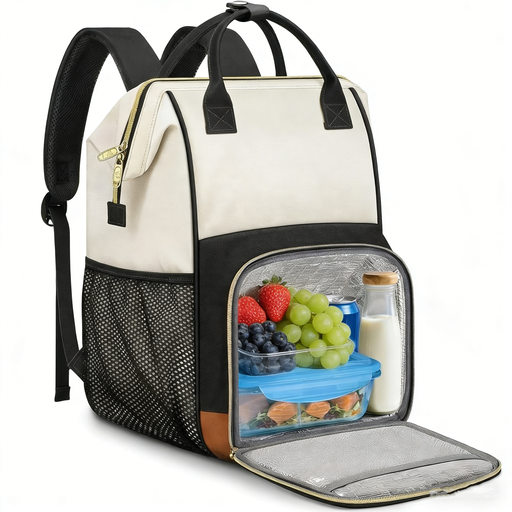
Why it suits this profile: For users who combine a laptop, documents, lunch and accessories, this model offers a dedicated 2-in-1 layout.
The lunch compartment is removable. This means you do not always have to carry a built-in cool compartment when you do not need it.
Laptop compartment for up to 15.6 inches, USB port, A4 organiser compartment, trolley strap and a stated weight of 1.14 kg. According to the product description, the fabric is water-resistant.
We have put together a complete, up-to-date list of products that fully meet these strict selection criteria and the applicable European safety regulations.
No, not automatically. Check your laptop’s dimensions and compare them with those of the laptop compartment. A 15.6-inch screen only indicates the diagonal measurement, not the size of the overall casing.
Its lifespan depends on the weight carried, frequency of use, exposure to moisture and the quality of the zips and seams. Do not overload the bag, distribute heavy items evenly and follow the manufacturer’s care instructions. Replace the backpack when the shoulder straps, seams or laptop compartment show visible damage.
The USB port itself does not consume power. However, you will need a separate power bank, which must be charged regularly. Also check that your own cable and charging protocol are compatible with the connection in the bag.
