
Vandaag of morgen in huis

Kwaliteit gegarandeerd

Welkomstaanbiedingen ontgrendelen: GRATIS bezorging | Tot 80% korting | Gratis 30 dagen JoyPlus-proefperiode
Download de app
A 15.6-inch laptop backpack needs to do more than simply hold a laptop. Students carry books and chargers, commuters travel through rain and busy public transport, while business travellers need well-organised compartments and room for clothing. Yet it is often only after buying one that you discover whether a backpack is genuinely practical to use.
The product name does not tell you everything. A bag described as “waterproof”, for example, may only have water-resistant outer fabric. A USB port also does not work independently: you need a power bank. And a laptop compartment for 15.6 inches is not automatically suitable for every model with that screen size.
In this guide, I’ll cover the key points to check and match several models to different usage scenarios.
A 15.6-inch laptop can have different external dimensions depending on the brand and model. So don’t just measure the screen; also measure the width, height and thickness of the laptop. Compare these measurements with the laptop compartment and allow space for a protective sleeve.
A well-fitting compartment stops the device from sliding around unnecessarily. Too little space, however, can put pressure on the zip or seams.
A water-repellent backpack helps protect against light rain and splashes, but it does not automatically provide prolonged protection during a heavy shower. Check:
For valuable electronics, you may want to use a separate laptop sleeve. A bag’s product description is not a guarantee that a laptop will stay dry in all weather conditions.
A spacious laptop backpack can be useful, but more compartments do not automatically mean better organisation. Check whether there is room for the items you carry every day: an adaptor, mouse, documents, water bottle, lunch and possibly clothing.
Also consider accessibility. A roll-top closes differently from a model with a traditional zip. This can offer extra flexibility, but it may make everyday access slower.
Choose a laptop backpack for women and men based on more than its appearance. Check both the maximum screen size and the dimensions of the compartment. A 15.6-inch laptop backpack should also provide sufficient protection around the base and sides, although the exact padding varies from model to model.
If you carry your laptop in a sleeve, measure both together. Also check whether the compartment can be accessed without completely emptying the bag.
For commuting, a capacity of around 20 to 25 litres is often practical for a laptop, accessories and everyday essentials. If you carry clothing or extra items, an expandable backpack may be a better choice.
A model that can, for example, expand from 25 to 30 litres offers flexibility for short trips. Do bear the weight in mind: a full bag puts more strain on your shoulders and zips. Keep heavy items close to your back.
For a work and commuting backpack, adjustable shoulder straps are important. A chest strap can help keep the bag more stable when cycling or walking. Also look for:
A chest strap does not automatically make a backpack suitable for intensive cycling. The fit and distribution of the load remain decisive.
On a laptop backpack with a USB port, the socket is usually located on the outside, while a cable inside connects to a power bank. The port therefore does not charge devices independently. Before buying, check that the cable and socket are compatible with your power bank.
For travel, lockable zips, a concealed RFID pocket or a separate compartment for a tracker can be useful. These features do not automatically reduce the risk of loss or theft. Treat them as practical extras, not as a guarantee of security.
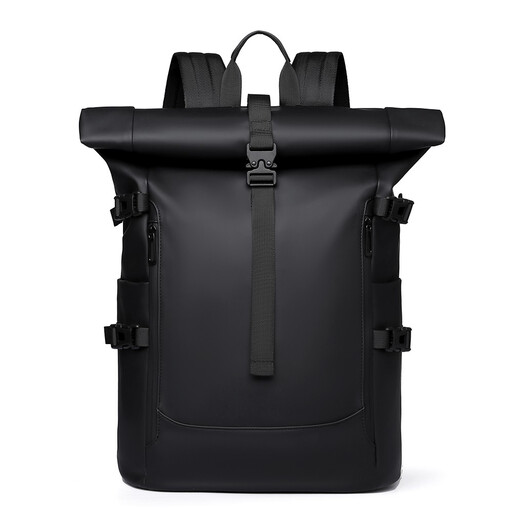
Why it suits this profile: A straightforward choice for students and urban users looking for a 15.6-inch laptop backpack for work, school or short bike rides.
The roll-top closure can keep the opening flexible. The product name mentions water repellency, so check for yourself whether this is sufficient for your rainy route.
15.6-inch laptop designation, roll-top design and multiple carrying straps for everyday use.

Why it suits this profile: A good fit for professionals, business travellers and commuters who value organisation and additional space.
The stated capacity is 25 litres and can be expanded to 30 litres. This allows you to adapt the bag for a working day or short trip without always using its maximum capacity.
Suitable for laptops up to 15.6 inches, with a capacity of 25 to 30 litres, chest strap, RFID-blocking pocket and lockable zips according to the product description.

Why it suits this profile: Useful for anyone looking for a business laptop backpack with a slim design and external USB connection.
The product description mentions a USB charging port and water-repellent material. Bear in mind that the USB function requires a separate power bank.
15.6-inch laptop compartment, lightweight business design, USB port and water-repellent finish according to the product details.
Use this quick checklist:
A laptop backpack suitable for school does not need the same layout as a travel backpack with a laptop compartment. For everyday transport, quick access and carrying comfort are often more important. For a business trip, expandability, lockable zips and a trolley sleeve carry more weight.
We’ve put together a complete, up-to-date list of products that fully meet these strict selection criteria and the applicable European safety regulations.
No. Screen size is only one indication. Check the external dimensions of your laptop and compare them with the maximum dimensions of the laptop compartment. Also allow room for a sleeve.
Its lifespan depends on the material, load, frequency of use and maintenance. Overfilled compartments put extra pressure on seams and zips. A bag will generally last longer when heavy items are placed close to your back and the bag is cleaned according to the care instructions.
The USB port does not use power by itself when no power bank is connected. Any additional costs therefore mainly depend on the power bank you use and how often you recharge it. The connection is a practical pass-through, not a built-in battery.
