
Vandaag of morgen in huis

Kwaliteit gegarandeerd

Welkomstaanbiedingen ontgrendelen: GRATIS bezorging | Tot 80% korting | Gratis 30 dagen JoyPlus-proefperiode
Download de app
A 15.6-inch laptop backpack needs to do more than simply hold a laptop. For students, commuters and business travellers, the layout, carrying comfort and protection from a British downpour matter too. A bag may look spacious on paper yet still disappoint in everyday use.
The most common pitfalls:
Do not just look at “15.6 inches”; also consider:
A laptop backpack with multiple compartments is useful when you carry accessories every day. For a laptop, A4 documents and books, you will also need a main compartment that is wide enough. A slim business backpack is practical for commuting, but may be less suitable if you also carry sportswear or a lunch box.
A water-resistant laptop backpack is suitable for short bike rides or a light shower, depending on its construction. Pay attention to the seams, zips and base, as water can still get in through these areas. Always place electronic devices in the designated compartment and, during prolonged rain, consider using a separate rain cover.
Product descriptions sometimes use terms such as “water resistant” or “water repellent”. These are not automatic guarantees of protection in all weather conditions. Read the product’s care and safety information carefully.
A comfortable backpack has adjustable shoulder straps, a back panel that does not rub unnecessarily and a layout that allows you to carry the weight close to your back. A chest strap can help keep the bag more stable when cycling or walking. Also check the empty weight: a heavy bag becomes noticeably less comfortable once you add your laptop, charger and books.
For travel, a luggage strap, expandable compartment and sturdy handle are useful extras. An expandable laptop backpack provides more space when you are carrying extra clothing or documents, but can become heavier and less compact when full.
The recommendations below are based on the stated product specifications and features. Always check the current dimensions, stock availability and product information on the product page before ordering.
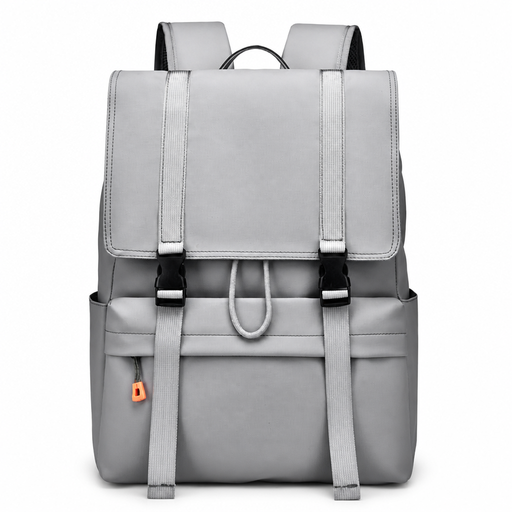
Why it suits this profile: This spacious laptop backpack is designed for everyday use at school, work and around town. The flip-top closure provides quick access to the main compartment.
The product name mentions water resistance and a 15.6-inch laptop size. Check the internal dimensions before buying a wide laptop.
Flip-top design, large main compartment and suitable for school, work and travel.
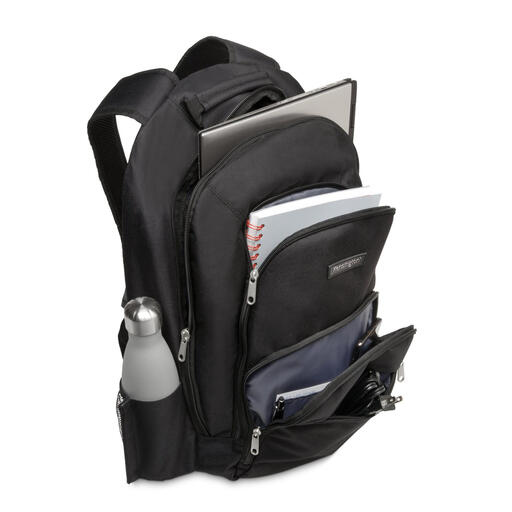
Why it suits this profile: A business backpack for professionals who value a well-organised layout and neutral appearance in the office and during their commute.
The listed specifications mention 1680D nylon, padded compartments and dimensions of 480 × 330 × 180 mm. This makes comparisons more concrete than relying solely on a marketing term such as “extra sturdy”.
Nylon construction, padded laptop compartment, accessory pockets and a stated weight of 710 grams.
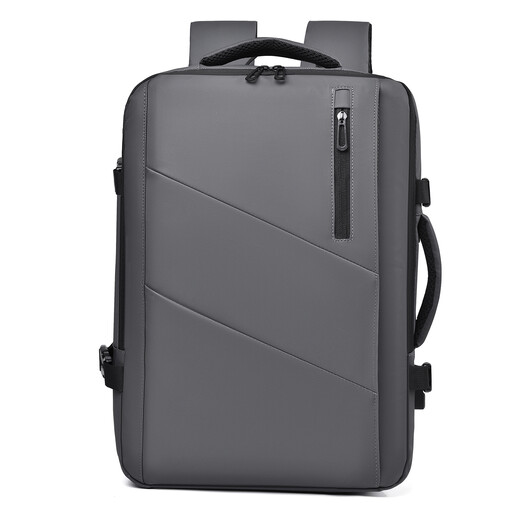
Why it suits this profile: This laptop travel backpack is ideal for business travellers and commuters who switch between a compact work bag and extra luggage space for a weekend trip.
The stated capacity expands from 25 to 35 litres. This tells you in advance how much space is available, rather than leaving you to rely on a phrase such as “large capacity”.
Expandable capacity, multiple compartments and a design for commuting and travel.

Why it suits this profile: A slim laptop backpack for men and women who want to connect their phone to a power bank in the bag while on the move.
The USB port is listed as a separate feature. Bear in mind that you will need a suitable power bank and cable for charging.
15.6-inch design, USB pass-through and water-resistant properties according to the product listing.
Use this short checklist:
We have put together a complete, up-to-date list of products that fully meet these strict selection criteria and the applicable European safety regulations.
Not always. Screen sizes are measured diagonally, while laptop casings vary in width and thickness. Compare your laptop’s dimensions with the stated size of the internal compartment.
Its lifespan depends on the material, zips, load and conditions of use. A bag that is filled heavily every day will wear out faster than a model carrying only a laptop and a few accessories. Do not overload the bag and follow the cleaning instructions.
It can be, especially if you want to charge your phone while travelling. The USB port is generally a connection between a cable on the outside and a power bank inside the bag. Check whether the power bank is included, as this should not be assumed.
