
Vandaag of morgen in huis

Kwaliteit gegarandeerd

Welkomstaanbiedingen ontgrendelen: GRATIS bezorging | Tot 80% korting | Gratis 30 dagen JoyPlus-proefperiode
Download de app
A 15.6-inch laptop backpack may seem like a straightforward purchase at first glance. However, problems often only become apparent after a few weeks of use. The laptop may just not fit in the compartment, the bag may turn out to be less spacious than expected, or a water-repellent outer fabric may offer insufficient protection during a heavy downpour.
Joybuy Product Recommendation Officer therefore encourages you to focus mainly on verifiable features. Not big marketing claims, but the size, layout, materials and intended use of the backpack.
A 15.6-inch screen size does not tell you everything about a laptop’s overall dimensions. The casing, wide bezels and a sturdy protective sleeve may mean that the device does not fit in the laptop compartment.
So measure the height, width and thickness of your laptop and compare them with the supplier’s size chart. Do you have a business laptop with docking accessories or a sleeve? If so, leave some extra room.
A water-repellent backpack can help keep out light rain and splashes. This does not automatically mean that the seams, zips and laptop compartment are waterproof for extended periods. The product title or description may call a bag “waterproof”, but always check whether a specific protection rating or further explanation is provided.
For bike rides and commuting in the Netherlands, a covered zip, a secure laptop compartment and, where relevant, a rain cover are practical features to look out for. During heavy rain, do not assume that electronic devices are fully protected if the supplier does not provide clear testing information or an IP rating.
A backpack with multiple compartments can help you stay organised, but small pockets cannot replace a spacious main compartment. Consider what you carry every day: laptop, charger, lunch box, documents, bottle, coat and possibly sportswear.
A spacious backpack with expandable capacity is useful for travel, but it can become heavier and bulkier when filled completely. If you only need to carry a laptop and accessories, a slim, lightweight backpack is often more practical.
Choose a backpack that is explicitly suitable for 15.6 inches, and check the actual dimensions as well. A padded laptop compartment helps keep the device separate from keys, books and other hard objects. It is not a guarantee against damage, so do not place heavy items directly against the laptop.
A backpack with a laptop compartment is particularly practical when the compartment is easy to access. It can save time when travelling by train or going through airport security.
A capacity of 20 to 25 litres is often suitable for everyday work or school. You may need more space for clothing and extra accessories on a short business trip. An expandable bag offers flexibility in that case.
According to its product name, the Expandable Carry On Backpack has a capacity of 25 to 35 litres. The HP Travel backpack lists a capacity of 25 litres, expandable to 30 litres. When the expansion is fully opened, check that the bag is still comfortable to carry and remains within your carrier’s luggage allowance.
Look for adjustable shoulder straps, a padded back panel and good weight distribution. A chest strap can be useful when walking or cycling, but it is not included on every business backpack.
A lightweight backpack reduces the bag’s own weight, but also check the construction of the zips, base and handle. Do not overfill the bag: manufacturers may specify a maximum capacity, but that does not mean carrying it fully loaded for extended periods will remain comfortable.
A backpack with a USB port usually contains a pass-through connection that allows you to connect a power bank inside the bag to a cable on the outside. The backpack itself does not usually supply power. You will still need a suitable power bank and cable.
Check where the cable opening is located and whether the internal pocket is large enough for your power bank. Do not treat the port as proof that the bag is waterproof; electronics and moisture still require attention.

Why it suits this profile: The product title specifies a suitable 15.6-inch size, a USB connection, a lightweight design and water-repellent material. That makes it suitable for everyday office work, school and commuting.
The specifications state the laptop size and USB function. Before buying, check the exact internal dimensions and use a separate power bank.
15.6-inch laptop specification; USB port; water-repellent and lightweight according to the product title.

Why it suits this profile: The specifications list a 25-litre capacity, expandable to 30 litres, support for laptops up to 15.6 inches, chest straps and multiple storage compartments. This makes it well suited to travel and longer working days.
The capacity is clearly stated and the bag has a separate laptop compartment. The expandable space means you do not immediately need a larger bag for extra luggage.
25 to 30 litres; RFID-blocking compartment according to the product description; chest straps and lockable zips.
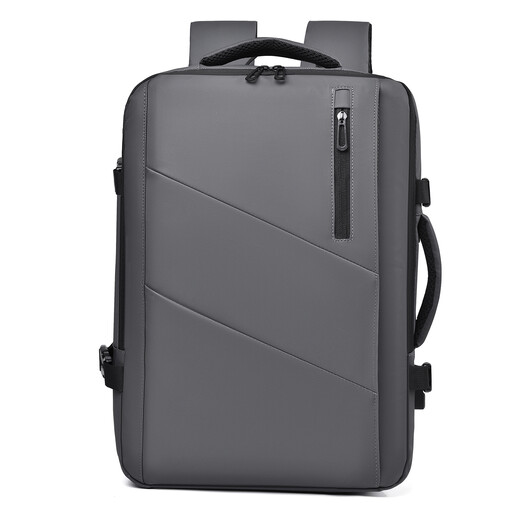
Why it suits this profile: The product title specifies an expandable capacity of 25 to 35 litres, multiple compartments and a design intended for business trips, weekends and commuting.
The expandable capacity makes the bag more flexible for everyday use and short trips. Before setting off, check the luggage dimensions and close all the zips securely.
Expandable from 25 to 35 litres; multiple compartments; waterproof according to the product title.
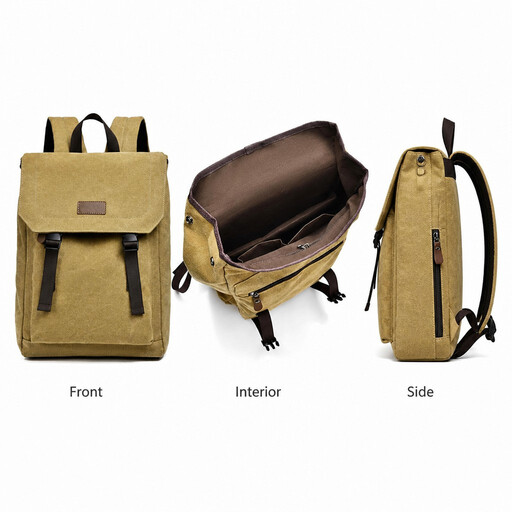
Why it suits this profile: The product title mentions canvas, a lightweight design, water resistance and a spacious layout. This backpack is therefore aimed at school, work and everyday urban use.
The product information mentions both the laptop size and the water-resistant construction. Even so, check the closure and internal dimensions if you often cycle in the rain.
Canvas construction; 15.6-inch specification; lightweight and water-resistant according to the product title.
We have put together a complete, up-to-date list of products that fully meet these strict selection criteria and the applicable European safety regulations.
No. Screen size is only one indication. Compare your laptop’s dimensions with those of the laptop compartment, and allow for a protective sleeve or charger.
Its lifespan depends on the material, zips, seams, load and usage. A bag that is filled heavily every day or frequently placed on the ground will wear out more quickly. So check the handles, base, shoulder straps and zips before ordering.
That depends on how you use it. For train journeys, school or the office, an external charging port can be practical. Bear in mind that the backpack usually does not have a built-in battery. You will need to use your own power bank and store it safely.
