
Vandaag of morgen in huis

Kwaliteit gegarandeerd

Welkomstaanbiedingen ontgrendelen: GRATIS bezorging | Tot 80% korting | Gratis 30 dagen JoyPlus-proefperiode
Download de app
A 15.6-inch laptop backpack needs to do more than simply hold a laptop. In the Netherlands, a backpack often has to cope with rain, packed bicycle panniers, crowded trains and everyday use. Students, pupils, commuters and business travellers are therefore generally looking for a combination of protection, organisation and carrying comfort.
There are, however, several common purchasing pitfalls. A backpack may look spacious in a product photo but offer few genuinely useful compartments. Likewise, “water-resistant” does not automatically mean that the contents will remain completely dry during a heavy downpour. Use the checks below to compare models based on concrete features rather than marketing language.
The measurement usually refers to the maximum screen diagonal. However, laptops vary in bezel thickness, casing and shape. Always check the internal dimensions of the laptop compartment and compare them with the dimensions of your device. A 15.6-inch gaming laptop, for example, may be thicker than a slim business model.
Also pay attention to the protection around the compartment. A padded compartment and a reinforced base offer more practical protection against knocks than a thin, loose laptop sleeve.
A waterproof laptop backpack and a water-repellent backpack are not the same thing. For the models in this selection, the product information mentions water resistance or water-repellent properties. This can help in light rain, but it does not guarantee that the zips and seams will keep water out for an extended period.
In heavy rain, consider using a separate rain cover. You should also avoid storing important electronics directly against the outer wall.
A spacious backpack can be useful for clothing, books or accessories, but a large main compartment without dividers makes it harder to find what you need. Check the number of compartments, whether there is a separate laptop compartment, and whether front and side pockets are available. For commuting, a well-organised business backpack is often more practical than a bag that simply offers a large amount of space.
For everyday use, the laptop size is not the only relevant factor. Also consider whether you need to carry a charger, mouse, A4 documents, lunch box, water bottle or sports and work clothing.
A larger backpack can become heavier once fully packed. Check the empty weight and carrying system as well.
Adjustable, padded shoulder straps help you fit the backpack more securely to your body. A padded back panel can improve carrying comfort, but the overall experience depends on the fit, how the backpack is packed and its total weight.
For cycling or long train journeys, a chest strap and a stable shape are useful features. Place the laptop close to your back and heavier items low in the backpack. This helps prevent the bag from pulling backwards while you walk.
A backpack with a USB port usually has an external connection that must be linked to a power bank inside the bag. The port does not charge devices independently. Check that your power bank and cables fit comfortably.
A backpack with a luggage strap can be slipped over the handle of a trolley case. This is convenient at stations and airports, but make sure the strap is sturdy and not merely decorative.
A rolltop laptop backpack closes with a rollable top section. This can make the capacity more flexible and partially shield the opening, but check whether the laptop compartment can be accessed separately.
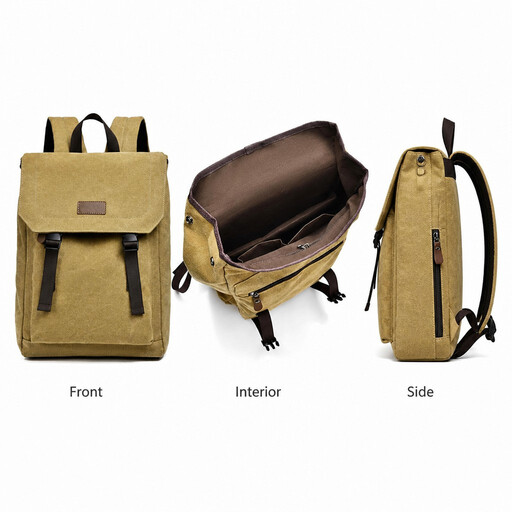
Why it fits: A casual backpack for school, work and urban travel, suited to users who want a straightforward look and enough space for everyday essentials.
The product information specifies a separate laptop compartment for 15.6-inch devices, a lightweight design and water-repellent properties. Check the exact internal dimensions before purchasing.
Canvas styling, low weight according to the product description, and an interior layout for school and work essentials.

Why it fits: Its 25-litre capacity expands to 30 litres, making it practical for the office, train travel and short overnight stays.
The stated capacity and dimensions are specific: 25 litres, expandable to 30 litres, with support for laptops up to 15.6 inches.
Equipped with multiple compartments, a chest strap, lockable zips and a concealed RFID-blocking pocket according to the product information.
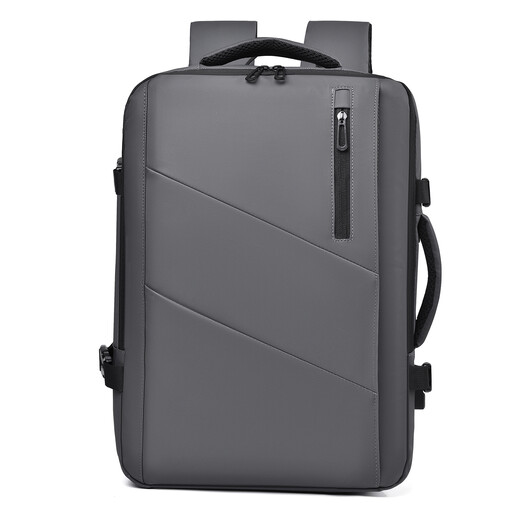
Why it fits: A travel backpack with a laptop compartment for users who carry little on working days but need additional space at the weekend.
According to the product name, the capacity expands from 25 to 35 litres. Before travelling, check your carrier’s permitted carry-on dimensions.
A spacious, expandable layout with multiple compartments and water resistance according to the product description.
A USB port, rolltop closure or RFID pocket can be useful, but these features do not automatically provide greater laptop protection. Base your decision on the functions you will genuinely use.
Browse a current selection of university backpacks and compare models by size, layout, carrying comfort and additional features.
Not necessarily. Screen size is only one factor. Check the length, width and thickness of your laptop and compare them with the dimensions of the laptop compartment. Also allow for a protective sleeve, which takes up additional space.
Its lifespan depends on the material, zips, seams, load and conditions of use. A backpack that is filled heavily every day will generally wear out faster than a model used only for a laptop and charger. Do not overload the bag, and regularly inspect the seams and shoulder straps.
For light rain, water-repellent material can be practical. During prolonged or heavy rain, a rain cover and a well-sealed laptop sleeve provide additional protection. Do not treat “water-resistant” as a guarantee of complete waterproofing.
