
Vandaag of morgen in huis

Kwaliteit gegarandeerd

Welkomstaanbiedingen ontgrendelen: GRATIS bezorging | Tot 80% korting | Gratis 30 dagen JoyPlus-proefperiode
Download de app
A 15.6 inch laptop backpack might seem straightforward to choose at first glance. Yet some laptops with this screen size don't fit properly in every compartment. Thin shoulder straps, an awkward layout, or a USB port without a clear connection can quickly lead to disappointment. If you travel with your backpack every day, you often only notice these shortcomings after a few weeks.
So don't just focus on the looks or buzzwords like "business" and "waterproof". Instead, pay close attention to the dimensions, closure, compartment layout, and how the backpack suits your daily use.
"15.6 inch" refers to the diagonal measurement of the screen. Laptop models with the same screen size can vary in width, thickness, and bezel around the display. So always check the internal dimensions of the laptop compartment and compare them with your laptop's measurements.
A compartment that's too roomy offers less stability when cycling or travelling. A compartment that's too tight can strain the zip or make it difficult to slide your laptop in and out.
A water-repellent laptop backpack can help ward off light rain, but that doesn't automatically say anything about the zips, seams, or base. Product titles sometimes use terms like "water resistant", "water repellent", or "waterproof" with different meanings.
For commuting in the UK, these points are particularly relevant:
Don't leave the backpack unattended outside in prolonged or heavy rain. If in doubt, check the product information and user reviews.
A spacious laptop backpack can be handy for a laptop, charger, notebook, lunch, and accessories. Yet many small pockets can be impractical if they're too narrow for an adapter or power bank. Look for a combination of one large main compartment, a separate laptop compartment, and smaller pockets for cables, keys, and cards.
A laptop backpack with a USB port isn't a charger on its own either. With this type of design, a connection is typically offered on the outside; you need to place a power bank inside the backpack and connect it yourself. So check whether the description clearly states which connection is used.
Measure your laptop in three ways: width, height, and thickness. Allow a small margin when comparing, so you can store the device without forcing it. A padded laptop compartment can offer extra protection against light bumps, but the exact thickness and construction should be checked per product.
For daily use, adjustable shoulder straps, a sturdy handle, and a back panel that doesn't press against the laptop closure are practical points to consider. If you travel by bike or train, a stable fit is usually more important than lots of decorative details.
A business laptop backpack is often slimmer and focused on documents, a laptop, and accessories. A spacious laptop backpack offers more room for clothing, a lunchbox, or school supplies, but can become heavier when fully packed.
Also consider the type of closure:
For a travel laptop backpack, it's also wise to check whether the bag fits under a seat or in an overhead locker. A cabin bag backpack doesn't automatically have the same maximum dimensions as every airline's hand luggage allowance.
Canvas, nylon, and synthetic fabrics each have a different look and care requirements. A lightweight laptop backpack is great for commuters and students, but a lower weight can also mean less structure. So use the product description as a starting point and assess what you need to carry daily.
Claims about water repellence or durability should be read as information from the product description. According to the brand or seller's own information, a material may have a certain property; the actual protection also depends on use, wear and tear, and weather conditions.
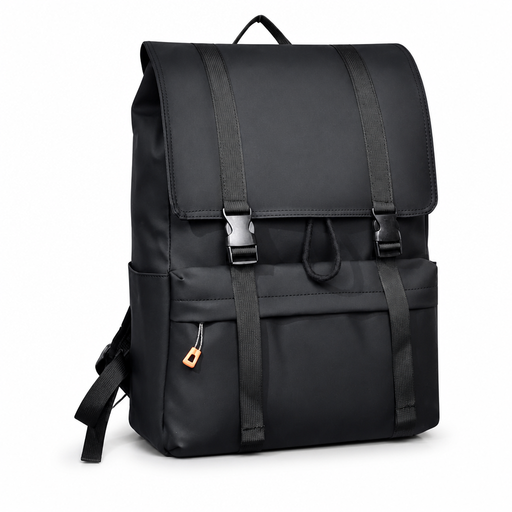
Why this fits the profile: The flip-top and drawstring closure are practical for students, school pupils, and everyday city use. The description mentions a spacious capacity for school, work, and travel.
The large opening makes it easier to check beforehand whether your laptop and accessories fit properly. Do check the exact internal dimensions.
15.6-inch designation, spacious daypack layout, and a flip-top with drawcord according to the product name.

Why this fits the profile: This slim business laptop backpack is designed for the office, commuting, and short trips. The product name mentions a USB charging port and water-repellent material.
The USB function is practically placed on the outside, but requires your own power bank. Check the port and cable connection beforehand.
Slim design, USB charging port, and multiple use cases for office, commuting, and travel.
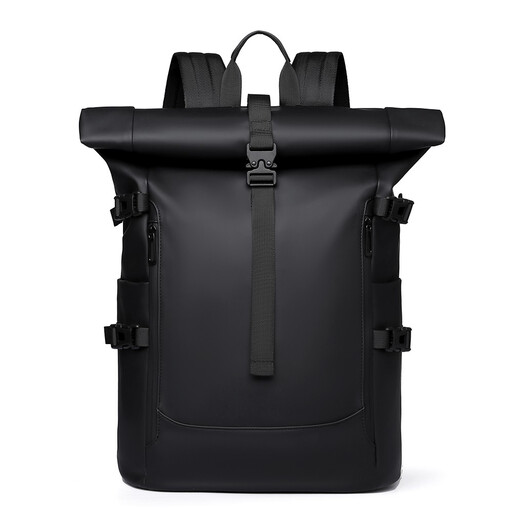
Why this fits the profile: The rolltop design suits cyclists, commuters, and urban travellers who want flexible organisation of their contents. The product name mentions a water-repellent design and large capacity.
The rollable top means you're not stuck with a fixed capacity. Do check how the laptop is secured inside.
Rolltop closure, large capacity, and design for work, cycling, and urban travel according to the product description.
We've put together a full, up-to-date list of products that fully meet these strict selection criteria and comply with current European safety regulations.
No. The screen size is just one measurement. Measure the width, height, and thickness of your laptop and compare them with the dimensions of the laptop compartment. Also allow for a protective case.
The lifespan depends on the material, seams, zips, load, and daily use. A backpack that is constantly packed heavily will wear out faster than one used within its stated capacity. Check the shoulder straps, base, and closures regularly.
The USB port itself doesn't supply power. You need a separate power bank and a suitable cable. So the extra cost depends on the accessories you already own and how you use the backpack.
