
Vandaag of morgen in huis

Kwaliteit gegarandeerd

Welkomstaanbiedingen ontgrendelen: GRATIS bezorging | Tot 80% korting | Gratis 30 dagen JoyPlus-proefperiode
Download de app
At first glance, choosing a 15.6 inch laptop backpack seems straightforward. Yet small differences in the laptop compartment, carrying comfort and layout can make a big difference during a daily train journey, a day at college or a business trip. A laptop backpack for work needs different features from a compact laptop backpack for school or a lightweight laptop backpack for short bike rides.
Pay particular attention to three common pitfalls:
Alongside the maximum screen size, look at the dimensions of the laptop compartment. Also check the length, width and thickness of your laptop. A model with a specially padded compartment usually offers better separation between the computer and other items, but the fit remains the deciding factor.
According to the product details, the Lenovo ThinkPad Professional 2nd Generation has a notebook compartment and dimensions of 30 × 43.5 × 18.5 cm. The information mentions protection for laptops up to 15 inches, while the specifications state a maximum screen size of 16 inches. So measure your own laptop before you order.
A lined laptop compartment, a sturdy base and good-quality zips are practical for daily transport. Nylon, polyester and plastic each have their own properties. According to the product specifications, the Kensington SP25 uses 1680 denier nylon and has thickened internal compartments. This gives concrete information about the material and construction, without automatically meaning the backpack is resistant to every impact.
A water-repellent laptop backpack is suitable if you're regularly outdoors on the move, but in prolonged rain it's best to store your electronics with extra protection. Also check whether the zips are fully covered and whether the product information actually mentions water-repellent material.
For a laptop backpack for work or school, storage capacity isn't the only thing that counts. A full backpack can quickly become heavy. Padded shoulder straps, a handle and possibly a chest strap can make carrying more practical. A lightweight laptop backpack is handy for commuters, but a slim design sometimes offers less protection or structure.
Think in advance about what you take with you every day:
For travellers, an expandable backpack can be useful. According to the product information, the HP Travel 25L offers a capacity of 25 litres, expandable to 30 litres, with multiple compartments and a separate RFID-blocking pocket. The manufacturer also mentions a tracker pocket and lockable zips. These are product features; they don't form a guarantee against loss or theft.
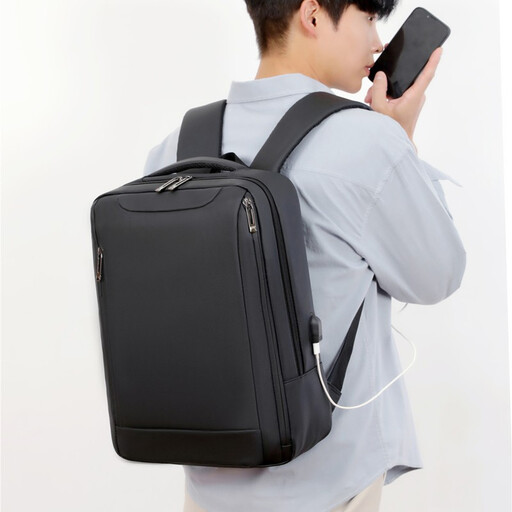
Why this fits the profile: The product title mentions a lightweight design, multiple compartments and support for a laptop up to 15.6 inches. That suits students and commuters looking for a simple laptop backpack for daily use.
The stated laptop size and layout make it easier to check in advance whether the model fits your computer. "Water-repellent" should be read here as a product feature, not as full waterproofing.
Lightweight positioning, 15.6-inch compatibility according to the product title and multiple compartments.
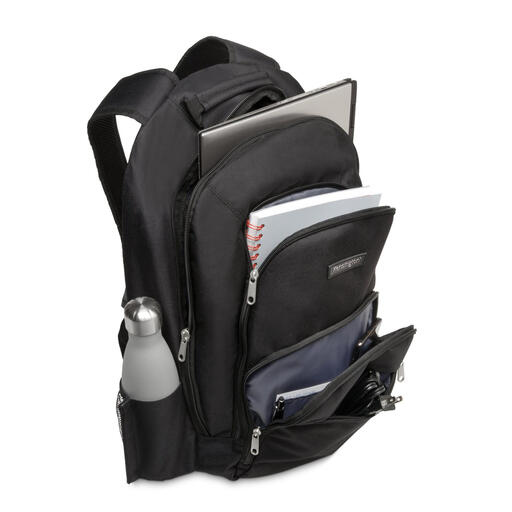
Why this fits the profile: This business laptop backpack is aimed at professionals who value a fixed layout and extra material information. According to the specifications, the backpack weighs 710 grams and measures 33 × 48 × 18 cm.
The product specifications mention a padded laptop compartment, accessory pockets and a nylon outer material. This means you don't have to rely solely on general marketing terms like "durable".
1680 denier nylon according to the product information, thickened compartments and multiple zip pockets.

Why this fits the profile: According to the product details, this travel laptop backpack offers 25 litres of capacity, expandable to 30 litres. The chest strap, multiple compartments and separate laptop compartment suit longer working days and short trips.
The capacity is clearly stated and the layout is described in detail. This helps prevent you from buying a compact backpack when you also want to carry clothes or extra equipment.
Expandable capacity from 25 to 30 litres, RFID-blocking pocket according to the product information and a chest strap.
We've put together a full, up-to-date list of products that fully meet these strict selection criteria and comply with current European safety regulations.
No. The screen size is only one indicator. Also check the external dimensions of your laptop and compare them with the laptop compartment. With a protective case, also pay attention to the extra thickness.
The lifespan depends on the material, zips, load and usage conditions. A backpack that is heavily filled every day will wear out faster than a model that only carries a laptop and charger. Distribute the weight, avoid overloading and regularly check the seams, shoulder straps and zips.
No. An external USB port typically works as a pass-through for a power bank. The power bank itself and the correct cable need to be connected separately. Check the product information before assuming that a backpack supplies power or can charge a laptop.
