
Vandaag of morgen in huis

Kwaliteit gegarandeerd

Welkomstaanbiedingen ontgrendelen: GRATIS bezorging | Tot 80% korting | Gratis 30 dagen JoyPlus-proefperiode
Download de app
A 15.6-inch laptop backpack needs to do more than simply carry a laptop. Students often take books and a charger with them too, while office workers and commuters need room for a lunch box, documents or a water bottle. Business travellers also look for a professional appearance, a luggage strap and a secure way to store accessories.
Even so, it can be difficult to see past product names. Terms such as “anti-theft”, “water-repellent” and “USB charging port” do not automatically tell you how practical a backpack will be in everyday use. The following points will help reduce the risk of making the wrong purchase.
The 15.6-inch designation refers to the screen diagonal, not the laptop’s overall dimensions. A laptop with a wide body or thick protective bezel may therefore be a tight fit. Before buying, check the external dimensions of your laptop and compare them with the dimensions of the laptop compartment in the product information.
Also pay attention to the closure. A laptop compartment that only just closes puts strain on the zip and leaves little room for a sleeve. A slightly roomier compartment may be more practical, but it must not allow the laptop to move around freely.
A water-repellent laptop backpack can help keep out light rain, but that does not mean the contents will stay dry for a long time in a heavy shower. Zips, seams and the base are particularly important when it comes to how well a bag copes with rain.
The product titles below refer to water-repellent or water-resistant material. Treat this as a product specification, not a guarantee of complete protection from water. If you cycle through the rain every day, you may wish to use an additional rain cover and keep electronics in a separate protective case.
A laptop backpack with a USB port sounds practical, but the port is generally designed for connecting a power bank. The power bank itself is not automatically included. Check whether there is a separate cable compartment and whether the output is compatible with your own charging cable.
An anti-theft backpack is not a guarantee against theft either. A hidden back pocket or a zip that is difficult to reach can make the bag less appealing to pickpockets, but you should also stay aware of your surroundings and keep valuable items close to your body.
Do not just look at “15.6 inches”. Check for:
A protective laptop compartment cannot eliminate every risk from drops or impacts. For everyday travel by train or bicycle, a separate sleeve is a simple additional precaution.
A spacious laptop backpack is useful when you carry books, documents and accessories alongside your computer. Multiple compartments help you keep a charger, mouse and keys separate. However, bear in mind that having lots of compartments does not automatically mean there is more usable capacity.
For a laptop backpack for work, adjustable shoulder straps, a carry handle and a stable back panel are practical features. If you travel by bicycle or public transport every day, a balanced load is generally more useful than a large main compartment that is packed completely full.
Check whether the product description refers to water-repellent, water-resistant or merely hard-wearing material. These terms do not mean the same thing. A sturdy base is useful when placing the bag on the ground. Zips should run smoothly without immediately catching the fabric.
The recommended models below are based on the available product descriptions. Where a brand or seller suggests a feature, such as water protection or an anti-theft design, you should read this as a claim from the product description. Always check the current specifications on the product page.
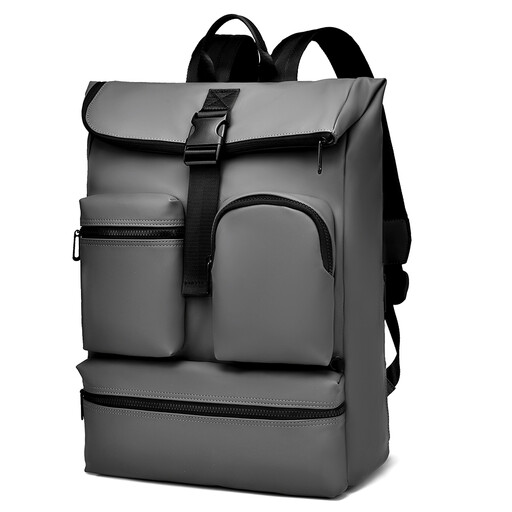
Why it suits this profile: This business backpack is designed for everyday use at the office, school and while travelling. The product title mentions a flip-top closure, multiple external pockets and a back pocket described as an anti-theft compartment.
The multiple pockets mentioned make it possible to keep accessories separate. However, do not confuse the water-repellent claim with waterproofing.
Suitable for a laptop up to 15.6 inches according to the product name; flip-top design, external pockets and a back pocket according to the product description.
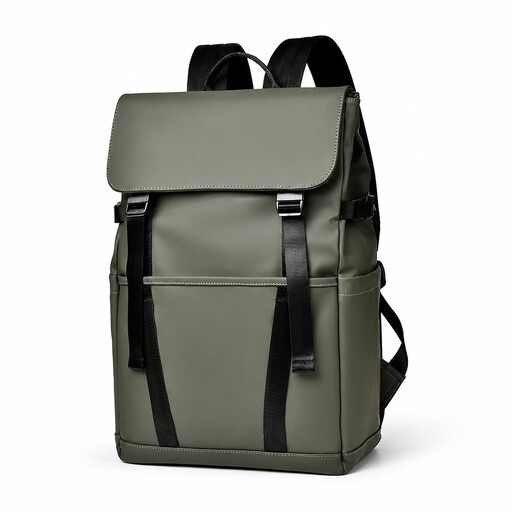
Why it suits this profile: This model combines professional and casual use. The product description mentions multiple compartments, a luggage strap and a design intended to help prevent scratches during commutes, travel and school use.
The luggage strap provides a practical feature for use with a suitcase. Before setting off, however, check that the compartment layout leaves enough room for your own accessories.
Suitable for 15.6 inches according to the product name; multiple compartments, water-resistant description and luggage strap according to the product description.

Why it suits this profile: This laptop backpack for men and women is designed for the office, commuting and travel. The product name mentions a USB charging port, a lightweight, slim design and water-repellent material.
The USB feature is clearly stated in the product name, but it will probably require your own power bank. Check the cable layout and connections before treating this feature as the deciding factor.
Suitable for 15.6 inches according to the product name; USB charging port, lightweight/slim design and water-repellent description according to the product description.
We have put together a complete, up-to-date list of products that fully meet these strict selection criteria and the applicable European safety regulations.
Not always. Screen size is only one part of the overall dimensions. Compare the height, width and thickness of your laptop with the internal dimensions of the compartment. Also allow for a protective sleeve or an additional hard case.
Its lifespan depends on the weight it carries, how it is transported, the quality of the zips and seams, and exposure to rain. A bag that is loaded heavily every day will wear out faster than a backpack containing only a laptop and charger. Distribute the weight evenly and prevent sharp objects from pressing directly against the lining.
The port does not use power by itself when no power bank is connected. You will need a suitable power bank and cable. Charging speed depends on the power bank, cable and connection. Therefore, check the technical details of the backpack and your own devices before using this feature.
