
Vandaag of morgen in huis

Kwaliteit gegarandeerd

Welkomstaanbiedingen ontgrendelen: GRATIS bezorging | Tot 80% korting | Gratis 30 dagen JoyPlus-proefperiode
Download de app
A 15.6-inch laptop backpack needs to do more than simply carry a laptop. Students take books and lunch with them, commuters travel by public transport or bicycle, and business users want room for documents, chargers and accessories. Even so, it is not always obvious which features are genuinely useful.
Many models look similar, while small differences can affect everyday use. So do not focus solely on appearance or a long list of marketing terms. Above all, check the dimensions, fastening, compartment layout and protection against rain.
A laptop’s stated size refers to its screen diagonal, not its overall external dimensions. A laptop with a wide bezel, numeric keypad or robust casing may be larger than a slim model with the same screen size.
So check the following before buying:
A laptop backpack with a laptop compartment provides better organisation than one large main compartment where the laptop lies loose among books and accessories.
Product names often use terms such as water-repellent, water-resistant or water repellent. These generally indicate protection against light rain or splashes, but they do not guarantee that a bag will keep out prolonged, heavy rain completely.
Pay attention to the construction:
A water-repellent laptop backpack is practical for everyday travel, but during prolonged rain it is best to give sensitive electronics additional protection.
A laptop backpack with a USB port sounds practical. However, check exactly what is included. A USB connection in the bag is not automatically a power bank or built-in battery. You will often need to connect a suitable power bank yourself. Also check that cables and chargers do not end up in the same compartment as the laptop.
The same applies to an anti-theft backpack: a hidden pocket or fastening may slow down access, but it does not offer absolute protection against theft. Consider the position of the pockets, the fastening and how easily you can open the bag on crowded public transport.
For a laptop backpack for work and school, two things matter: a suitable laptop compartment and enough spare space. A roomy backpack for a laptop, books and clothing is not always comfortable if the contents shift around. Multiple compartments help keep heavy and fragile items separate.
Think in advance about what you take with you every day:
If you only carry a laptop and a few accessories, a well-designed daypack may be enough. If you also carry sportswear or travel essentials, a high-capacity model will be more suitable.
A flip-top laptop backpack usually has a flap that folds over the top. This can shield the contents and gives the bag a casual look. A roll-top laptop backpack closes by rolling down the top. This is useful when the amount you carry varies, although opening and closing it may take more steps than using a standard zip.
When choosing, consider:
A laptop backpack for travel should offer more than storage space; it should also be practical when changing connections and waiting around. A luggage strap, several carrying options and a well-organised compartment layout can all help. The product description should mention these features explicitly; do not rely on photos alone.
For cyclists and commuters, a compact size, lightweight construction and a fastening that does not hang loose are often more important than a large number of small pockets.

Why it suits this profile: This model is designed for the office, commuting and everyday use. The description mentions a 15.6-inch laptop compartment, USB port, water-repellent properties and a lightweight, slim design.
The stated laptop size makes it easier to check in advance whether your device will fit. The USB port must be used with your own suitable power bank.
15.6-inch laptop compartment; lightweight, slim daypack; USB port according to the product description.
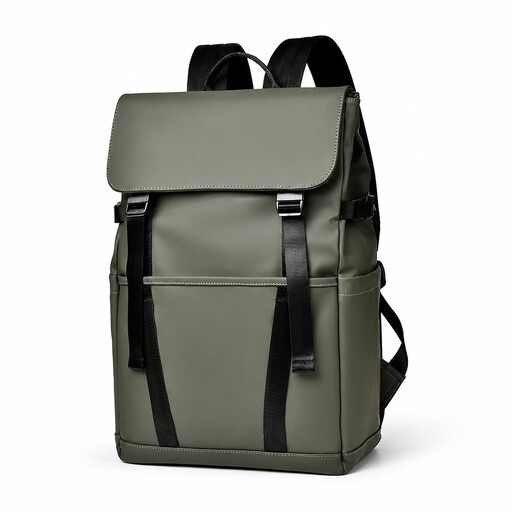
Why it suits this profile: A business laptop backpack for anyone combining work, study and travel. The description mentions multiple compartments, water resistance, a luggage strap and a scratch-resistant finish.
Multiple compartments help prevent your belongings from shifting around. Water-resistant does not mean completely waterproof; use additional protection during prolonged rain.
Multiple compartments; luggage strap; suitable for commuting, school and travel according to the product description.
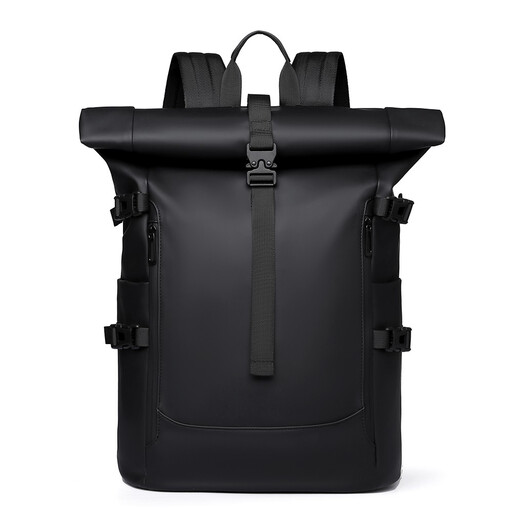
Why it suits this profile: A roll-top laptop backpack is well suited to cyclists, commuters and travellers whose daily load varies. The description mentions a large capacity, multiple carrying straps and water-repellent properties.
The roll-top opening prevents a fixed flap from limiting the contents. Bear in mind that opening it takes a few extra steps, and check your laptop’s dimensions.
Roll-top closure; large capacity; 15.6-inch laptop size and water-repellent design according to the product information.
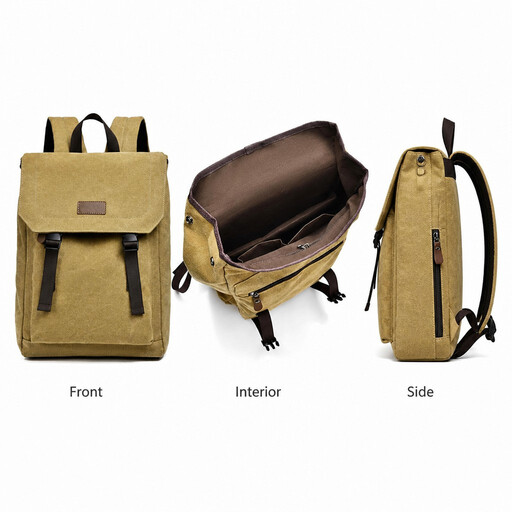
Why it suits this profile: This canvas backpack is designed for school, work and travel. The product name mentions a lightweight design, flip-top closure, water resistance and large capacity.
The large capacity is practical for books and accessories. Check in advance whether the flip-top closure is quick enough for your daily journey.
Canvas design; flip-top closure; lightweight and roomy shape for school, work and travel.
We have put together a complete, up-to-date list of products that fully meet these strict selection criteria and the applicable European safety regulations.
No. Screen size is only one indication. Compare your laptop’s external dimensions with those of the laptop compartment, and allow room for a protective sleeve.
Its lifespan depends on the load, materials, fastenings and everyday use. A bag that is constantly overfilled will wear out faster around the seams, zips and shoulder straps. Check the seams regularly and avoid carrying the bag when it is fuller than necessary.
The USB port itself does not use any power. To charge a device, you will generally need a separate power bank. Check which cables you use in advance and store the power bank safely away from the laptop.
