
Vandaag of morgen in huis

Kwaliteit gegarandeerd

Welkomstaanbiedingen ontgrendelen: GRATIS bezorging | Tot 80% korting | Gratis 30 dagen JoyPlus-proefperiode
Download de app
A 15.6-inch laptop backpack needs to do more than simply hold a laptop. For commuters, students and travellers, protection against knocks, space for accessories and comfort during a long train journey or cycle through the city matter too. Yet many models look very similar. A low price or a long list of features does not automatically say much about how a bag performs in everyday use.
So watch out for these common pitfalls:
Screen sizes are measured diagonally. The 15.6-inch size corresponds to approximately 39.6 cm, but laptops with this screen size can have different bezels and casings. So measure your laptop: width, depth and thickness.
A good laptop backpack for a 15-inch laptop may sometimes also hold a 15.6-inch model, but only if the dimensions match. Also check the external dimensions of the bag. For example, the Lenovo ThinkPad Professional 2nd Generation measures 30 × 43,5 × 18,5 cm. The product information lists a notebook compartment and compatibility with screen sizes up to 16 inches, while the description mentions laptops up to 15 inches. With this type of model, check the dimensions of your own laptop before ordering.
For everyday transport in the Netherlands, a water-resistant laptop backpack is practical. The product page should clearly state that the material is water-resistant or water-repellent. This is not the same as a guaranteed waterproof bag.
A fabric laptop backpack can be lightweight and flexible. A model made from plastic or synthetic material may offer a different degree of shape retention. Also pay attention to the seams, zips and base. These areas often experience the most strain when the bag is put down every day.
For a laptop backpack for work and travel, padded, adjustable shoulder straps are useful. A handle is handy when you want to lift the bag for a short time. If you often travel by train or plane, look for a laptop backpack with a trolley sleeve.
A laptop backpack with multiple compartments helps you organise cables, documents and personal belongings. However, more compartments are only useful if the layout suits your routine. A slim model may be enough for a daily commute; for a full working day or a short trip, more capacity makes better sense.
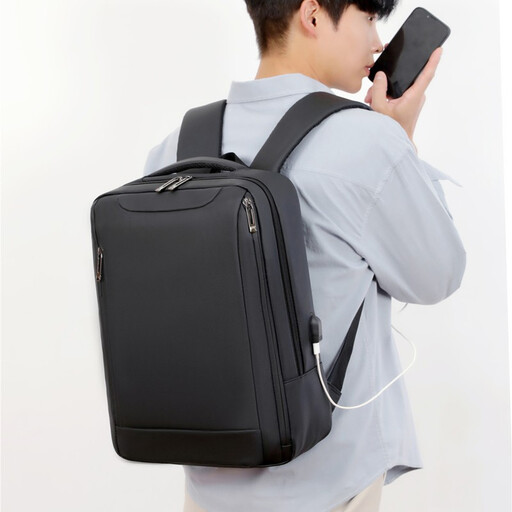
Why it suits this profile: A lightweight, slim design is ideal for students and commuters carrying a 15.6-inch laptop, charger and a few documents.
The product name and description mention a lightweight design, multiple compartments and water-repellent material. However, check the exact internal dimensions before buying.
Suitable for 15.6-inch laptops according to the product name; slim design and multiple compartments for everyday use.
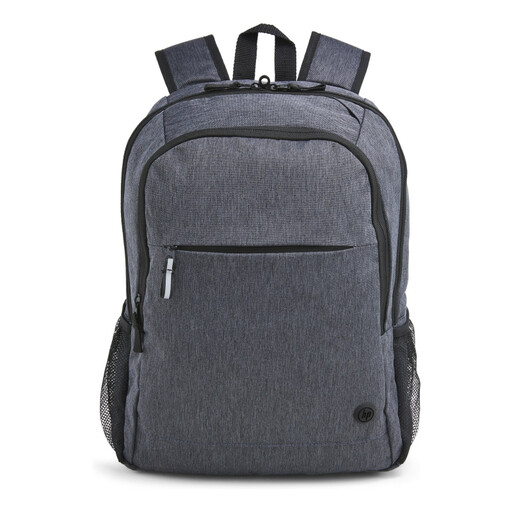
Why it suits this profile: This model is a good fit for professionals who travel every day and value an organised business laptop backpack.
According to the product specifications, the bag has a padded 15.6-inch laptop compartment, lockable zips and a water-resistant finish. These features are described clearly and can be checked, but they do not guarantee protection against theft or water.
Weight of approximately 480 grams; trolley sleeve, padded shoulder straps and zipped compartments.
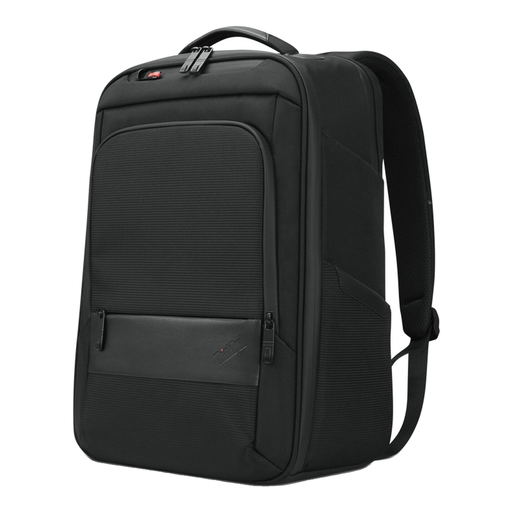
Why it suits this profile: The combination of a roomier design, space for documents and a handle suits professionals and IT users who carry more every day.
The specifications mention a notebook compartment, zipped compartments and space for accessories and documents. The bag weighs approximately 1 kg, which is worth bearing in mind when carrying lots of belongings.
Dimensions of 30 × 43,5 × 18,5 cm; handle, zipped compartments and, according to the product information, 70% recycled material.
We have compiled a complete, up-to-date list of products that fully meet these strict selection criteria and the applicable European safety regulations.
No, not always. Screen size is only one measurement. Check the width, depth and thickness of your laptop and compare them with the dimensions of the padded compartment. Also allow extra room for a protective sleeve.
Its lifespan depends on the weight carried, how you put the bag down and the quality of the zips, seams and shoulder straps. Use the bag within the stated load limit, avoid placing sharp objects next to the laptop and clean dirt with a soft, slightly damp cloth. According to the product information provided, the products mentioned come with a statutory minimum two-year guarantee; additional rights may apply.
A USB connection in a backpack is generally a cable pass-through. You will need a separate power bank; the bag does not supply power itself. Check that the cable and connection are compatible with your equipment, and remove the power bank before washing the bag or getting it thoroughly wet.
