
Vandaag of morgen in huis

Kwaliteit gegarandeerd

Welkomstaanbiedingen ontgrendelen: GRATIS bezorging | Tot 80% korting | Gratis 30 dagen JoyPlus-proefperiode
Download de app
A 15.6-inch laptop backpack may seem easy to choose at first glance. However, not every model designed for a 15.6-inch laptop will fit equally well. A compartment that is too tight can damage your laptop, while an oversized backpack becomes unnecessarily heavy and awkward. Terms such as “waterproof”, “anti-theft” and “large capacity” also deserve a critical look.
For students, school pupils, commuters and business travellers, three things matter most: a suitably sized laptop compartment, a practical layout and protection against everyday use in the British weather.
A 15.6-inch laptop does not always have the same external dimensions. Screen size alone therefore does not tell you everything. Also check the width, height and depth of the laptop compartment. A business laptop with a thick casing may otherwise be difficult to fit into a narrow compartment.
Also check whether the compartment has sufficient padding. A laptop backpack only protects the computer against minor knocks if the laptop is reasonably enclosed on all sides. Do not place heavy items directly against the device.
A water-repellent backpack can help keep out light rain or splashes. That does not automatically mean the bag will remain waterproof for an extended period during a heavy shower. Pay attention to the product description, fastening and seams. A roll-top design or covered zip may provide extra protection in practice, but no backpack can make electronic devices immune to moisture in all conditions.
In heavy rain, consider using a separate rain cover and carry the laptop in its designated compartment.
A spacious backpack with lots of zips may seem convenient, but numerous small compartments are not always suitable for a charger, lunch box or documents. Check whether the layout suits the items you carry every day. For commuting, a separate laptop compartment, document compartment and easily accessible front pocket are often more useful than a large number of small compartments.
An expandable backpack offers extra space when needed, but it can become fuller and heavier than expected. So pay attention to the capacity, not just the appearance.
As well as “15.6 inch”, check the stated dimensions. For example, the HP Travel 25L specifies a maximum screen size of 39.6 cm (15.6 inch). The bag has a capacity of 25 litres, expandable to 30 litres, and weighs approximately 860 grams according to the product information.
A laptop backpack must fit not only your computer but also its accessories. Consider:
Polyester and canvas are often used for business or travel backpacks. The product title may mention water repellency, but always check exactly what is being promised. “Water resistant” or “water repellent” is not a general guarantee of prolonged protection against rain.
For a water-repellent backpack, these features are particularly relevant:
Adjustable shoulder straps are important for everyday cycling, walking or travelling. A chest strap can help keep the bag more stable, especially when you are carrying lots of items. Place heavy belongings as close to your back as possible and distribute the weight across several compartments.
A backpack with a USB port can be useful for routing a cable to the outside. The USB port itself is generally not a charger: you will usually also need a power bank. So check whether the power bank is included. If this is not stated, do not assume that it is.
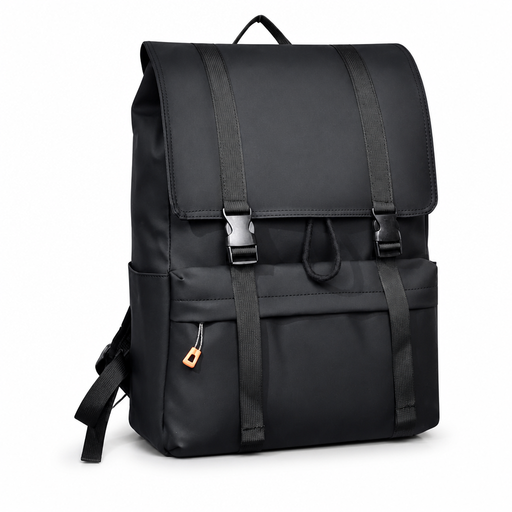
Why it suits this profile: This model is designed for school, work and urban use. The product title mentions a water-repellent design, drawstring closure and spacious layout.
The product information states the 15.6-inch size and clearly specifies the closure. Before buying, check the exact internal dimensions of the laptop compartment.
Water-repellent design according to the product title; suitable for school, work and city travel; drawstring closure.

Why it suits this profile: The specified layout and capacity are suitable for travellers and commuters who want to combine a laptop, clothing and accessories.
The capacity and dimensions are clearly stated. The bag also has a separate RFID-blocking pocket and lockable zips; this is not a guarantee against theft.
25-litre capacity, expandable to 30 litres; chest strap; multiple compartments; weighs approximately 860 grams according to the product information.
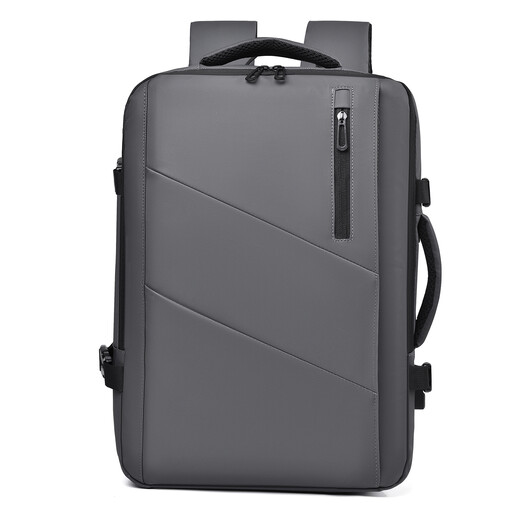
Why it suits this profile: The expandable capacity from 25 to 35 litres suits weekend trips, business travel and commuting with extra luggage.
The maximum capacity is clearly stated. Use the extra space only when needed and check the laptop dimensions before ordering.
Expandable from 25 to 35 litres according to the product title; multiple compartments; designed for laptops, travel and everyday transport.
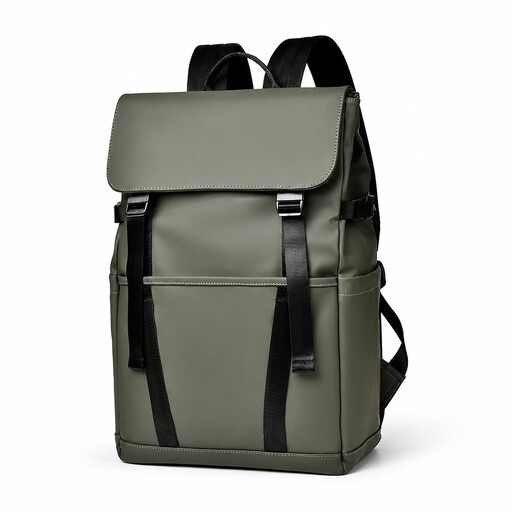
Why it suits this profile: The flip cover and multiple compartments are well suited to everyday use in the office, at school and while travelling.
The product title mentions water resistance, multiple compartments and a luggage strap. Check the zips and seams if you often cycle in the rain.
Flip cover; multiple compartments; scratch-resistant design according to the product title; luggage strap for use with a suitcase.
We have compiled a complete, up-to-date list of products that fully meet these strict selection criteria and the applicable European safety regulations.
Use this quick checklist:
A model with a USB port can be practical at the station, but the power comes from your own power bank. An anti-theft backpack with lockable zips can make access more difficult, but no product guarantees that theft will be prevented.
No. Manufacturers use different casings. Measure the laptop itself and compare those measurements with the laptop compartment. Allow a few extra millimetres of space, but make sure the laptop cannot move around loosely inside the compartment.
Its lifespan depends on the material, zips, load and frequency of use. A bag that is filled heavily every day will wear out faster than one intended for occasional use. Do not overfill the backpack, and place sharp objects in separate compartments. Pay particular attention to the seams, base and attachment points of the shoulder straps.
Not necessarily. A USB port usually works with a separate power bank, which you will need to charge independently. An expandable backpack can provide extra space, but a fuller bag also means more weight to carry. Choose features that suit your route and luggage, rather than simply paying for a long list of specifications.
