
Vandaag of morgen in huis

Kwaliteit gegarandeerd

Welkomstaanbiedingen ontgrendelen: GRATIS bezorging | Tot 80% korting | Gratis 30 dagen JoyPlus-proefperiode
Download de app
At first glance, choosing a laptop backpack for a 15.6-inch laptop seems straightforward. Yet many people end up with the wrong bag because the laptop compartment is too snug, claims about water resistance are unclear, or the layout turns out to be impractical for everyday use. Whether you use your bag for school, the office, commuting or city breaks, you need more than just a large main compartment.
As Joybuy Product Recommendation Officer, I focus on the product details that matter in practice. That way, you can compare offers more easily and find a 15.6-inch laptop backpack that suits the way you use it.
The 15.6-inch measurement refers to the screen diagonal, not the laptop’s full external dimensions. The bezel, casing and any protective sleeve all take up extra space. So always check the dimensions of the laptop compartment and compare them with the measurements of your device.
A close-fitting compartment can be handy when you’re on the move, but awkward if you use a sleeve. A compartment that’s too roomy offers less protection against your laptop sliding around. Check the fastening, too: a zip, flap or elastic strap can affect how easily you can take your laptop out each day.
A water-repellent laptop backpack is generally made from material that can fend off light rain or splashes for a while. That’s not the same as being waterproof in a heavy downpour or if the bag stays wet for a long time.
Check:
A marketing claim without further details is no guarantee of complete protection. In bad weather, you may want to keep important documents in a separate sleeve.
A large laptop backpack with multiple compartments may look appealing, but a poorly thought-out layout can leave you rummaging for cables, keys and cards. Think about what you carry: a charger, mouse, notebook, water bottle, lunch box and perhaps some clothes all need different kinds of space.
A backpack with a laptop compartment is most useful when the laptop section won’t get squashed by the rest of your belongings. For commuting, a separate accessory pocket or front pocket is often more useful than a large, open compartment.
Look for a laptop compartment that’s explicitly listed as suitable for a 15.6-inch laptop. Also check the backpack’s overall dimensions and how much room there is around the compartment. A slim business backpack works well if you mainly carry a laptop, documents and a charger. For school or travel, a roomier style may be more practical.
Bear in mind that “large capacity” isn’t a standard measurement. If the capacity in litres isn’t listed, assess the bag by looking at the visible compartments, the width of the main section and whether you can open the bag fully.
A lightweight laptop backpack reduces the total weight you carry each day. But that advantage disappears if the shoulder straps are thin or the bag isn’t easy to adjust. Look for:
A streamlined shape is often practical for taking a business backpack on the train or tram and into the office. A school backpack or a backpack for work and travel can offer more room for accessories and personal belongings.
Canvas, polyester and similar synthetic materials can each have a different look and wear characteristics. Don’t just look at the material: check the finish on the seams, zips, buckles and strap attachment points, too.
A metal or plastic zip doesn’t, on its own, tell you much about how long it will last. Avoid overloading your bag: one that’s constantly too full will put more strain on its seams and fastenings. So assess claims such as “durable” based on specific product information, not just the product title.
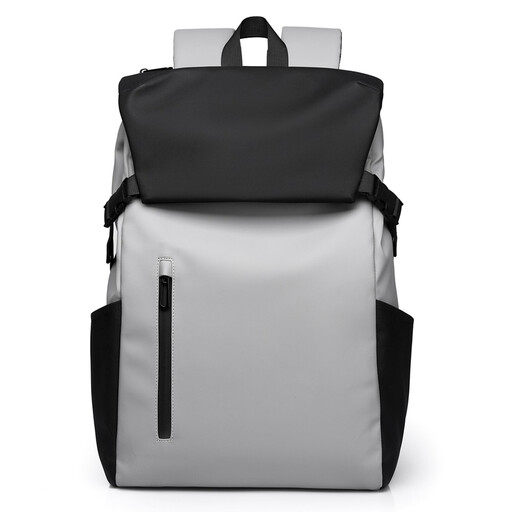
Why it suits this profile: This model is designed for school, getting around town and everyday use. The product description lists a 15.6-inch laptop compartment and a water-repellent, hard-wearing finish.
The product name explicitly states that it’s compatible with 15.6-inch laptops. The water-repellent claim should be understood as protection against light rain, not as full waterproofing.
15.6-inch laptop compartment, described as water-repellent and hard-wearing, suitable for school and commuting.

Why it suits this profile: A practical choice for the office, train journeys and commuting if you’re looking for a slim style with an external USB port.
The product description lists both a 15.6-inch laptop compartment and a water-repellent, lightweight design. A USB port is just a connection: you’ll need to connect a power bank separately.
Business-style design, USB charging port according to the product description, compatibility with 15.6-inch laptops and a lightweight design.
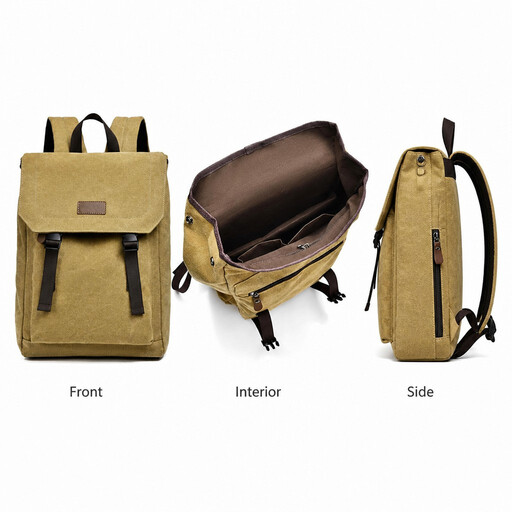
Why it suits this profile: This canvas daypack is a good fit if you carry a laptop, books and everyday essentials for school, work or travel.
The product name specifies a 15.6-inch laptop compartment and a water-resistant canvas finish. Before buying, check the exact compartment dimensions if you use a protective sleeve for your laptop.
Canvas material according to the product name, lightweight design, generous capacity, and suitable for school, work and travel.
A laptop backpack with a USB port can be useful if you want to charge your phone while you’re out and about. However, the port doesn’t replace a power bank or tell you how quickly your phone will charge. Check that the internal cable is easy to reach and that your power bank fits comfortably in a separate compartment.
For men and women, fit, shoulder straps and capacity matter most, not a gender label in the product name. A men’s and women’s laptop backpack may well be the same model. Choose one based on its size, how you carry it and its layout.
If you cycle every day, it’s a good idea not to fill the bag to capacity and to give important electronics extra protection. For train journeys, an easy-to-reach front pocket and a sturdy zip are often more useful than decorative details.
We’ve put together a complete, up-to-date list of products that meet these strict selection criteria and the applicable European safety regulations.
No. The screen size isn’t the same as the laptop’s overall dimensions. Compare your laptop’s width, height and thickness with the dimensions of the laptop compartment. Allow extra room if you use a protective sleeve.
Its lifespan depends on the material, stitching, zips, load and conditions of use. A bag that’s heavily packed every day or often left wet may wear out more quickly. Check the seams and shoulder straps regularly, and avoid overloading it.
The USB port doesn’t use power by itself. You’ll need a separate power bank, which you’ll have to charge. So the cost mainly depends on the power bank and charging it, not on the backpack itself.
