
Vandaag of morgen in huis

Kwaliteit gegarandeerd

Welkomstaanbiedingen ontgrendelen: GRATIS bezorging | Tot 80% korting | Gratis 30 dagen JoyPlus-proefperiode
Download de app
A 15.6-inch laptop backpack may seem easy to choose at first glance. However, many buyers fall into the same traps: a bag that is only spacious enough on paper, material described as waterproof when it is merely water-repellent, or a USB port that does nothing without a power bank.
For students, professionals and commuters, the choice mainly comes down to protection, carrying comfort and a layout that suits your everyday essentials. Below, you’ll find the key points to check, along with some popular options for different uses.
A 15.6-inch laptop does not always have the same external dimensions. So don’t just check the screen size; also check the internal dimensions of the laptop compartment. A sturdy protective case can take up additional space too.
Pay attention to the product description and compare your laptop’s dimensions with the measurements provided. If you’re unsure, a slightly roomier compartment is more practical than a tight fit that puts pressure on the zip.
Many bags use terms such as “waterproof”, “water resistant” or “water repellent”. These descriptions do not mean the same thing. A water-repellent laptop backpack helps protect against light rain, but it does not necessarily offer protection during prolonged or heavy rainfall.
So check:
Claims about water resistance are based on information provided by the brand or seller. Do not treat them as a guarantee that the bag will remain completely dry in all weather conditions.
A laptop backpack with a USB port is appealing for commuting, but the port does not charge your device by itself. You’ll need your own power bank, which connects inside the bag. Also check that the connection is compatible with your cable and that the internal layout leaves enough room for the power bank.
The same applies to multiple compartments: extra storage is only useful if the pockets are large enough for your charger, mouse, documents and water bottle.
Choose a model with a separate laptop compartment suitable for laptops up to 15.6 inches. A padded interior and sturdy base can provide extra protection when putting the bag down or travelling. A bag with only one large main compartment generally offers less targeted protection for your laptop.
If you often travel by train, bicycle or aeroplane, you’ll also benefit from a laptop bag with multiple compartments. This keeps cables, keys and documents separate from your laptop.
A lightweight laptop backpack is comfortable when you cover long distances every day. Don’t just look at the weight of the bag; consider the carrying system too. Wide, adjustable shoulder straps distribute the load more effectively than narrow straps.
For school and the office, a capacity of around 15 to 25 litres is often suitable. If you carry clothing, lunch or travel accessories, it’s better to look for a spacious laptop backpack or an expandable model. Bear in mind that overloading can put strain on zips and seams.
Nylon, canvas and polyester are commonly used for laptop bags. Nylon is generally lightweight and easy to clean with a damp cloth. Canvas has a more casual appearance, but may react differently to moisture and wear. A business laptop backpack usually has a minimalist design and compartments for documents and accessories.
A laptop backpack for women and men does not need a specific fit: adjustable straps, a suitable back panel and a practical, neutral layout are more important than the target audience mentioned in the product name.
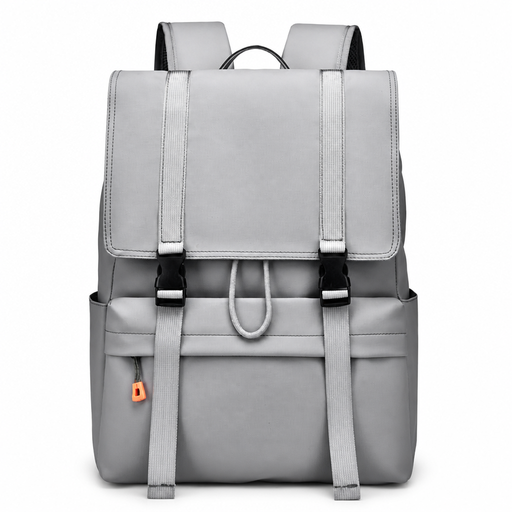
Why it suits this profile: A versatile choice for students and beginners looking for one bag for school, work and trips around town. The flip-top design provides quick access to the main compartment.
The product name states that it supports a 15.6-inch laptop. However, check the exact dimensions of your own device before buying.
Suitable for school, work and city use; flip-top fastening and spacious daypack layout.
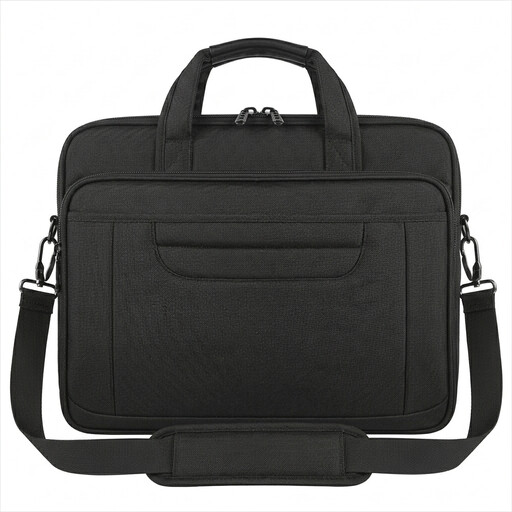
Why it suits this profile: Ideal for professionals looking for a business laptop backpack or 15.6-inch laptop shoulder bag for the office, meetings and travel.
The bag has a separate main compartment, multiple accessory pockets and a reinforced construction. The description refers to water-resistant nylon; this does not mean it is fully waterproof.
800 grams; detachable shoulder strap, trolley strap and concealed back pocket.
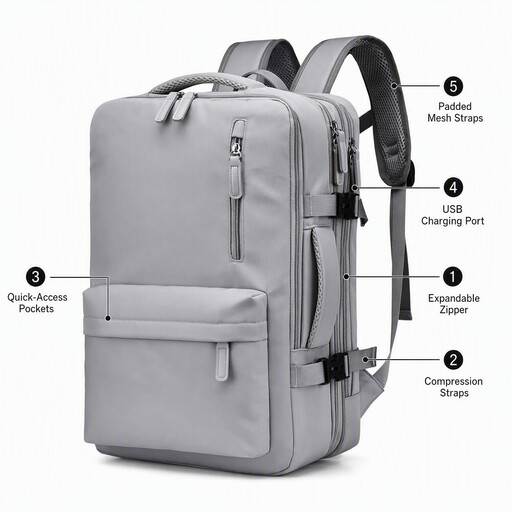
Why it suits this profile: A practical backpack for work and travel when you want to carry your laptop, clothing, documents and chargers together.
The expandable design means you do not need two different bags for short and longer trips. However, the USB port requires a separate power bank.
Water-repellent description; expandable design, multiple compartments and external USB charging port.
Use this quick checklist before buying a laptop backpack or laptop bag:
We’ve put together a complete, up-to-date list of products that fully meet these strict selection criteria and the applicable European safety regulations.
No. Screen size is only one indication. The casing varies by brand and model. Measure the length, width and thickness of your laptop, then compare these with the stated laptop compartment dimensions.
Its lifespan depends on the material, zips, seams, carrying weight and care. A bag that is consistently overloaded will wear out more quickly. Use the bag according to the care instructions and distribute heavy items across the available compartments.
The USB port itself does not use power without a connected power bank. You therefore need to factor in the cost of buying and charging a suitable power bank. The feature is particularly useful when you want to connect a phone or other compatible device while you’re out and about.
