
Vandaag of morgen in huis

Kwaliteit gegarandeerd

Welkomstaanbiedingen ontgrendelen: GRATIS bezorging | Tot 80% korting | Gratis 30 dagen JoyPlus-proefperiode
Download de app
A 15.6-inch laptop backpack may seem straightforward to choose at first glance. However, models vary considerably in compartment layout, carrying comfort, materials and protection against rain. A backpack that appears spacious enough can become impractical in everyday use if the laptop is not held securely, the zips catch or the shoulder straps do not provide enough support.
So do not focus solely on terms such as “business”, “waterproof” or “large capacity”. Above all, check which features are actually stated in the product information and whether they suit the way you intend to use the backpack in the UK.
A waterproof laptop backpack sounds appealing for cycling and commuting. However, product descriptions also use terms such as water-repellent and water-resistant. This usually means that light rain is kept out temporarily. It does not automatically mean that the bag will withstand a prolonged heavy downpour or immersion.
Therefore, check:
In prolonged rain, consider using a separate rain cover. If a brand presents its own water resistance as a benefit, treat this as a claim from the product description rather than a universal guarantee.
The 15.6-inch measurement refers to the screen diagonal. The external dimensions of laptops vary by brand and model. As a result, a business laptop with a thicker casing may fit less easily than a slim consumer model.
Before buying, measure:
A 15.6-inch laptop bag or backpack with a separate compartment is generally more practical than a large main compartment without a fixed laptop divider.
A spacious laptop backpack with lots of zipped compartments can be useful for cables, documents, a mouse and personal belongings. Too many small pockets, however, can make it difficult to store larger accessories. Look instead for a combination of a padded laptop compartment, a main compartment and a few well-positioned accessory pockets.
Ideally, a suitable model should have a separate, padded laptop compartment. Check that the laptop does not rest directly on the bottom. A sturdy base and sufficient padding reduce the risk of damage when the backpack is put down, but no backpack replaces careful handling.
For work and study, a separate document compartment and space for a charger are also useful. If you carry a lot every day, it may be better to choose a spacious laptop backpack than a lightweight laptop backpack with an extremely slim profile.
A business backpack may look professional, but it should also be comfortable to carry on train journeys, while cycling or when walking. Look for:
A lightweight laptop backpack is not always the right choice if its construction consequently provides less support. Consider the balance between weight, protection and capacity.
A model with a capacity of, for example, 25 litres may be suitable for everyday use. An expandable laptop backpack that can be increased from 25 litres to 35 litres, according to the product title, provides extra space for a short business trip or weekend away. However, consider whether you might end up consistently overloading the bag.
A laptop backpack with a USB port can be useful when you are out and about. The USB connection is usually a pass-through to a power bank inside the bag; the backpack itself does not charge devices. So check that the cable and power bank you want to use are compatible and that the external connection is conveniently positioned.

Why it suits this profile: This slim model is designed for the office, commuting and everyday use by men and women. The product title mentions a USB charging port and a water-repellent design.
The product’s specific positioning makes it clear that this is a 15.6-inch laptop backpack. Before buying, check the exact laptop dimensions and use a power bank for the USB function.
Suitable for a 15.6-inch laptop; according to the product title, it is lightweight, slim, water-repellent and fitted with an external USB port.
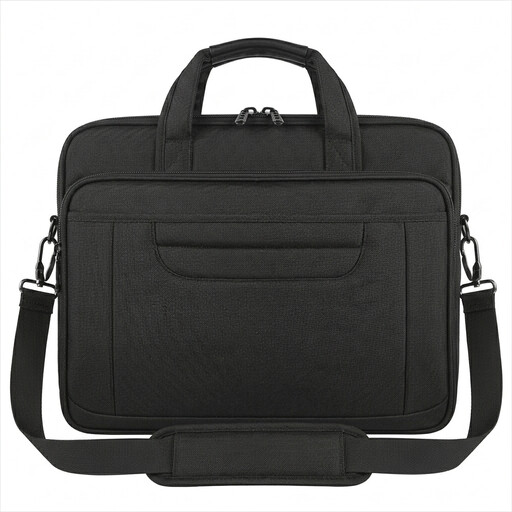
Why it suits this profile: This bag is ideal for anyone who values a professional look and flexible carrying options. The model can be used as a briefcase or shoulder bag.
The dimensions of 40,6 × 30 × 7,5 cm and the weight of 800 grams are stated. This makes it easier to compare the bag than relying solely on “large capacity”.
Water-resistant nylon, a concealed rear pocket, luggage strap and detachable shoulder strap, according to the product information.
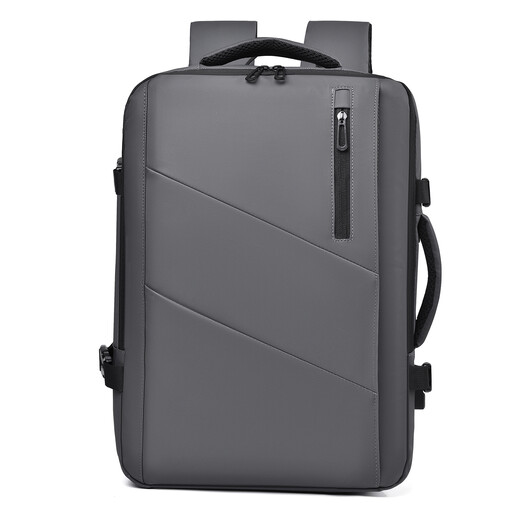
Why it suits this profile: This model is aimed at travellers, business travellers and users who carry extra clothing or documents on some days.
The expandable capacity is clearly stated as 25 to 35 litres. Check the compartment dimensions and do not pack the bag so heavily that it becomes uncomfortable to carry.
Expandable capacity from 25 to 35 litres; the product title mentions a waterproof design, multiple compartments and use as a travel or business backpack.
We have compiled a complete, up-to-date list of products that fully meet these strict selection criteria and the applicable European safety regulations.
No. The screen size alone is not enough. Measure the laptop and compare these measurements with the internal compartment. Also allow room for a protective case and the charger.
For everyday cycling or walking, water-resistant material can be practical. However, “water-resistant” does not automatically provide protection against prolonged heavy rain. A rain cover can offer additional protection. Always check the precise product description.
Its lifespan depends on the materials, zips, seams, load and maintenance. Do not overfill the bag, distribute heavy items evenly and follow the cleaning instructions. For example, the laptop briefcase model described above is recommended to be cleaned with a damp cloth and mild detergent, while machine washing and direct heat should be avoided.
