
Vandaag of morgen in huis

Kwaliteit gegarandeerd

Welkomstaanbiedingen ontgrendelen: GRATIS bezorging | Tot 80% korting | Gratis 30 dagen JoyPlus-proefperiode
Download de app
A 15.6-inch laptop backpack may seem easy to choose at first glance. However, not every 15.6-inch laptop will automatically fit properly in the same backpack. One laptop may be thin and lightweight, while a gaming laptop or business notebook can be considerably thicker. Terms such as “waterproof”, “USB charging port” and “extra protection” also do not always tell you exactly what you need.
For students, school pupils, professionals and commuters, three common buying pitfalls are particularly important.
A 15.6-inch laptop has a screen diagonal of approximately 39.6 cm. However, the external dimensions vary from one model to another. Therefore, check the height, width and thickness of your laptop and compare them with the dimensions of the laptop compartment. A compartment that is too spacious allows the device to move around; one that is too tight can put strain on the zip or seams.
Do you use a 14-inch laptop? A 14-inch laptop sleeve may be more practical, especially if you carry few accessories. A sleeve protects against minor knocks and scratches, but generally offers less storage space and carrying comfort than a backpack.
A water-resistant laptop backpack can help repel splashes and a brief shower. That does not automatically mean the bag is suitable for prolonged heavy rain. Check the exact product description and, in poor weather, consider using a separate rain cover.
For example, the HP Prelude Pro 15.6-Inch Backpack is described as having a water-repellent or water-resistant finish. According to HP’s product information, the bag also features a padded laptop compartment. Nevertheless, use the bag carefully in prolonged rain and keep the laptop as dry as possible.
A laptop backpack with a USB port can be useful during a commute, but the port is generally a pass-through connection for a power bank. The power bank itself is not automatically included. An RFID pocket, trolley strap or expandable compartment is likewise only useful if you will actually use those features.
Also consider how you intend to carry the bag. A spacious backpack with multiple compartments may be comfortable, but it becomes heavy once you add your laptop, charger, books and water bottle.
A suitable laptop compartment should ideally be padded, close securely and keep the computer stable. Do not look only for “suitable for 15.6 inches”; also consider:
A padded compartment reduces the risk of scratches and minor knocks, but no standard backpack can guarantee protection against falls or heavy impact.
Nylon, polyester and canvas are common materials. Their practical properties vary from product to product. According to the product specifications, the Kensington SP25 Classic uses 1680D nylon and has a padded inner compartment for laptops up to 15.6 inches. According to HP, the HP Prelude Pro has an outer material made from 95% recycled content and a water-resistant finish.
Check whether the description refers to water-repellent, water-resistant or waterproof. Do not treat these terms as interchangeable. If you cycle regularly in the Netherlands, a rain cover can be a worthwhile addition.
For a work laptop backpack, separate compartments for a charger, mouse, documents and phone are useful. A spacious laptop backpack is appealing for school, hybrid working or short trips, but pay attention to its empty weight.
For air or rail travel, a laptop backpack with a trolley strap, lockable zips and a separate document compartment can be particularly practical. According to the product specifications, the HP Travel 25L has a capacity of 25 litres, expandable to 30 litres. This makes an expandable laptop backpack suitable when you occasionally need to carry extra clothing or accessories. Do not overfill the bag; this can place unnecessary strain on the shoulder straps and zips.
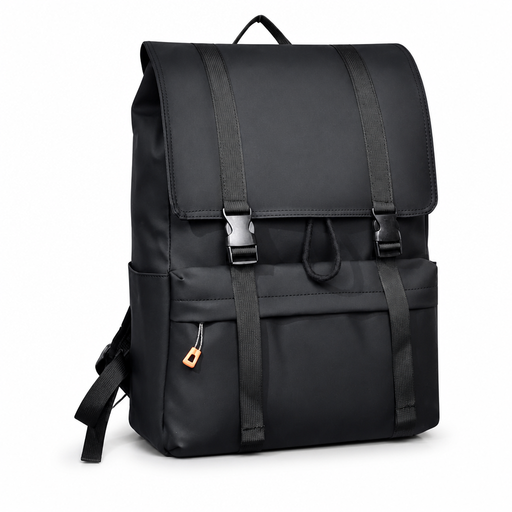
Why it works: A practical choice for students and school pupils who want to carry a laptop, books and everyday essentials in one bag.
The product title mentions a water-resistant finish and a large main compartment. However, check your laptop’s exact dimensions before ordering.
Suitable for laptops up to 15.6 inches according to the product name; designed as a casual backpack for school, work and urban use.
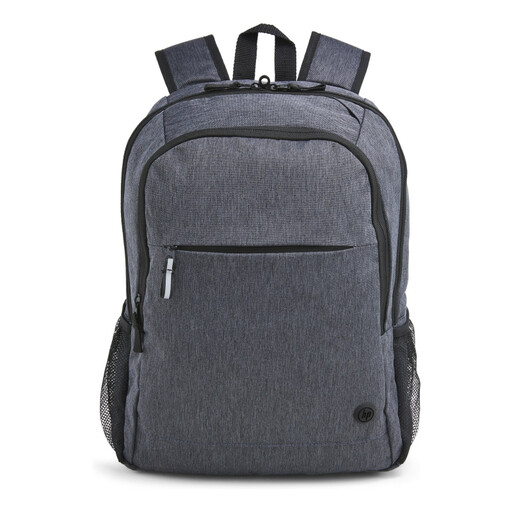
Why it works: Designed for commuting, office use and travel, with a trolley strap and easily accessible compartments.
According to HP’s product information, this model has a padded 15.6-inch laptop compartment and a trolley strap. These are verifiable features, but they do not guarantee protection against theft or falls.
Padded shoulder straps, lockable zips, reflective details and a cable opening according to HP; the outer fabric is described as being made from 95% recycled material.

Why it works: Suitable for business trips, weekend getaways and commuters whose luggage needs vary from day to day.
The expandable capacity means you do not always have to carry a large bag. However, keep an eye on the total weight when using the additional space.
25-litre capacity, expandable to 30 litres, sternum straps and a concealed RFID pocket according to HP’s product information.
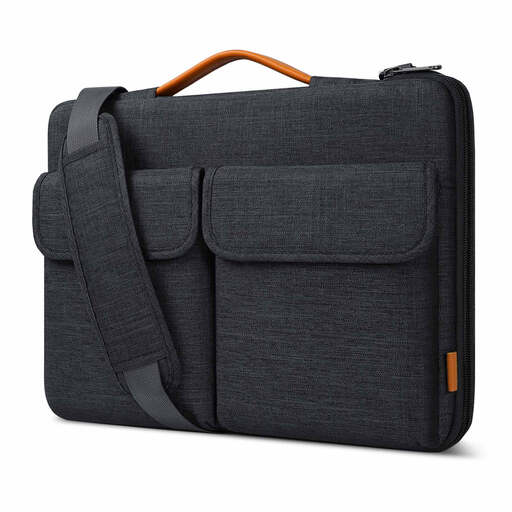
Why it works: Ideal for anyone who prefers to carry a laptop as a shoulder bag or by the handle and does not need much additional luggage.
The description mentions splash-resistant material and a soft inner lining. In heavy rain, additional protection is still advisable.
Internal dimensions of 38.5 × 26.5 × 3 cm, a handle, detachable shoulder strap and luggage strap according to the product information.
A USB port is primarily a convenient cable pass-through. Check whether your power bank fits in a dedicated compartment and whether the cable is easy to access. Brands offer RFID protection as a security feature; do not treat it as a guarantee against every form of data theft. A trolley strap is useful at stations and airports, but check that it fits securely around your suitcase.
If you are looking for a business laptop backpack, choose a slim model with compartments for documents and accessories. For cycling or longer walks, adjustable padded shoulder straps matter more than a long list of additional features.
Browse a current selection of laptop bags and laptop backpacks based on size, protection, capacity and intended use.
No. Screen size is only one measurement. Compare your laptop’s external dimensions with those of the laptop compartment. Allow for additional thickness if you use a protective sleeve.
A water-resistant finish can help during brief showers. In prolonged or heavy rain, a rain cover is the wiser choice. Never place a laptop loose in a bag when moisture protection is important.
Its lifespan depends on the material, zips, seams, load and frequency of use. A bag that is filled heavily every day will wear out faster. Distribute the weight, avoid overloading the bag and clean it according to the care instructions. Also check the statutory warranty and any additional manufacturer’s warranty for each product.
