
Vandaag of morgen in huis

Kwaliteit gegarandeerd

Welkomstaanbiedingen ontgrendelen: GRATIS bezorging | Tot 80% korting | Gratis 30 dagen JoyPlus-proefperiode
Download de app
A 15.6-inch laptop backpack may seem like a straightforward purchase at first glance. Yet many models disappoint in everyday use. The laptop compartment may be a little too tight, for example, the backpack may let water in when it rains, or the layout may prove inconvenient during a train journey. For students, commuters and business travellers, everyday practicality is particularly important.
The screen size does not tell you everything about a laptop’s external dimensions. A thick model, gaming laptop or laptop with a protective case may need more room than a slim office computer. So check the dimensions of your laptop, including any case, and compare them with the laptop compartment.
A laptop backpack with a USB port generally works as a pass-through connection for a power bank. The power bank itself is usually not included. The KONO model states this explicitly: you connect your own power bank inside the main compartment and attach it to the USB cable. The port is designed for charging a phone or tablet, for example; use a suitable, certified power bank and cable for this purpose.
An anti-theft laptop backpack can help make unwanted access more difficult, but it cannot eliminate every risk. A combination lock, hidden zip or sturdy fastening is primarily a deterrent. Do not leave valuable belongings unattended, therefore, even at a busy station, café or airport.
For a backpack for a 15.6-inch laptop, three points are important:
A business backpack for commuting often needs a different layout from a laptop backpack for school. Students may carry A4 books and accessories, for example, while commuters mainly want to organise a laptop, charger and everyday essentials.
According to the product information, the KONO laptop backpack is made from polyester and is described as water-repellent. This makes it suitable for light rain and everyday use, but water-repellent does not mean completely waterproof. A rain cover is still advisable in prolonged or heavy rain, especially when carrying your laptop and documents.
Pay attention to the zips and seams, too. Even when the material is water-repellent, water can get through seams or open zips. A laptop sleeve inside the compartment provides an additional layer of protection.
A comfortable backpack with a laptop compartment should have well-adjustable shoulder straps. According to the specifications, the KONO model weighs approximately 0.73 kg and has padded, breathable shoulder straps. This can be comfortable on longer journeys or walks, but overall carrying comfort also depends on how much you pack.
When carrying a heavy laptop, use both shoulder straps and distribute the weight evenly. Place heavy items close to your back and avoid routinely overloading the backpack.
The recommendations below are based on verifiable product information: dimensions, laptop compatibility, material, weight, layout and features. As the supplied range contains one suitable laptop backpack model, the same model is matched to different user profiles. The right choice depends on your everyday situation.
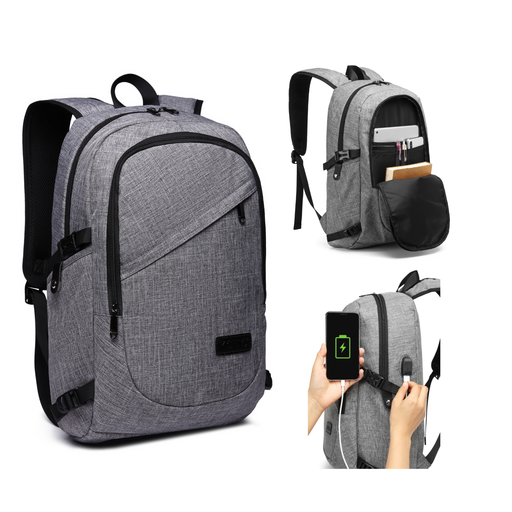
Why it suits this profile: For school, university or a first job, this model offers a laptop compartment for devices up to 15.6 inches, a main compartment and organiser pockets, without the need for multiple bags.
The product description clearly specifies the laptop size, weight and layout. This allows you to check in advance whether it suits the way you intend to use it.
Laptop compartment for devices up to 15.6 inches; multiple pockets; approximately 0.73 kg; USB port for use with your own power bank.
Why it suits this profile: Anyone who works and travels every day can benefit from an organised bag with protection from light rain, a padded laptop compartment and a closable main compartment.
The water-repellent description is not treated as meaning waterproof. Additional protection is still needed in heavy rain.
Polyester material; padded, breathable shoulder straps; main compartment with a removable three-digit combination lock.
Why it suits this profile: For business trips, holidays and long commutes, the combination of a spacious main compartment, organiser pockets and charging on the go is practical.
The combination lock is presented as a theft deterrent, not a guarantee. You remain responsible for what you take with you and where you leave the bag.
Room for clothing, A4 books and travel essentials; USB charging port; removable lock; suitable for everyday transport.
We have put together a complete, up-to-date list of products that fully meet these strict selection criteria and the applicable European safety regulations.
No. Screen size is only one indication. Measure the laptop’s length, width and thickness, then compare these measurements with the laptop compartment. Also take a protective sleeve or hard cover into account.
The USB port is connected to a cable inside the main compartment. You place your own power bank there and connect your phone or tablet on the outside. The power bank is not included with the model mentioned. The port cannot charge a device by itself without a connected power source.
Wipe the surface clean with a soft, damp cloth. The product information advises against using harsh abrasive cleaners, submerging the backpack or putting it in the washing machine. Allow the bag to air-dry completely and do not store it in direct sunlight for extended periods.
