
Vandaag of morgen in huis

Kwaliteit gegarandeerd

Welkomstaanbiedingen ontgrendelen: GRATIS bezorging | Tot 80% korting | Gratis 30 dagen JoyPlus-proefperiode
Download de app
A 15.6-inch laptop backpack needs to do more than just carry a laptop. For commuting, lectures, classes, shifts and business trips, you’ll also need space for documents, chargers, lunch and personal items. Yet many backpacks look much the same at first glance. A USB port, water-resistant fabric and “large capacity” may sound useful, but they don’t always tell you enough about how a bag will work day to day.
So look out for these three common pitfalls:
Measure your laptop in three places: width, height and thickness. A 15.6-inch laptop backpack is usually designed for standard laptops with a screen diagonal of up to 15.6 inches, but the internal dimensions can vary between models.
A practical laptop compartment should ideally have:
Taking a tablet, document wallet or charger as well? Choose a roomy laptop backpack with separate compartments. This helps prevent hard accessories from pressing directly against your laptop.
A water-resistant laptop backpack is suitable for light rain and short journeys, depending on the fabric, seams and zips. The term doesn’t automatically mean the bag is fully waterproof. So also look at:
Use the bag’s product description as your starting point. If a brand claims a particular level of protection or performance, treat it as information from the brand, not as a universal guarantee.
The bag’s own weight matters for everyday use. A model with lots of extra compartments, metal fittings or an insulated lunch compartment may be heavier. So check the weight if it’s listed. A 1.14 kg backpack will feel different from an ultra-light model, especially once you’ve added your laptop, books and lunch.
These features are useful in a laptop backpack for work or school:
A backpack with a USB port can be useful on the go. Usually, it’s an external port that connects to your own power bank. The power bank itself and charging capacity aren’t automatically included, so check exactly what comes with the bag.
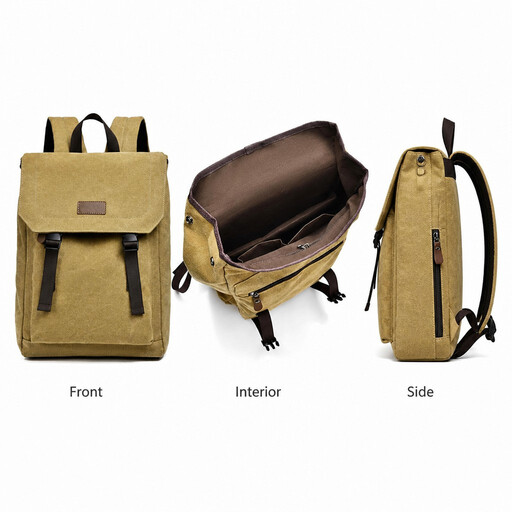
Why it suits this profile: The description calls it a lightweight, roomy backpack for school, work and travel. That makes it a sensible choice if you’re looking for a straightforward everyday laptop backpack.
The product name states that it supports laptops up to 15.6 inches and has a water-resistant finish. Before buying, check your laptop’s exact dimensions, and remember that water-resistant doesn’t mean waterproof.
According to the product description: suitable for laptops up to 15.6 inches, with a lightweight design and roomy layout for school, work and travel.

Why it suits this profile: Its business-style name and slim design make it a good fit for office work, commuting and short business trips, for both women and men.
The product description mentions a water-resistant finish, USB charging port and lightweight, slim design. Before buying, check which internal compartments and level of laptop protection you need for your belongings.
According to the product listing: suitable for 15.6-inch laptops, water-resistant and lightweight, with a USB charging port for use on the go.
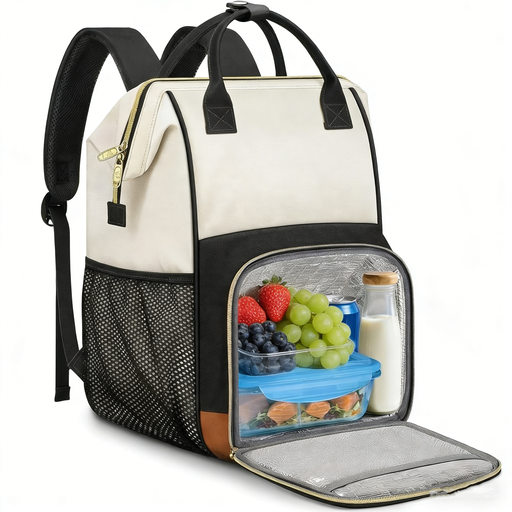
Why it suits this profile: This 2-in-1 backpack is a good choice for nurses, teachers, office workers and students who want to carry a laptop, documents and lunch in one bag.
According to the product description, the lunch compartment is removable and foldable. That means it takes up less space when you’re not carrying lunch. The water-resistant fabric still doesn’t make the bag fully waterproof.
According to the product details: space for laptops up to 15.6 inches, a detachable insulated lunch compartment made from aluminium foil and EVA, a USB port, an A4 organiser compartment and a luggage strap. The stated weight is 1.14 kg.
When choosing a women’s laptop backpack or a men’s laptop backpack, practical features matter more than the label. Consider the colour, fit and dimensions, but focus especially on the layout and weight. The models above aren’t designed exclusively for one group.
We’ve put together a complete, up-to-date list of products that meet these strict selection criteria and the applicable European safety regulations.
No, not always. Screen diagonal is only one measurement. Check your laptop’s width, height and thickness too, then compare them with the stated internal dimensions of the laptop compartment.
Put a suitable power bank in the internal compartment and connect it to the backpack’s internal USB cable. Plug your charging cable into the external port. Check beforehand that the power bank and cable are compatible. A USB port doesn’t provide power by itself.
Its lifespan depends on the material, zips, seams, carrying weight and conditions of use. Don’t overload the bag, avoid placing hard accessories loose against your laptop, and clean water-resistant fabric according to the product instructions. Check the shoulder straps, handles and zips regularly for signs of wear.
