
Vandaag of morgen in huis

Kwaliteit gegarandeerd

Welkomstaanbiedingen ontgrendelen: GRATIS bezorging | Tot 80% korting | Gratis 30 dagen JoyPlus-proefperiode
Download de app
A 15.6-inch laptop backpack needs to do more than simply carry a laptop. In the Netherlands, a bag has to cope with rain, fully loaded bicycle panniers, crowded train journeys and daily packing and unpacking. Yet product names such as “business”, “water resistant” or “large capacity” do not always reveal how practical a bag is in everyday use.
Pay close attention to the compartment layout, the protection provided by the laptop sleeve and how the capacity is specified. Below, you will find the features that matter and which popular options suit different use cases.
A water-repellent laptop backpack can help keep out light rain and splashes. That does not automatically mean the bag can withstand a prolonged heavy downpour. Pay attention to the difference between:
The products in this guide use “water resistant” or “water repellent” in their product titles. Treat this as the seller’s product description, not as a guarantee that the contents will remain completely dry.
A spacious laptop backpack can carry plenty, but one large compartment makes cables, documents and accessories harder to access. Check whether the bag has multiple compartments and whether the laptop sleeve is suitable for your device.
A 15.6-inch laptop can vary in width, thickness and screen bezels depending on the brand and model. Measure your laptop, including its protective sleeve, and compare those dimensions with the size chart on the product page. The “15.6-inch” designation is a useful starting point, but it is no substitute for checking the measurements.
A laptop backpack with a USB port generally has an external connection that must be linked to your own power bank. The backpack does not supply power independently. Check that the internal cable, your power bank and the charging cable you use are compatible.
An expandable backpack also deserves a critical look. Extra capacity is useful for a short trip, but a fully loaded bag can become heavier and less comfortable to carry. Use the expansion zipper only when you genuinely need the additional space.
Consider the position of the laptop compartment. A sleeve positioned close to your back helps keep the bag compact and prevents the laptop from shifting among loose belongings. Also look for:
The available product information for the models listed below does not specify the exact padding or internal dimensions for every model. Check these details on the product page before ordering.
Canvas can create a casual look, while a business laptop backpack made from a smoother synthetic material is often easier to clean. Neither material choice, by itself, indicates how durable or water-resistant a backpack is.
Look for specific terms such as “water resistant” or “water repellent” in the description and check whether care instructions are provided. In heavy rain, consider using a separate rain cover, particularly when carrying a laptop or important documents.
A lightweight laptop backpack is ideal for cyclists, students and commuters who spend longer periods on the move each day. By contrast, a bag with numerous compartments, thick padding and expansion options may be heavier.
Think about what you typically carry:
For school or office use alone, a streamlined layout is often sufficient. For a train journey or short business trip, a larger main compartment or expansion zipper may be more useful.
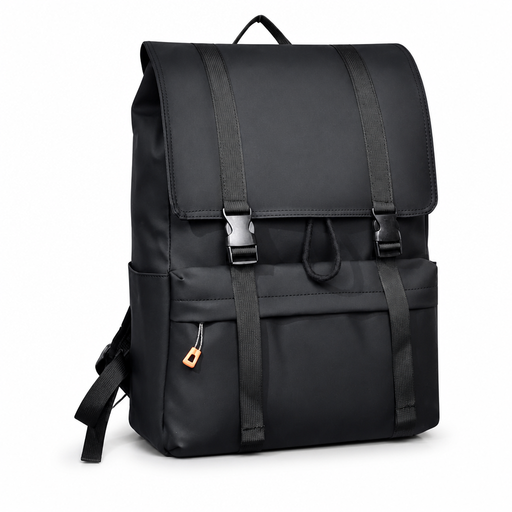
Why This Fits Their Persona: This flip-top backpack is designed for everyday use at school, work or on city journeys. According to the product title, the model features a drawstring closure, a water-repellent design and a spacious daypack layout.
The product title clearly states the laptop size and closure type. Still, check the exact internal dimensions before placing a laptop inside its protective sleeve.
Flip-top design; described as water resistant and offering large capacity.
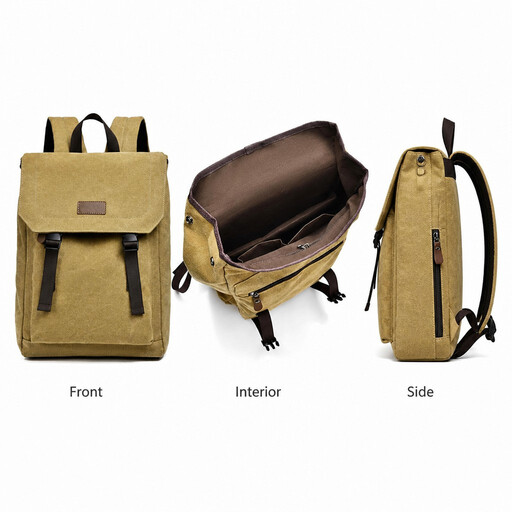
Why This Fits Their Persona: This canvas model suits users looking for a casual aesthetic at school, in the office and while travelling. According to the product title, the model is described as lightweight and water-repellent.
The choice is not based on appearance alone: the product description specifies the size, laptop compartment and moisture protection. Compare the measurements with those of your own laptop.
Canvas look; described in the title as lightweight and suitable for school, work and travel.
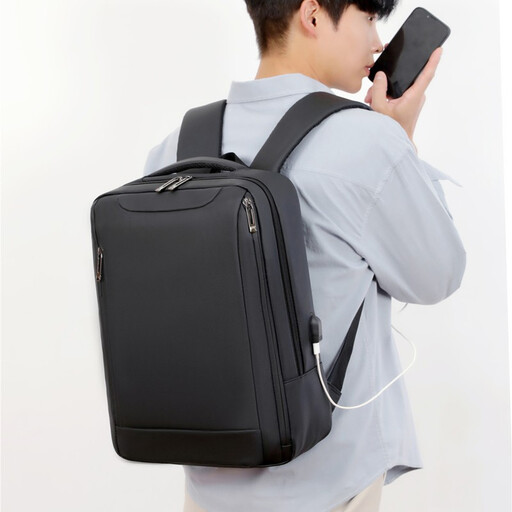
Why This Fits Their Persona: A business laptop backpack with multiple compartments is a practical choice for commuters carrying a laptop, charger, documents and everyday accessories to the office.
The title specifies both the laptop size and the multiple compartments. “Water repellent” remains a limited moisture claim; use additional protection during prolonged rain.
Described as lightweight; multiple compartments; business design for commuting.
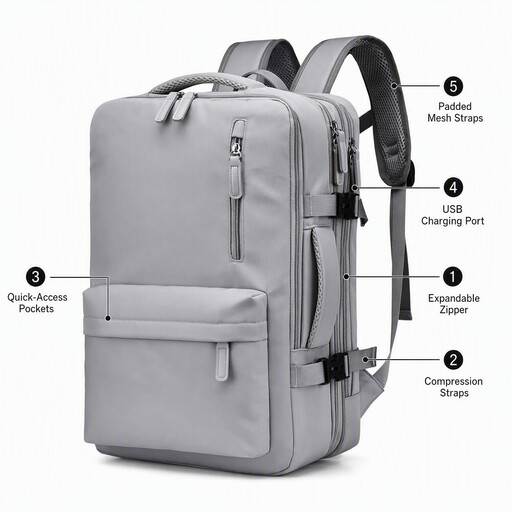
Why This Fits Their Persona: This travel backpack with a laptop compartment is designed for anyone moving between the office, train and a short business trip. The product title mentions an expandable design and an external USB charging port.
The expansion feature provides additional room, but check the dimensions in advance if you plan to use the bag as carry-on luggage. The USB port requires your own power bank.
Expandable design; external USB charging port according to the product title; suitable for a 15.6-inch laptop.
For a laptop backpack for school and work, an easily accessible laptop compartment and an organised layout are usually more important than maximum capacity. Students may appreciate a canvas model with room for books and accessories.
Commuters who cycle daily or travel by public transport should prioritise low weight, multiple compartments and a moisture-resistant outer fabric. For short business trips, an expandable backpack is convenient, but always check the dimensions and carrying comfort when the bag is fully packed.
Browse a current selection of backpacks and compare sizes, layouts and features for your everyday needs or short trips.
Not necessarily. Screen size is measured diagonally, while the fit of the laptop compartment depends on the device’s overall width, height and thickness. Measure your laptop, including its sleeve, and compare those dimensions with the information on the product page.
Its lifespan depends on the material, zippers, seams, the weight you carry each day and how you use the bag. Overloading can put additional strain on shoulder straps and closures. Regularly inspect the seams, zippers and base of the backpack.
The USB port itself does not consume power, but you need a power bank to charge a device while travelling. The additional cost therefore mainly depends on whether you already own a suitable power bank or still need to purchase one. Also check the connector and charging cable used by your phone or other device.
