
Vandaag of morgen in huis

Kwaliteit gegarandeerd

Welkomstaanbiedingen ontgrendelen: GRATIS bezorging | Tot 80% korting | Gratis 30 dagen JoyPlus-proefperiode
Download de app
A 15.6-inch laptop backpack may seem straightforward to choose, but product titles do not always tell the whole story. A backpack may, for example, be described as “waterproof” when only the outer fabric is water-repellent. Likewise, a USB port does not mean that the backpack contains a built-in battery. And a laptop compartment described as suitable for 15.6-inch devices may prove too narrow in practice because of a laptop’s wider chassis.
For students, pupils, professionals and commuters, three factors matter most: your laptop’s actual dimensions, protection against everyday wear and tear, and an organisation system that suits your routine. Below, you will find our recommendations for 2026, based on the available product descriptions and verifiable specifications.
A 15.6-inch laptop does not always have the same external dimensions as another model of the same screen size. A business laptop with thick bezels or a robust chassis takes up more room than a slim model. For this reason, check not only the screen size but also the width, height and depth of your laptop.
Also look out for conflicting information. The NINETYGO College-Style backpack is associated with 15.6 inches in its name, while the product information states that it supports laptops up to 14 inches. For a 15.6-inch laptop, this is therefore a model that requires additional checks before purchase.
A water-repellent laptop backpack can help protect against light rain and splashes. That does not automatically mean that the seams, zippers and laptop sleeve will withstand prolonged heavy rain. Manufacturers use different terms and protection levels; “water-resistant” does not have one universal meaning across all product titles.
For cycling or a daily train commute, a coated outer fabric, covered zippers and an elevated laptop position are useful features. In prolonged rain, however, you should still carry a rain cover or protective sleeve.
A spacious laptop backpack may seem appealing, but a large main compartment without a fixed layout can allow cables, chargers and documents to become tangled together. Conversely, too many small pockets can reduce the usable space.
Consider what you carry every day: laptop, charger, A4 documents, lunch box, water bottle, headphones and, if necessary, sportswear. A backpack for commuting often requires a different layout from a laptop backpack designed for school.
Choose a separate, padded laptop compartment that is slightly larger than your device, but not so spacious that the laptop can slide around. A reinforced base and soft lining help reduce contact with the ground and minimise scratches. Always place the laptop with its vulnerable side facing the padded section and avoid overloading the backpack.
According to the product information, the Lenovo ThinkPad Professional backpack features a laptop compartment and measures 30 × 43.5 × 18.5 cm. The description mentions protection for laptops up to 15 inches, while the specifications state a maximum screen size of 16 inches. Check your own laptop’s dimensions before ordering.
For daily use, adjustable, padded shoulder straps are more important than a large capacity alone. A chest strap can be useful when cycling or walking longer distances. A grab handle provides a second carrying option at stations or in meeting rooms.
Also consider the backpack’s empty weight. According to the specifications, the HP Prelude Pro weighs approximately 480 grams, while the Lenovo backpack weighs around 1 kilogram. A heavier business laptop backpack may feel more robust, but it adds to the weight of your laptop and accessories.
A laptop backpack with a USB port usually has a cable pass-through that allows you to connect your own power bank inside the bag. The USB connection is therefore generally not an independent power source. Check that your power bank and charging cable are compatible with the connection.
For travel, a trolley sleeve can be particularly useful. An expandable laptop backpack provides additional room for clothing, documents or accessories, but may become heavier and less compact when fully loaded. According to the product description, the HP Travel 25L has a capacity of 25 litres, expandable to 30 litres.
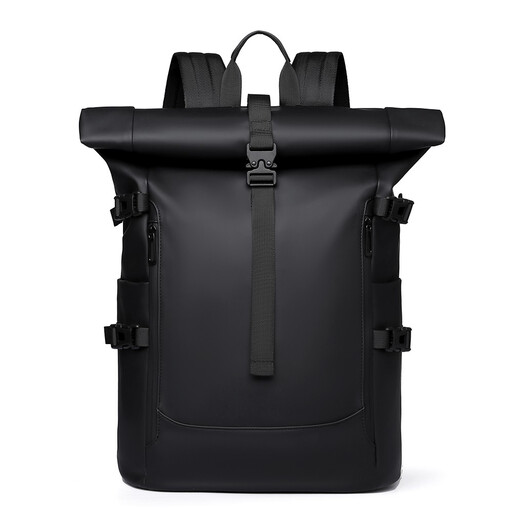
Why This Fits Their Persona: A practical choice for students and professionals starting out who want to carry a laptop, books and everyday essentials in one casual backpack.
The product title states that the backpack is water-repellent, not fully waterproof. Use an additional cover in heavy rain and check your laptop’s dimensions.
Roll-top design and generous capacity; according to the product description, it is suitable for work, cycling and everyday urban use.
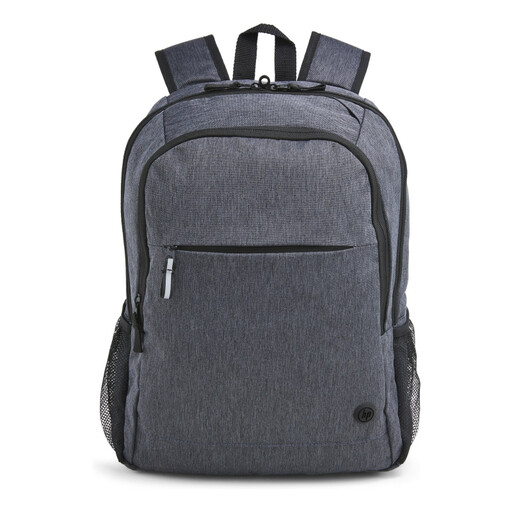
Why This Fits Their Persona: A strong fit for professionals seeking a laptop backpack with a refined appearance for daily commuting and carry-on travel.
According to HP’s product description, the bag has a padded 15.6-inch compartment, a water-repellent finish and lockable zippers. These features do not guarantee protection against theft or water damage.
Weighing approximately 480 grams; trolley sleeve, reflective details and cable pass-through according to the specifications.

Why This Fits Their Persona: Designed for travellers and commuters who carry clothing, documents, accessories or lunch alongside their laptop.
The capacity is clearly specified: 25 litres, expandable to 30 litres. This allows you to compare the extra space with your actual load instead of relying solely on claims such as “large capacity”.
Expandable capacity, chest strap and multiple compartments; the product description also mentions an RFID-blocking pocket and lockable zippers.
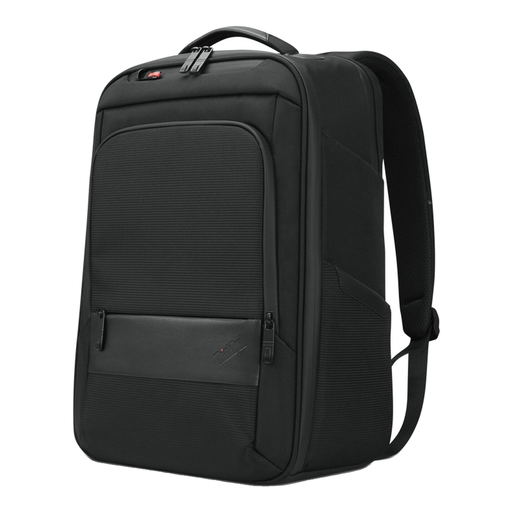
Why This Fits Their Persona: A business laptop backpack for anyone who wants to carry documents, accessories and a ThinkPad-compatible laptop in an organised way.
The specifications list the dimensions, weight, laptop compartment and zipped pocket. Because both 15- and 16-inch compatibility are mentioned, checking your laptop’s dimensions is especially important.
Dimensions of 30 × 43.5 × 18.5 cm, a grab handle and, according to the product information, 70% recycled materials.
We have curated an up-to-date selection of business backpacks, with a focus on laptop compatibility, organisation, carrying comfort and everyday use in the Netherlands.
No. Screen size is only one factor. Measure your laptop in centimetres and compare those dimensions with the laptop compartment. Account for a protective sleeve, rounded corners and additional thickness.
Choose a model made with water-repellent fabric and, ideally, covered zippers, but do not automatically regard it as waterproof. In prolonged rain, use a separate rain cover and do not place the laptop against the outer wall without a padded compartment.
That depends on how you use it. The port is particularly convenient if you carry your own power bank while travelling. Before buying, check that the cable pass-through is accessible and that the backpack still offers sufficient compartments and carrying comfort without a power bank.
