
Vandaag of morgen in huis

Kwaliteit gegarandeerd

Welkomstaanbiedingen ontgrendelen: GRATIS bezorging | Tot 80% korting | Gratis 30 dagen JoyPlus-proefperiode
Download de app
A 15.6-inch laptop backpack may seem like a straightforward purchase at first glance. Yet many models fit less well than expected, offer limited protection or turn out to rely heavily on marketing language for their supposed features. For students, commuters, business professionals and travellers, the key is finding the right balance of fit, carrying comfort and genuinely useful storage.
The following considerations will help you choose a 15.6-inch laptop bag that suits your everyday needs.
The size of a laptop screen is not the same as the laptop’s external dimensions. A 15.6-inch laptop may be thicker or wider because of its chassis, numeric keypad or reinforced edges. Always check the dimensions of the laptop compartment and compare them with your device.
A model described simply as “suitable for 15.6 inches” may be too tight in practice. A slightly roomier compartment is more practical, but make sure the laptop cannot move around freely inside it.
A water-repellent laptop backpack can help keep light rain at bay for a limited time. That does not automatically mean that the seams, zippers and laptop compartments are fully waterproof. Read the product description carefully and care for water-repellent materials according to the maintenance instructions.
For everyday cycling in the Netherlands, a covered zipper, a securely closing laptop compartment and, if necessary, a separate rain cover are more useful than the words “water resistant” alone.
With a laptop backpack with a USB port, you usually get only a pass-through connection. You connect your own power bank inside the bag, which then supplies power to your phone. The backpack generally does not contain a built-in battery. Check whether there is enough room inside for a power bank and whether the cable remains accessible without being bent sharply.
A large number of compartments is not necessarily a sign of a practical layout either. Check whether cables, chargers, a mouse, documents and a water bottle can each be stored separately.
Look for a padded laptop compartment that supports the computer on all sides. A raised base that does not rest directly on the ground reduces the risk of hard impacts during everyday use. Also check whether the compartment can be secured with a strap, zipper or elastic closure.
For commuting, a backpack is often more comfortable than a laptop shoulder bag because the weight is distributed across both shoulders. A business backpack may be suitable for the office, but consider whether its professional appearance comes at the expense of carrying comfort.
Nylon and polyester are commonly used for lightweight work backpacks. In the product information, look for:
The laptop briefcase model below, for example, is listed as featuring water-repellent nylon, reinforced stitching and metal zippers. The product description also states that its eco-friendly claim is not supported by independent certification. This is a good example of why material claims should be assessed individually.
A spacious laptop bag is not always practical if the main compartment loses its shape easily or the shoulder strap digs into you. Look for padded straps, a chest strap on backpacks and a detachable shoulder strap on bags.
For school and travel, additional compartments for notebooks, passports, cables and accessories are useful. Anyone who commutes by train every day may also appreciate a luggage strap or a discreet back pocket.

Why it stands out: A practical choice for students and commuters looking for a slim 15.6-inch laptop backpack with a connection for their own power bank.
The USB function is not presented as a standalone battery. Use your own power bank and check in advance that there is enough internal space for the cable and charger.
Listed as water-repellent and lightweight; the USB port is designed to connect to an external power source.
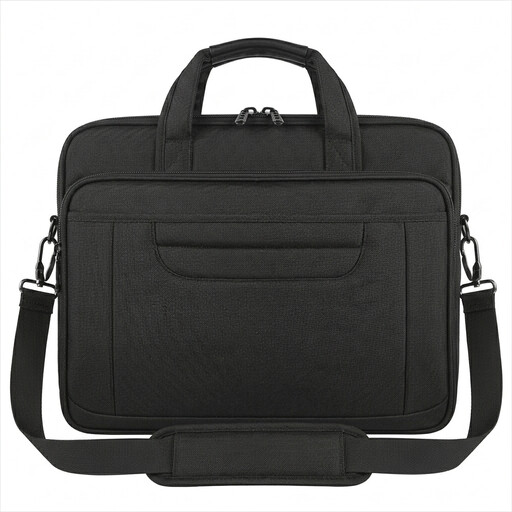
Why it stands out: Ideal for the office, business appointments and train journeys when you prefer carrying a handbag, shoulder bag or briefcase.
The bag is listed as suitable for laptops up to 15.6 inches and measures 40.6 × 30 × 7.5 cm. Compare these dimensions with your own laptop before ordering.
Water-repellent nylon, a detachable shoulder strap, luggage strap and rear pocket. The listed weight is 800 grams.
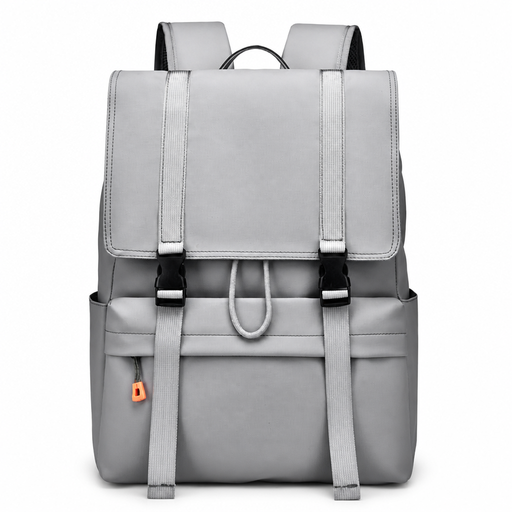
Why it stands out: A spacious backpack for school and travel, city commutes and days when you carry documents and accessories alongside your laptop.
The product name highlights water resistance and generous capacity, but the available information does not specify the exact volume or protection rating. Check these details before buying.
Flip-top design, drawstring closure and a product description that supports use for school, work, city travel and trips.
Browse the latest selection and compare models by layout, carrying style, dimensions and features to suit your daily routine.
A foldable tote bag such as the Beneunder GP155 weighs approximately 64 grams according to the product information and has a capacity of 16 litres. This is primarily a lightweight extra bag for shopping, travel or everyday use. The available information does not mention a padded laptop compartment, so do not use this model as a replacement for a protective laptop backpack.
No. Screen size is only one factor. Compare the length, width and thickness of your laptop with the dimensions of the laptop compartment. Also allow for any sleeve or protective case you intend to keep using.
That depends on the weight carried, how you use the bag and the quality of its seams, zippers and straps. Do not overload it, as excessive tension on zippers and seams can accelerate wear. Clean the bag according to the care instructions and allow wet material to air-dry.
It can be useful if you often want to charge your phone while travelling and already own a compatible power bank. The USB port itself normally does not supply power. Also compare laptop protection, carrying comfort and interior organisation; these features have a greater impact on everyday use than the port alone.
