
Vandaag of morgen in huis

Kwaliteit gegarandeerd

Welkomstaanbiedingen ontgrendelen: GRATIS bezorging | Tot 80% korting | Gratis 30 dagen JoyPlus-proefperiode
Download de app
A 15.6-inch laptop backpack may seem easy to choose at first glance. However, models can differ significantly in fit, protection, carrying comfort and internal organisation. A backpack that looks spacious in the product photos may not have enough room in everyday use for a charger, lunch box or documents. “Water-repellent” can also mean something very different from fully waterproof.
For students, school pupils, commuters, business users and travellers, three pitfalls are particularly important:
15.6 inches refers to the diagonal screen size. Alongside the screen size, therefore, check your laptop’s actual dimensions, including any broad casing. Look for the following in the product information:
The specifications for the Lenovo ThinkPad Professional 2nd Generation Laptop Backpack state a maximum screen size of 16 inches. However, the product description refers to protection for laptops up to 15 inches. This discrepancy is a reason to compare your own laptop’s dimensions with the latest product information before purchasing.
A water-repellent laptop backpack is practical for cycling, walking to the station or dealing with a brief shower. Pay close attention to the wording:
A padded laptop compartment helps reduce scratches and minor impacts, but it is not a substitute for a protective sleeve when travelling extensively. Place the laptop with its more vulnerable side facing into the padded compartment and prevent heavy objects from pressing directly against it.
A lightweight laptop backpack is comfortable when you commute daily by bike, train or bus. Check whether the shoulder straps are adjustable and padded. A chest strap can provide additional stability when the bag is full, while a top handle is useful for shorter distances.
A laptop backpack with multiple compartments makes it easier to keep a charger, mouse, documents and personal belongings organised separately. Do pay attention to the overall capacity, however. A large number of compartments does not automatically mean that each one is large enough for an A4 folder or water bottle.
For air travel or commuting, a luggage sleeve is a useful addition. It allows you to place the backpack over the handle of a wheeled suitcase. A laptop backpack with a USB port only works in combination with a power bank and cable; the port itself is not a built-in battery.

Why it suits this profile: The title describes a business backpack for 15.6-inch laptops, featuring a USB charging port, water-repellent design and lightweight construction. That makes it suitable for everyday use at school, in the office or during a daily commute.
The product title explicitly lists the key features. Before ordering, however, check the actual compartment layout and the USB port connection in the latest specifications.
The listed features include a 15.6-inch format, water-repellent material, lightweight design and a USB charging port.
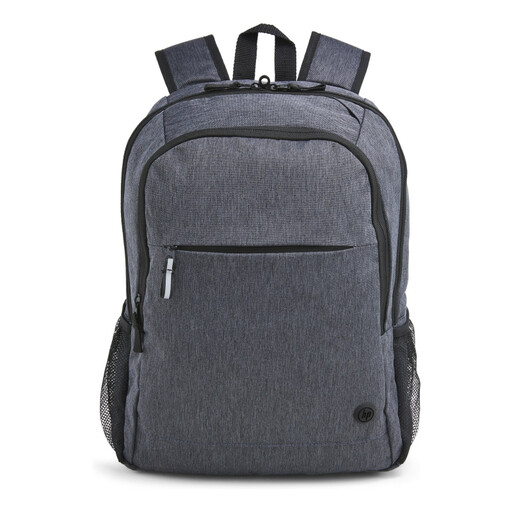
Why it suits this profile: According to the product information, this business laptop backpack features a padded compartment for a 15.6-inch laptop, padded adjustable shoulder straps, a luggage sleeve and reflective details.
The specifications mention not only a water-repellent outer layer, but also the size and carrying options. Do not use the bag as fully waterproof luggage without an additional cover.
The stated features include 95% recycled external material, a padded laptop compartment, lockable zips and a trolley sleeve.
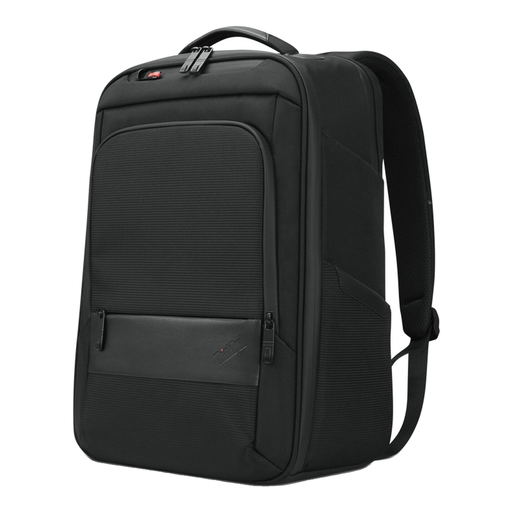
Why it suits this profile: The stated dimensions of 30 × 43.5 × 18.5 cm provide room for accessories and documents. The model features a handle, zipped compartments and a laptop compartment for everyday work or travel.
The external dimensions make clear that this is not an ultra-slim sleeve. Do check the conflicting maximum-size references of 15 and 16 inches before placing a larger model inside.
The specifications list 70% recycled material, a laptop compartment, zipped compartments and a handle.
Browse a current selection of stylish laptop backpacks and compare size, organisation and features based on how you intend to use yours.
No. Screen size, bezel thickness and laptop casing vary by model. Measure your laptop and compare those dimensions with the laptop compartment. Also check the shape of the opening and the fastening mechanism.
For light rain, a water-repellent outer layer can be useful. However, the product information does not automatically prove that the bag is fully waterproof. In prolonged or heavy rain, provide additional protection for your laptop and documents with a cover or waterproof inner bag.
Its lifespan depends on the load, materials, zips and daily maintenance. Avoid overloading the bag, do not place sharp objects next to the laptop and clean it according to the manufacturer’s instructions. A backpack showing wear at the seams or straps should be replaced in good time to prevent its contents from being lost.
