
Vandaag of morgen in huis

Kwaliteit gegarandeerd

Welkomstaanbiedingen ontgrendelen: GRATIS bezorging | Tot 80% korting | Gratis 30 dagen JoyPlus-proefperiode
Download de app
A 15.6-inch laptop backpack may seem easy to choose at first glance. However, not every 15.6-inch laptop will automatically fit properly in every compartment. A large number of compartments, a USB port or the term “waterproof” can also create the wrong impression. Students, school pupils, professionals, commuters and travellers do not all have the same requirements.
With this practical guide, you can assess the dimensions, protection, capacity and carrying comfort. That way, you can find a laptop backpack that suits your daily journey, working day or trip.
A 15.6-inch laptop has a screen diagonal of approximately 39.6 cm. However, the external dimensions vary by brand and model. A 15.6-inch laptop backpack may therefore still be too tight because of a thick casing, wide bezel or additional protective sleeve.
Check the following before buying:
A waterproof laptop backpack should not automatically be regarded as completely resistant to prolonged rain or immersion. Sometimes a product only specifies water-repellent fabric or a water-resistant construction. This may be sufficient for a short cycle through light rain, but it does not mean that your laptop will stay dry in all conditions.
Pay attention to the specific product information. Look for details about the material, fastening, seams and any protective covers. In heavy rain, also avoid placing electronics next to an open external pocket.
A laptop backpack with a USB port sounds convenient, but the port generally does not provide power by itself. You will usually need a power bank inside the bag, connected with a cable. Also check whether the compartment is large enough for your charger, documents, lunch and accessories.
A spacious laptop backpack is not always more comfortable. More capacity also means more weight. A good layout, sturdy zips and adjustable straps are therefore more important than the stated number of litres alone.
For a laptop backpack for work or school, a suitable, padded laptop compartment is an important starting point. Do not choose based solely on “15.6 inches”; compare the dimensions of your own laptop with the product specifications.
Do you have a compact model? A 14-inch laptop backpack or laptop bag may be more practical. An oversized compartment does not always keep the laptop securely in place.
For everyday use, 15 to 25 litres may be sufficient. If you carry clothing, sports equipment or travel essentials alongside your laptop, a larger bag may be more suitable. An expandable laptop backpack provides flexibility without requiring the bag to remain fully expanded at all times.
According to the product information, the HP Travel 25L 15.6-Inch Blue Laptop Backpack has a capacity of 25 litres, expandable to 30 litres. The bag weighs approximately 860 grams and has a separate laptop compartment, various storage pockets, chest straps and lockable zips in the main compartment.
Look for padded shoulder straps, a padded back panel and the ability to adjust the straps properly. A chest strap can help keep the shoulder straps in place while cycling or walking, but it does not distribute the weight completely.
Additional features can be useful when travelling, such as a trolley strap, lockable zips or a hidden pocket. Manufacturers intend an RFID-blocking pocket to restrict certain types of wireless communication. According to HP’s product description, the HP Travel backpack has a hidden RFID-blocking pocket. This is not a guarantee against theft or data loss.
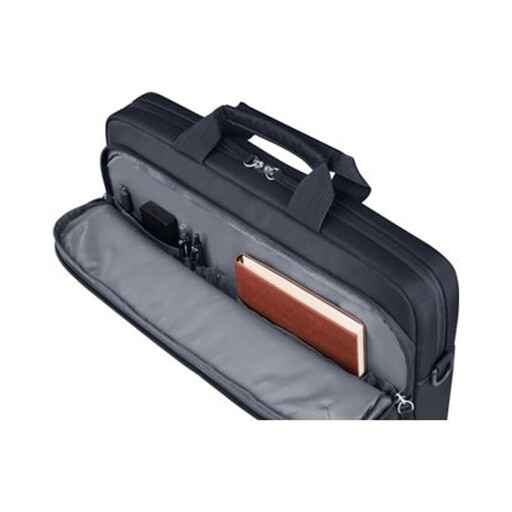
Why it suits this profile: This model is suitable for anyone looking for a compact bag for a 14-inch laptop, documents and everyday accessories. It can be carried by hand or using the detachable shoulder strap.
The product information clearly states a maximum size of 14.1 inches and a capacity of 9 litres. This means you will not buy a large bag assuming that it is designed for a 15.6-inch laptop.
Padded laptop compartment, water-resistant polyester, trolley strap and detachable shoulder strap.

Why it suits this profile: This laptop backpack for work, commuting and travel combines a 15.6-inch laptop compartment with extra space for clothing, snacks and accessories.
The capacity is clearly stated as 25 litres, expandable to 30 litres. The product description also mentions a laptop compartment, multiple compartments and lockable zips.
Expandable capacity, chest straps, RFID-blocking pocket and a stated weight of approximately 860 grams.
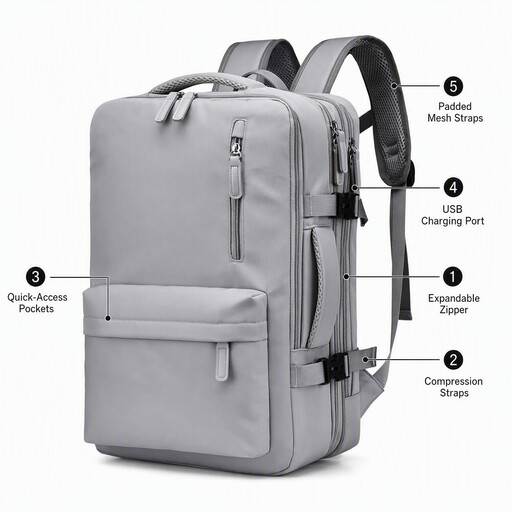
Why it suits this profile: The product title mentions an expandable design, a 15.6-inch laptop compartment, multiple pockets and an external USB charging port. This makes it suitable for travellers and commuters who carry a lot with them.
The USB port is not presented as a built-in charger: you need a suitable power bank and cable. Also check the current dimensions of the laptop compartment before buying.
Expandable construction, external USB port and, according to the product title, a water-resistant design.
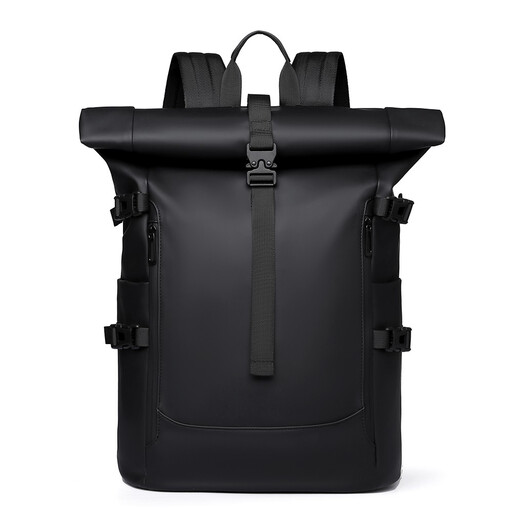
Why it suits this profile: A roll-top model is ideal for cyclists, commuters and urban users looking for an adjustable opening and a casual design for work, cycling or travel.
The product title says water-repellent, not guaranteed waterproof. Use additional protection for your laptop during prolonged rain.
Roll-top closure, spacious everyday layout and, according to the product title, a water-repellent design for work, cycling and urban travel.
We have put together a complete, up-to-date list of products that fully meet these strict selection criteria and the applicable European safety regulations.
No. Screen size is only one measurement. Also compare your laptop’s length, width and thickness with the laptop compartment. Allow for a case or sleeve, and check that the zip closes without pressure.
Its lifespan depends on the material, zips, seams, load and conditions of use. Do not overfill the bag, distribute heavy items across several compartments and store sharp objects separately. Clean polyester according to the product instructions; for example, the HP Everyday bag is recommended to be cleaned with a damp cloth and not in a washing machine.
It can be convenient when travelling, but the port is usually only a pass-through connection to a power bank inside the bag. Check which cable you need and use a suitable power bank. The USB port does not replace a charger and says nothing about how well your laptop is protected.
