
Vandaag of morgen in huis

Kwaliteit gegarandeerd

Welkomstaanbiedingen ontgrendelen: GRATIS bezorging | Tot 80% korting | Gratis 30 dagen JoyPlus-proefperiode
Download de app
A 15.6-inch laptop backpack might seem like a straightforward purchase at first. But there are significant differences in fit, protection, comfort and storage space. A bag that looks spacious on the product page may not have enough room in practice for a charger, lunch box or documents. Terms such as ‘water-resistant’ and ‘USB charging port’ are not always clearly explained either.
Use these checks to choose a laptop backpack for everyday use in the Netherlands with confidence.
A 15.6-inch laptop doesn’t have a universal external size. Screen diagonal is only one factor; dimensions can vary between brands and models. So, as well as checking ‘15.6 inch’, check the dimensions of the laptop compartment. A padded laptop compartment gives your laptop extra separation from other belongings, but it’s only useful if your laptop isn’t too tight or too loose inside.
Look out for conflicting product information, too. The NINETYGO College-Style Dual-Shoulder Backpack title says it supports laptops up to 15.6 inches, while the product specifications state compatibility up to 14 inches. If you’re considering this backpack, it’s worth checking the current dimensions with the seller before ordering.
A water-repellent laptop backpack can help keep out light rain or splashes. That doesn’t mean it’s suitable for prolonged exposure to heavy rain. Pay attention to the wording used:
A rain cover can provide extra protection for everyday cycling. Also, keep your laptop in its separate compartment and don’t put a wet umbrella next to electronic devices. For example, the NINETYGO College-Style backpack states that it has level 4 water repellency, but also warns that the material isn’t fully waterproof.
A spacious laptop backpack is useful for work, study or travel, but a large number of compartments won’t necessarily make a bag easier to organise. Check whether the layout suits what you carry:
A business backpack with well-placed zipped pockets may be more practical than an extremely large model without a set layout. Consider access, too: a separate side pocket for your laptop is handy for checks on public transport, while a wide opening can be useful when you’re carrying more.
Choose a laptop backpack with a padded laptop compartment and check the maximum laptop size in both centimetres and inches. A compartment for a 15.6-inch laptop won’t always fit a bulky gaming laptop. If your laptop has a large charger and you also carry a tablet and accessories, check the total capacity in litres as well.
For school and the office, a capacity of around 15 to 25 litres is often practical. If you’re taking clothes, documents and electronics for an overnight stay, consider an expandable travel backpack instead. According to the product information, the HP Travel 25L backpack expands from 25 to 30 litres.
Nylon, polyester and reinforced fabrics are common in this category. Don’t just look at the material name; check:
According to its product specifications, the Kensington SP25 uses 1680D nylon and has thickened inner compartments. The NINETYGO College-Style backpack is made from 900D tear-resistant fabric, according to its product description. These figures are useful for comparing products, but don’t tell you on their own how long a bag will last. Overloading can put extra strain on the seams, zips and straps.
A comfortable backpack for carrying a laptop has adjustable, preferably padded shoulder straps and a back panel that doesn’t feel unnecessarily rigid. A chest strap can help keep the bag stable when travelling or cycling. Pack heavy items close to your back, and don’t put sharp objects directly next to your laptop.
A lightweight bag isn’t always the right choice: a lower weight can mean less padding or a less supportive design. So, compare the bag’s weight when empty with the protection and layout you need.

Why it suits this type of buyer: The product title mentions a 15.6-inch laptop compartment, a USB charging port and a water-repellent design. These features suit students and commuters looking for the basics for school and work. Before buying, check the exact dimensions and whether a power bank is included.
The features listed help you understand what to look for, but they won’t prevent a sizing mismatch. Compare your laptop’s dimensions with those of the inner compartment instead of relying on screen size alone.
USB charging port according to the product title; business-style design; water-repellent design according to the product title.
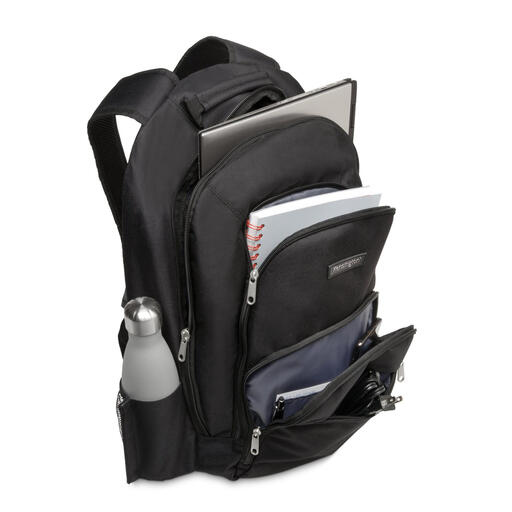
Why it suits this type of buyer: This business backpack is designed for professionals who want to carry documents, accessories and a laptop in an organised way. Its stated dimensions are 480 × 330 × 180 mm, and it weighs 710 grams.
The specifications list a nylon exterior, thickened laptop compartments and several accessory pockets. This makes it easier to assess protection and organisation than relying on a marketing term alone.
1680D nylon according to the product specifications; thickened laptop compartments; several zipped and accessory pockets.

Why it suits this type of buyer: According to the product information, this laptop backpack for travel and commuting has a 25-litre capacity, expandable to 30 litres. Chest straps, several compartments and a trolley strap are handy for longer journeys.
The expandable capacity means you don’t need a different bag for every trip. However, the product information warns against overloading it: extra space doesn’t mean you can carry unlimited weight.
25 to 30 litres of capacity; chest straps; trolley strap; RFID-blocking pocket and lockable zips according to the product description.
We’ve put together a complete, up-to-date list of products that meet these strict selection criteria and the applicable European safety regulations.
No. Check your laptop’s external dimensions and compare them with the dimensions of the laptop compartment. Also consider the laptop’s thickness and whether there’s room for a protective case.
Its lifespan depends on the material, zips, load and conditions of use. A bag that’s packed heavily every day will wear out faster than one used for light commuting. Stick to the recommended capacity, avoid overloading and follow the care instructions. Only clean the bag in the way recommended by the manufacturer.
A USB port on a laptop backpack usually connects to a power bank; the backpack itself generally doesn’t provide power. So, check whether a power bank is included, where it should be placed and which cable you’ll need. Keep electronic devices dry and don’t use damaged cables.
