
Vandaag of morgen in huis

Kwaliteit gegarandeerd

Welkomstaanbiedingen ontgrendelen: GRATIS bezorging | Tot 80% korting | Gratis 30 dagen JoyPlus-proefperiode
Download de app
A 14-inch laptop sleeve may seem like a simple purchase, but the wrong size or fastening can cause problems every day. A case that is too roomy shifts around during transport, while one that is too tight can put pressure on your laptop. Terms such as “waterproof”, “shockproof” and “universal fit” do not always mean what you might expect either.
For students, professionals, home workers and travellers, three things are particularly important: the internal dimensions, the level of protection and how you plan to use the case. Below, you’ll find what to look out for and which options suit different situations.
A 14-inch laptop does not always have the same external dimensions. The screen diagonal tells you nothing about the thickness, bezel width or shape of the casing. Therefore, check the dimensions of your laptop and compare them with the internal dimensions of the sleeve.
For example, the Case Logic Reflect REFMB113A is offered as a 14-inch model, but the product specification states a maximum screen size of 33 cm, or 13 inches. This difference is a reason to check carefully before buying whether your device will fit.
A water-repellent laptop sleeve can protect against light splashes, but it is not automatically suitable for heavy rain or a wet bicycle bag. The Case Logic Reflect REFMB114 is described as having a splash-resistant design. At the same time, the usage instructions advise against using the sleeve in heavy rain.
Products made from PU faux leather sometimes mention “waterproof” or “water-resistant” in their descriptions. According to the VoxorAI product description, the models have been designed with a water-repellent or water-resistant outer material. Treat this as protection against limited exposure to moisture, not as a guarantee that your laptop will stay dry in all conditions.
“360-degree protection” or “shockproof” may sound clear, but check what construction lies behind the claim. Look for a soft lining, padding, protection around the zip and how securely the laptop stays in the sleeve. A slim laptop sleeve is lightweight and easy to carry, but it generally offers less room for robust impact protection than a larger laptop bag.
Measure your laptop at three points:
A 14-inch laptop sleeve is often suitable for several brands, but “universal” does not mean that every model will fit. According to the product description, the VoxorAI models are offered for brands including Apple, ASUS, Dell and Xiaomi. Even so, check the dimensions of your specific laptop or MacBook.
Also pay attention to the product designation. A laptop with a 14.1-inch screen may have different external dimensions from a compact 14-inch MacBook. A sleeve for a MacBook must therefore be chosen based on more than just the screen size.
A laptop sleeve with a zip closes all the way around and generally keeps the laptop securely in place. Check that the zip runs smoothly and that the zipped section does not come into direct contact with the edge of the laptop. The Case Logic Reflect REFMB114 uses a zip fastening and, according to the product specifications, is intended for a 14-inch laptop and a 14-inch MacBook Pro.
A magnetic flap can be opened quickly and suits a minimalist design. The VoxorAI models feature this type of flap. This is practical if you often take your laptop out of your bag, but check that the flap closes fully when the sleeve is carried upright.
Polyester is lightweight and suitable for everyday transport. The Case Logic Reflect REFMB114 is made from polyester and has a slim design. PU faux leather creates a different look and is combined with a faux-suede lining in the VoxorAI models.
If you also want to carry a mouse, charger or cable, choose a laptop sleeve with accessory compartments. A sleeve with compartments is more convenient for commuting, but often takes up more room than a simple sleeve. Avoid overfilling it: extra items can put pressure on the screen.
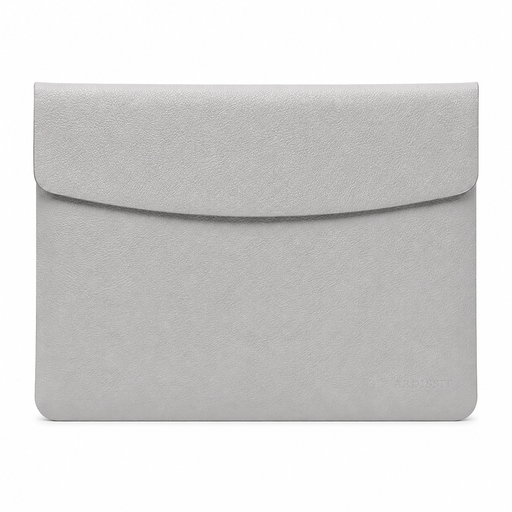
Why it suits this profile: Measuring 35 × 25.3 × 0.5 cm and weighing 300 grams, it is ideal for users looking for a lightweight sleeve for everyday transport.
The stated size and model type make it easier to compare options. The magnetic flap means you are not relying on an unclear universal fit, although you should still check your laptop’s dimensions.
PU faux leather, faux-suede lining, magnetic fastening and a weight of 300 grams.
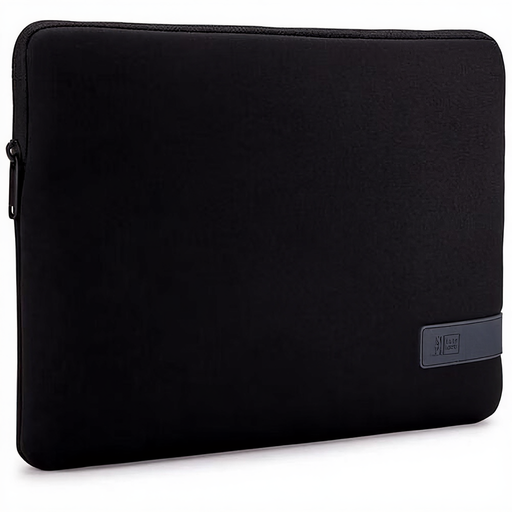
Why it suits this profile: A professional, slim laptop sleeve for anyone who values a familiar 14-inch format, a zip fastening and easy portability.
The product specifications state that this is a 14-inch model with a zip fastening and a weight of 213 grams. The instructions warn that the sleeve is not intended for heavy rain.
Polyester, zip fastening, slim design, splash-resistant construction according to the product information, and compatibility with a 14-inch MacBook Pro.
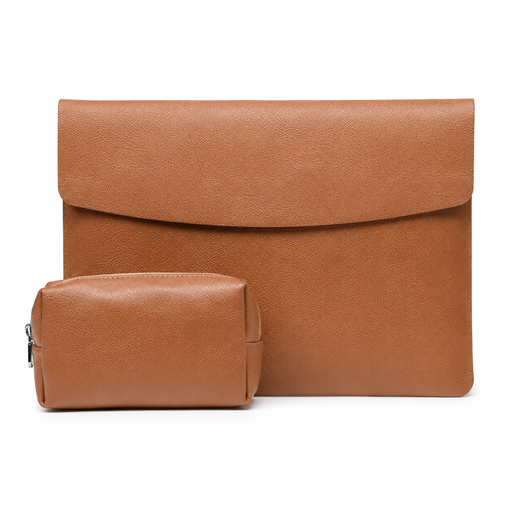
Why it suits this profile: The accessory pocket for a mouse and charger is practical for travellers, students and home workers who want to keep their essentials together.
The fixed dimensions of 35 × 25.3 × 0.5 cm make it easier to check the fit. The magnetic flap opens quickly, but it does not provide a full zip closure around the sleeve.
PU faux leather, faux-suede lining, an accessory compartment and a stated weight of 360 grams.
A compact sleeve is usually enough if you only carry your laptop. If you also take a charger, mouse, USB cables or documents with you, a model with extra compartments is more practical. Pay attention to the overall weight and prevent hard accessories from pressing against the laptop.
According to the product specifications, the HP Renew Business 14.1-Inch Laptop Sleeve has a front pocket, several compartments for cables and devices, an RFID pocket and a cable pass-through. This makes it suitable for workplaces where you regularly move between locations. The stated maximum screen size is 14.1 inches, so check that the external dimensions match your laptop.
We have put together a complete, up-to-date list of products that fully meet these strict selection criteria and the applicable European safety regulations.
No. Screen size is only one factor. Compare the width, depth and thickness of your laptop with the internal dimensions of the sleeve. Also take into account a fixed stand, screen protector or additional casing.
A zip closes the sleeve all the way around and helps prevent the laptop from sliding out. A magnetic flap opens more quickly and may be sufficient when carrying the sleeve inside a larger bag. The right choice depends on how you carry the sleeve and how often you take out your laptop.
Its lifespan depends on daily use, friction, moisture and the strain placed on the zip or flap. Do not store sharp objects in the same compartment, avoid overfilling the sleeve and clean polyester or PU faux leather according to the product instructions. A laptop sleeve also cannot protect against every type of pressure or fall, so transport your laptop carefully even when the sleeve is full.
