
Vandaag of morgen in huis

Kwaliteit gegarandeerd

Welkomstaanbiedingen ontgrendelen: GRATIS bezorging | Tot 80% korting | Gratis 30 dagen JoyPlus-proefperiode
Download de app
A 14-inch laptop sleeve might seem easy to choose, but screen size doesn’t tell the whole story. Laptops with a 14-inch screen can have different external dimensions depending on the make and model. Sleeves also vary considerably in fit, fastening, protection and storage space. If you only consider colour or price, you could end up with a sleeve that’s too roomy, difficult to close or too small for your charger.
Students, commuters and business users often come up against three common pitfalls:
Read on to find out which specifications to check in advance and which models suit different needs.
Measure your laptop at three points: width, depth and thickness. Compare these measurements with the sleeve’s internal dimensions. Remember to allow for any extra thickness from a protective hard case, rubber feet or a built-in battery.
A model with a magnetic flap, such as the VoxorAI sleeve, measures 35 × 25,3 × 0,5 cm, according to the product description. This gives you a useful guide, but always check that your specific Apple, ASUS, Dell, HP, Lenovo or Xiaomi model fits within these dimensions.
A sleeve that’s too roomy offers less stability when you’re on the move. One that’s too tight can put strain on the zip, flap or seams.
A protective laptop sleeve can be made from polyester, nylon, neoprene, imitation leather or a combination of these materials. The material mainly affects how the sleeve feels, how easy it is to clean and how much structure it provides.
Look out for the following:
If a brand uses terms such as ‘shock-resistant’ or ‘drop-resistant’, treat these as claims from the product information. The level of protection also depends on the drop height, surface, fit and conditions of use.
A slim laptop sleeve is useful when you’re putting your laptop in a backpack or work bag. If you want to carry your laptop on its own, a 14-inch laptop bag with a handle or shoulder strap may be a better choice.
A laptop sleeve with pockets may have room for:
Check the carrying comfort and weight. A lightweight sleeve weighing around 300 to 350 grams is ideal for everyday commuting. A bag with plenty of pockets and padding often weighs more, but may be more practical for long days at the office or university.
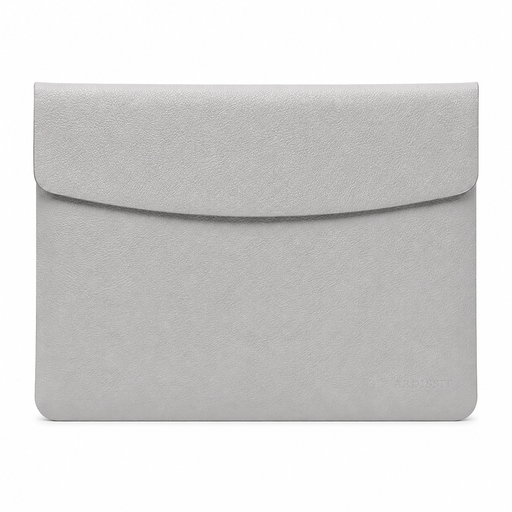
Why it suits this user: This compact 14-inch laptop sleeve is designed for anyone looking for a lightweight, simple way to carry their laptop in a backpack or handbag. According to the product description, it’s suitable for devices from brands including Apple, ASUS, Dell and Xiaomi.
The size, weight and fastening are clearly listed. However, water-repellent should not be taken to mean completely waterproof.
300 grams, 0,5 cm thick according to the specifications, PU imitation leather and a magnetic flap.
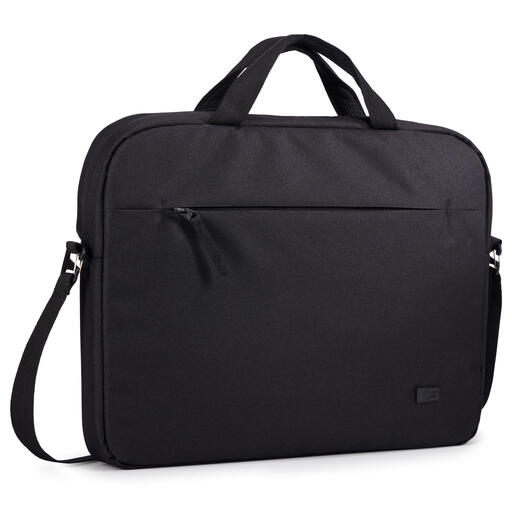
Why it suits this user: A good choice for students and professionals who want a sleeve with a handle and shoulder strap. The product information states that it’s made from 100% recycled polyester.
The product specifications state explicitly that the sleeve is moisture-resistant, not waterproof. This makes its limitations clear.
350 grams, a shoulder strap, a handle and integrated pockets for accessories.
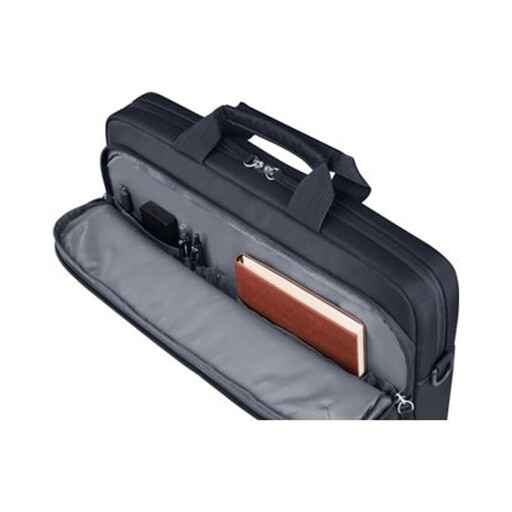
Why it suits this user: A practical choice for commuters and business users who need a laptop bag with a shoulder strap, space for documents and several accessory pockets.
The bag combines a padded laptop compartment with separate pockets. Its water-resistant finish is intended to protect against limited exposure to moisture.
9 litres of capacity, a detachable shoulder strap, a trolley strap and 600D polyester according to the product specifications.
We’ve put together a complete, up-to-date list of products that meet these strict selection criteria and the applicable European safety regulations.
No. Always check your laptop’s external dimensions and compare them with the sleeve’s internal dimensions. Thickness matters too, especially if your laptop has a built-in protective cover or an extra-thick base.
A water-repellent sleeve is generally designed for light showers or brief contact with moisture. Check the product information, and use an extra bag or rain cover in prolonged rain. Water-repellent doesn’t automatically mean waterproof.
Its lifespan depends on daily use, strain on the zip or flap, and how you store it. Don’t put sharp objects in a sleeve, avoid overfilling the pockets and check the seams and fastenings regularly. This will help keep your laptop protected for longer.
