
Vandaag of morgen in huis

Kwaliteit gegarandeerd

Welkomstaanbiedingen ontgrendelen: GRATIS bezorging | Tot 80% korting | Gratis 30 dagen JoyPlus-proefperiode
Download de app
A 14-inch laptop sleeve may seem like a simple product: put your laptop inside, close the zip or flap and you’re ready to go. However, many disappointing purchases are caused by the wrong size, limited protection or a material that is less practical than the product photo suggests. Students, professionals and home workers often use their laptop sleeve every day in a rucksack, cycle bag or work bag. That’s when the details matter.
In this buying guide, you’ll learn what to look for in a 14-inch laptop sleeve, which product claims to assess critically and which models suit different situations.
A laptop with a 14-inch screen does not automatically have the same external dimensions as another 14-inch laptop. The bezel around the screen, the thickness of the casing and the shape of the corners may differ. So always check the internal dimensions of the sleeve and compare them with your laptop.
A sleeve that is too roomy allows the laptop to move around. A sleeve that is too tight can put strain on the zip, magnetic flap or edges of the laptop.
A water-resistant laptop sleeve can help limit the effects of light drizzle or spilled liquid. That does not mean the sleeve is suitable for prolonged exposure to heavy rain or submersion. Check the exact product description and, in bad weather, consider using an additional bag or rain cover.
According to the product descriptions of various models, they feature a water-resistant, moisture-resistant or “waterproof” design. As such performance claims are supplied by the brand or seller, it is wiser to treat them as an indication of intended use rather than a guarantee against water damage.
A thin slim laptop sleeve is convenient in a laptop bag, but it often has less room for substantial protection. A sleeve with foam, an EVA structure or a padded lining may be more suitable if you often carry your laptop on its own. Also, do not place heavy books or other hard objects on top of a laptop inside a sleeve.
Measure your laptop at three points:
Compare these measurements with the sleeve’s laptop compartment. The VoxorAI sleeve has stated dimensions of 35 × 25.3 × 0.5 cm. According to the product information, the model weighs 300 or 360 grams, depending on the version. So check which variant you select at checkout.
A zip closes the sleeve all the way around and helps keep the laptop in place. A magnetic flap may provide quicker access and a clean look, but check that the flap covers the entire opening.
A faux-suede lining, polyester interior or soft foam layer can help reduce contact with the laptop casing. Pay attention to the zip, too: a zip without a protective edge can cause scratches if used carelessly.
For carrying in a rucksack, a slim model is often sufficient. If you only carry the sleeve to university or the office, you may benefit more from a handle, shoulder strap or additional pockets. A laptop sleeve with accessories is practical if you also want to carry a mouse, charger, cables or documents.
However, check that additional pockets do not become overfilled. A full front pocket can put pressure on the laptop and distort the shape of the sleeve.
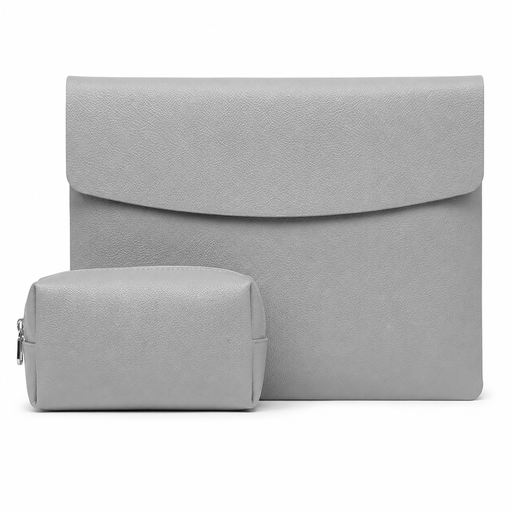
Why it suits this profile: This grey sleeve is designed for everyday transport and, according to the product information, comes with a mouse and charger. That can be useful for students or home workers who want to keep their essential accessories together.
The stated dimensions and weight of 360 grams make comparisons easier. However, check your laptop’s dimensions before ordering; “14 inches” alone does not guarantee a good fit.
PU faux leather, faux-suede lining, magnetic flap and included accessories according to the product description.
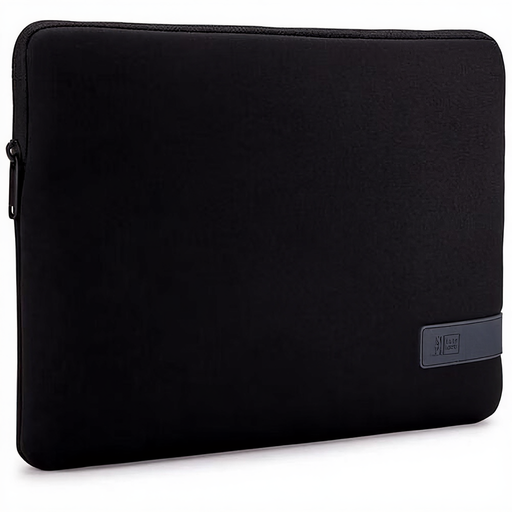
Why it suits this profile: A professional choice for those looking for a lightweight black sleeve to carry in a work bag or rucksack.
The product information mentions light impact protection and a splash-resistant design. The usage instructions also warn against heavy rain, making the limitation clear.
Polyester, zip closure, weight of 213 grams and support for laptops up to 14 inches according to the product specifications.
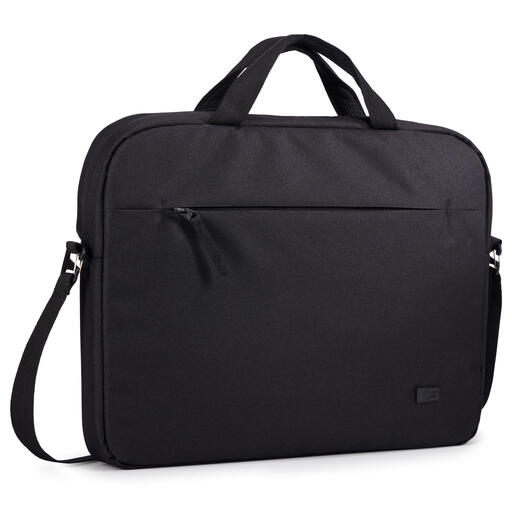
Why it suits this profile: Suitable for commuters and users who want to carry the sleeve on its own, thanks to the handle and shoulder strap.
The description states that the sleeve is water-resistant and warns that it is not waterproof. This tells you that an extra protective layer may be needed during prolonged rain.
100% recycled polyester according to the product description, integrated pockets, handle, shoulder strap and a stated weight of 350 grams.
We’ve put together a complete, up-to-date list of products that fully meet these strict selection criteria and the applicable European safety regulations.
A laptop sleeve for Apple ASUS Dell Xiaomi can only be used as a general indication. Not every model from these brands has the same dimensions. For example, a 14-inch MacBook Pro may have a different thickness or corner shape from a 14-inch ASUS or Dell laptop.
Use this checklist:
A 13.3-inch sleeve may sometimes physically fit around a compact laptop, but do not buy based solely on screen size. The Case Logic models for 13 to 13.3 inches are therefore not automatically suitable for every 14-inch laptop.
Clean a polyester or PU surface with a soft, slightly damp cloth. Do not use harsh cleaning products unless recommended by the manufacturer. Allow a damp sleeve to dry completely before putting your laptop back inside.
Do you carry your laptop by bike every day? Close the zip or flap fully and place the sleeve upright in your bag. In heavy rain, a water-resistant laptop sleeve remains an extra layer of protection, not a replacement for protection against prolonged exposure to moisture.
No. Screen size does not tell you enough about the external dimensions. Compare the width, depth and thickness of your laptop with the sleeve’s internal dimensions.
Usually not. Products are often described as water-resistant, splash-resistant or moisture-resistant. This does not guarantee protection in heavy rain or during submersion. Always check the limitations in the product information.
Its lifespan depends on how it is used, as well as the material, closure and load. Regularly check the seams, zip, flap and lining. Replace the sleeve when the inner layer starts to come away or the laptop is no longer held securely in place.
