
Vandaag of morgen in huis

Kwaliteit gegarandeerd

Welkomstaanbiedingen ontgrendelen: GRATIS bezorging | Tot 80% korting | Gratis 30 dagen JoyPlus-proefperiode
Download de app
A 14-inch laptop may look compact, but it won’t necessarily fit every laptop sleeve labelled the same size. The laptop’s external dimensions, thickness and the space available for a charger can vary from model to model. A sleeve that’s too roomy offers little stability, while one that’s too tight puts strain on the zip or fastening.
For students, professionals and travellers, three common pitfalls are particularly important:
Compare your laptop’s dimensions with the internal measurements of the sleeve. Don’t just look at the screen size; also check:
A laptop sleeve for a MacBook may be suitable for a 14-inch MacBook Pro, but always check the latest product specifications to be sure. Asus, Dell, HP and Xiaomi laptops can also have the same screen size but different external dimensions.
A protective laptop sleeve can offer different types of protection. A soft lining mainly helps prevent scratches and minor knocks. Extra padding or a separate padded laptop compartment is more practical if you carry your laptop in a rucksack or work bag every day.
Pay attention to the wording in the product description:
The construction of the bag is just as important as the material. A wraparound zip will generally work differently from a magnetic flap. With a magnetic fastening, it’s worth checking that the laptop stays securely in place while you’re carrying it.
A slim black laptop sleeve is handy for commuting when you carry your laptop in a rucksack. For train journeys, meetings and trips to the office, a laptop sleeve with a shoulder strap may be more practical. A carry handle makes it easier to move between your desk, meeting room and car.
Think about your accessories too:
A water-resistant laptop sleeve is useful for short journeys in changeable British weather. However, check whether the manufacturer clearly states that the product isn’t waterproof. In heavy rain, it’s better to use an extra bag or a rain cover.
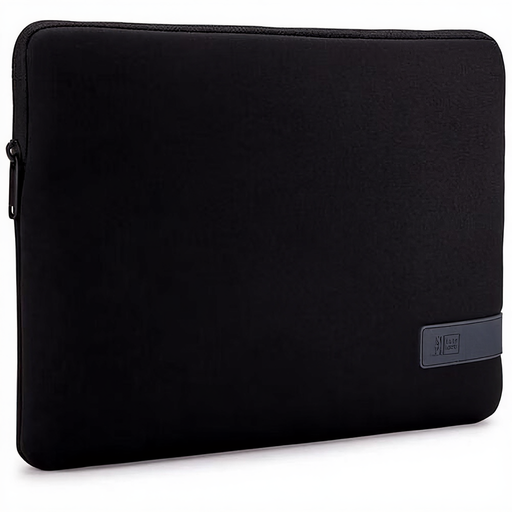
Why it suits this profile: This compact black sleeve is designed for 14-inch laptops and is easy to carry in a rucksack or under your arm. According to the product information, it weighs 213 grams and has a zip fastening.
The product description mentions light impact protection and a splash-resistant design. This makes it clear that the sleeve is intended for everyday use, not heavy rain or drops.
Polyester material, zip fastening, suitable for 14-inch laptops and weighs 213 grams.
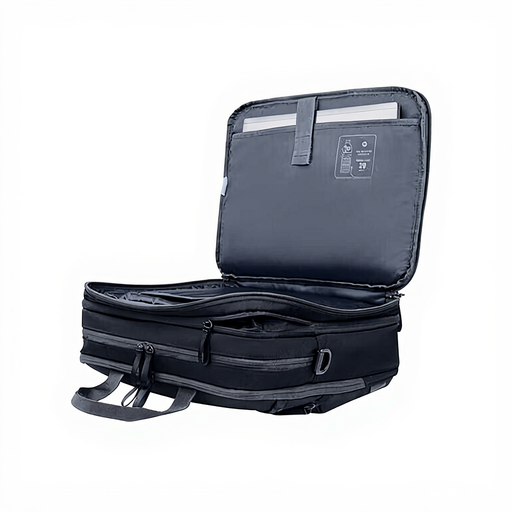
Why it suits this profile: This business bag is designed for people who want to carry their laptop, documents and personal belongings together. According to the product specifications, its capacity can be expanded from 15 to 20 litres.
This bag isn’t just about a slim appearance: three compartments, padding and several pockets make it easy to see how much storage space is available.
Water-resistant polyester, 180-degree access, padded pockets and an RFID pocket, according to the product information.
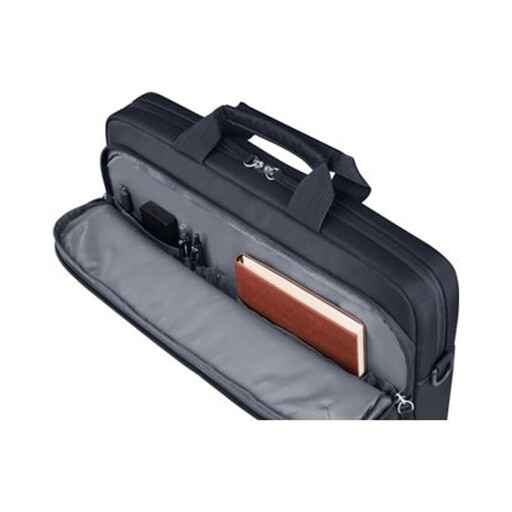
Why it suits this profile: For commuting and travelling, this 14-inch laptop bag offers extra structure, a detachable shoulder strap and a trolley strap. According to the specifications, it has 9 litres of storage space.
The padded laptop compartment, storage pockets and stated water-resistant finish make its function clearer than a marketing claim about style alone.
600D polyester, padded compartment, 9-litre capacity, document storage, detachable shoulder strap and trolley strap.
We’ve put together a complete, up-to-date list of products that meet these strict selection criteria and current European safety regulations.
No. Screen size is only one factor. Compare your laptop’s width, depth and thickness with the laptop compartment. Also check whether you’ll need extra room for a charger or protective hard case.
A water-resistant design is intended for limited exposure to moisture. According to the product information for various models, this isn’t the same as being waterproof. For prolonged or heavy rain, it’s better to use additional rain protection.
Its lifespan depends on the material, zips, how much you carry and how often you use it. Don’t overfill the side pockets, keep sharp objects away from your laptop and close the zip fully. When buying, also check the statutory guarantee and any additional manufacturer’s warranty.
