
Vandaag of morgen in huis

Kwaliteit gegarandeerd

Welkomstaanbiedingen ontgrendelen: GRATIS bezorging | Tot 80% korting | Gratis 30 dagen JoyPlus-proefperiode
Download de app
As a Joybuy Product Recommendation Officer, I see daily how many people invest in a compact 13-inch laptop, such as a MacBook or Ultrabook. It's a convenient size for on-the-go use, whether you're a student, professional, or commuter. But how do you ensure your valuable device survives the daily journey to the office, university, or a coffee shop unscathed? A quality protective sleeve isn't a luxury; it's a necessity.
The market for laptop sleeves is vast, and it can be challenging to see through the marketing claims. That's why we've curated a selection based on clear specifications and practical features. This article will help you make an informed decision for a 13-inch laptop sleeve that suits your needs.
Before we look at the products, here are a few practical tips to help you determine what you really need.
The type of material largely determines the level of protection. A soft polyester sleeve, often called a softcase, is lightweight and flexible. It typically offers good protection against scratches and minor bumps. For those seeking more robustness, a sleeve made of EVA foam (Ethylene Vinyl Acetate) is a better option. This material is shock-absorbent and, as a hardcase, offers more protection against drops and pressure. So, consider whether you need a 13.3-inch laptop protective sleeve for basic protection inside another bag, or one that can withstand impacts on its own.
Are you a minimalist, or do you prefer to have everything organised and within reach? A simple sleeve is slim and easy to carry. Models with extra pockets, like the Case Logic laptop sleeve we discuss below, offer space for a charger, mouse, or notepad. Some sleeves even have a handle, allowing them to function as a compact 13-inch laptop bag. A black laptop sleeve is often a popular choice for its neutral and professional look.
The terms "13-inch" and "13.3-inch" are often used interchangeably, but the dimensions of laptops can vary. Always check the internal dimensions of the 13-inch laptop sleeve and compare them with your laptop's dimensions. A sleeve that's too loose offers less protection, while one that's too tight won't fit or will put stress on the zipper. The product details almost always list the exact compartment dimensions.
Based on material, functionality, and design, we've highlighted three popular choices for you.
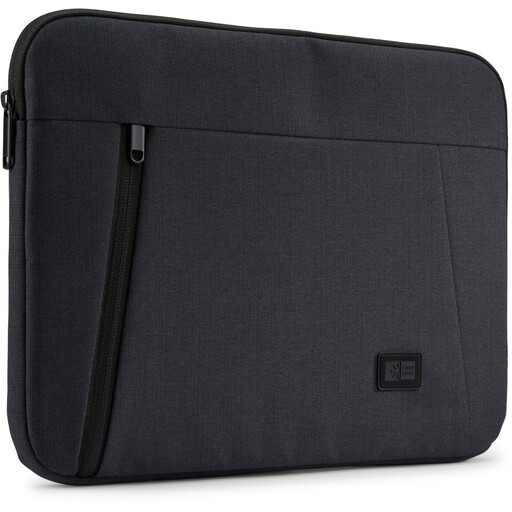
Why it stands out: This sleeve combines protection with organisation. The zippered front pocket is a practical detail for those who like to keep accessories such as a charger, cables, or a pen readily accessible.
Pros:
Who is this for? For the student or professional looking for a slim sleeve without sacrificing storage for essential accessories. Ideal for those who want to stay organised without carrying a large bag.
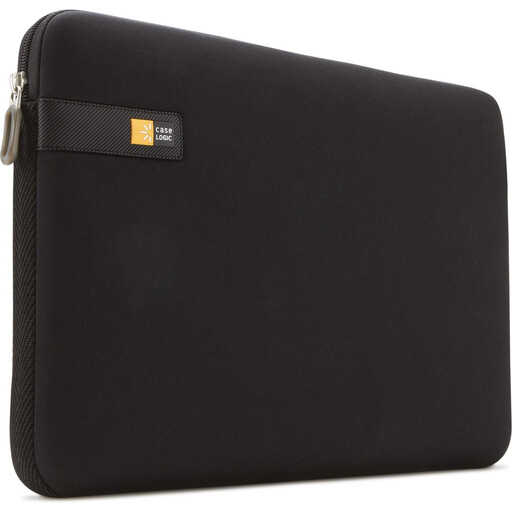
Why it stands out: This is a prime example of a minimalist sleeve. The focus is entirely on a slim profile and seamless protection, with no extra frills. The EVA foam provides excellent shock absorption.
Pros:
Who is this for? For the minimalist seeking a reliable 13.3-inch laptop protective sleeve as an extra layer of protection inside another bag. Perfect for those who value a clean design and portability.
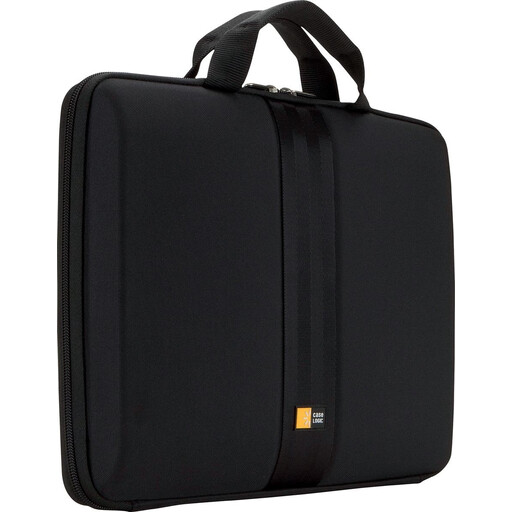
Why it stands out: This hardcase offers a higher level of protection. The sturdy EVA foam exterior is designed to better withstand pressure and impacts. The handle also adds an extra layer of functionality.
Pros:
Who is this for? For the user who frequently carries their laptop in busy environments and seeks maximum protection. The handle makes it a practical 13-inch laptop bag for those who want to travel light.
A good laptop sleeve is essential, but sometimes you're also looking for other useful accessories for work or study. A complete setup just makes life a little easier.
For example, are you looking for high-quality writing instruments? Then check out our collection of alloy pens for a durable and stylish addition to your office supplies.
1. Will a 13.3-inch laptop fit in a 13-inch sleeve? Usually, but it's not guaranteed. Laptop and sleeve manufacturers sometimes use these sizes interchangeably. The screen diagonal (e.g., 13.3 inches) says nothing about the total width and depth of the laptop, including its bezels. The only way to be sure is to compare your laptop's dimensions (length x width x thickness) with the sleeve's internal dimensions, which are listed in the product description.
2. What is the difference between a laptop sleeve and a laptop bag? A laptop sleeve is primarily designed as a snug protective layer that you either place inside another bag or carry under your arm. A laptop bag is a fully-fledged bag with handles and/or a shoulder strap, and in addition to a laptop compartment, it often offers extra compartments for documents, accessories, and other items. Some sleeves, like the Hard Case mentioned above, have a handle and thus represent a hybrid form.
3. How do I clean my laptop sleeve? For most polyester or EVA sleeves, a damp cloth is sufficient to wipe the exterior clean. If necessary, use a mild cleaning agent, but avoid harsh chemicals that could damage the material. Always let the sleeve air dry completely before putting your laptop back inside. Consult the manufacturer's care instructions for specific guidance.
